Can an AI Agent Pause in Slack Before a PostgreSQL Write?
Connect PostgreSQL and Slack so database reconciliation runs automatically and posts a summary to your team, then optionally run it as an AI agent that pauses in Slack for approval before any risky database write.
How do you connect PostgreSQL to Slack?
Use a FlowRunner flow that runs a PostgreSQL action like Select Rows or Update Rows and pairs it with a Slack action like Send Message to Channel: the flow queries or writes the database on a schedule, then posts the result as a message your team can see without opening either system. FlowRunner is a visual AI-agent orchestration platform where automations run autonomously and pause for human judgment on the steps that carry real consequence. The same connection that posts a routine summary can run as an AI agent that reads what it finds in PostgreSQL, reasons about whether a write is safe, and pauses in Slack for a person before it touches a production table.
The problem reconciliation without a shared channel creates
The controller or ops lead who owns database reconciliation usually works alone. They export rows from PostgreSQL, open a second tab for the billing system or another source of record, and compare line by line. When something does not match, they either fix it on the spot with an ad hoc UPDATE statement or flag it in a spreadsheet nobody else opens. Either way, the rest of the team has no visibility into what ran, what changed, or what is still pending.
The risk compounds with scale. An UPDATE or DELETE run by hand, without a WHERE clause double checked by anyone else, can rewrite far more rows than intended, and the first sign of trouble is a support ticket days later. Exceptions fall through the cracks because the person doing the reconciliation is also the only approver, the only reviewer, and the only record of what happened. There is no channel where the rest of finance or operations can see the batch, weigh in on a judgment call, or confirm a fix before it lands.
How it works: the PostgreSQL to Slack connection
A FlowRunner flow wires PostgreSQL and Slack together as two sides of the same reconciliation run.
On the PostgreSQL side, the agent calls Select Rows to pull the records that matter for this run, using column selection, equality filters, and pagination so it returns exactly what it needs without hand-written SQL. For joins or logic the row helpers do not cover, Execute Query runs a parameterized statement with $1, $2 placeholders bound through the Parameters array, so nothing gets concatenated into the query string. Before writing, the agent can call Get Table Schema to confirm the target columns exist and match the expected types.
On the Slack side, the agent calls Send Message to Channel to post a batch summary to a channel like #finance-ops, and Send Direct Message when a specific person needs to see something the rest of the team doesn’t. For anything that needs a decision, the agent uses Block Kit to add interactive buttons to the message; the On Block Action trigger fires the moment someone clicks one, which is the mechanism that resumes the flow after a human responds.
The two systems never need to be open at the same time. PostgreSQL holds the data. Slack is where the team sees what happened and where a decision gets made when one is needed.
Can an AI agent run it? (And why a human stays in the loop)
A plain sync just moves data. An AI agent decides what the data means before it acts on it.
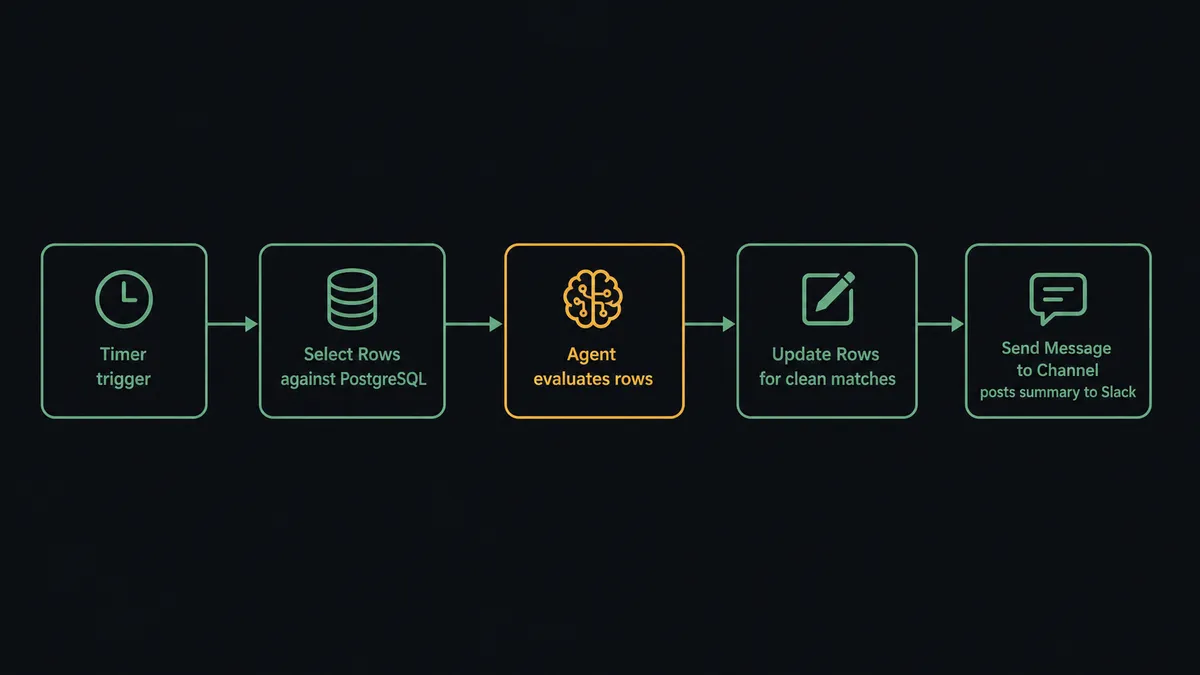
The agent reads what Select Rows returns from PostgreSQL. It joins the results against the incoming data, checks which rows are clean matches, and flags the ones whose values conflict with the source of record. It calls Update Rows for the matches it is confident about, each with an explicit Where object, since PostgreSQL’s write guard rejects an Update Rows or Delete Rows call with no filter. None of this requires a person, and none of it is a fixed script; the agent is reasoning about what it found on this run, not replaying the same steps every time.
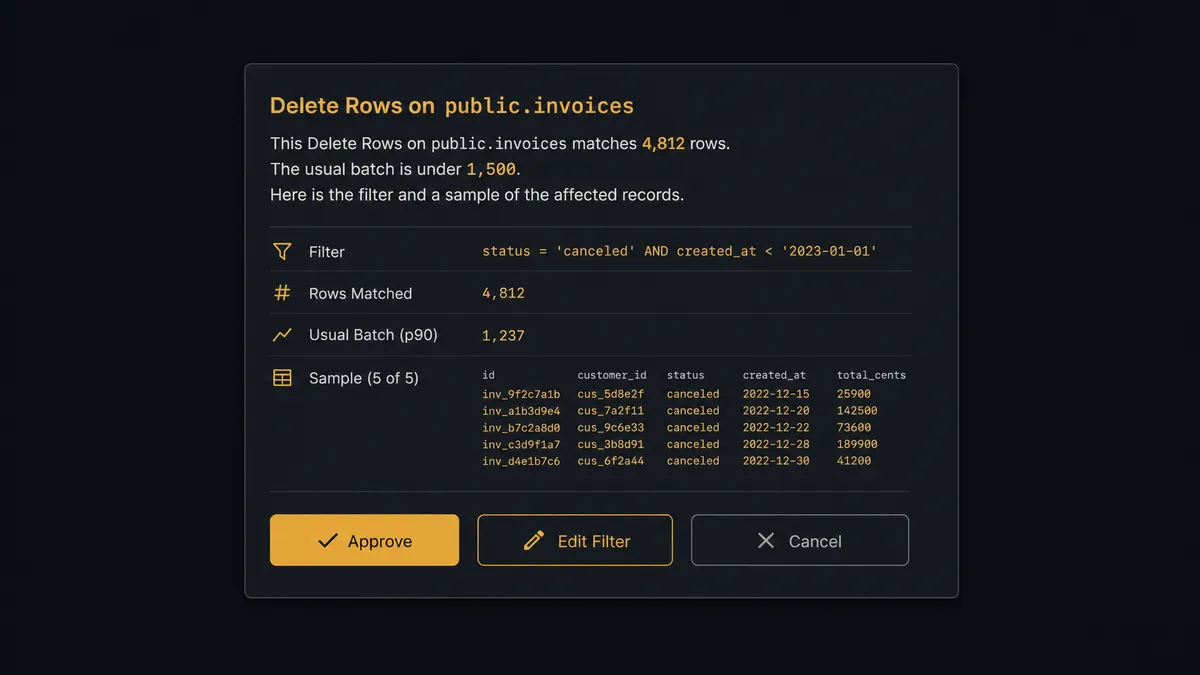
The judgment call comes at the write itself. When an Update Rows or Delete Rows call would affect more rows than the configured threshold, or would touch a table flagged as production, the agent does not proceed on its own. It packages the Where object, the row count, and a sample of the affected records, then invokes a human-in-loop subflow as a callable tool. That subflow posts to Slack: “This Delete Rows on public.invoices matches 4,812 rows. The usual batch is under 1,500. Here is the filter and a sample of the affected records. Approve, edit the filter, or cancel.” Interactive buttons on the message, powered by the On Block Action trigger, capture the response.
This is the digital andon cord: the agent stops the line the moment it hits something a script would have run blind. A person approves, adjusts the filter, or cancels, right from Slack, on their phone if needed. The agent resumes with that decision as input, and the approver’s identity and the timestamp are captured in the audit trail alongside the SQL that ran. This is not a sync tool. The agent knows when to stop and ask.
FlowRunner vs n8n
If you’re technical enough to be evaluating a PostgreSQL to Slack connection directly, you’ve probably looked at n8n. It’s a fair comparison. n8n has a large node library, strong self-hosting flexibility, and a workflow builder technical teams pick up quickly.
The differences show up once the writes carry real risk and the decisions need to involve more than one person.
| What matters | n8n | FlowRunner |
|---|---|---|
| Human-in-loop | No native escalation pattern; a workflow can branch on a condition but does not route a decision to a person and wait | Native: the agent invokes a human-in-loop subflow as a callable tool; approver identity and timestamp land in the audit trail |
| Database write safety | No built-in guard; a misconfigured node can run an unfiltered UPDATE or DELETE | Update Rows and Delete Rows require an explicit Where object; the agent refuses to run without one |
| Agent reasoning | Workflows follow a fixed logic tree the builder defines in advance | AI Agent reads the data returned from PostgreSQL, reasons about it, and decides which action to call next |
| Compliance suite in the cloud product | Full audit retention and SSO sit on a custom-priced Enterprise tier | 30-day audit trails and RBAC ship on the $299/mo Professional tier |
| Users on a plan | Seat-based limits on lower tiers | Unlimited users and unlimited workflows on every tier |
n8n is a strong choice for technical teams building complex custom logic they want full control over. FlowRunner is the choice when a database write can go wrong at scale and the team needs a record of who signed off, not just a log of what ran.
Before and after
| Before | After | |
|---|---|---|
| Reconciliation visibility | One person compares exports by hand; the rest of the team finds out after the fact | Agent runs Select Rows, flags conflicts, and posts a summary to #finance-ops that everyone can see |
| Write safety | An UPDATE or DELETE with a missing WHERE can quietly rewrite an entire table | Update Rows and Delete Rows require a Where object; writes above the row threshold pause for approval in Slack |
| Decision speed | Exceptions wait for a meeting or an email thread before anyone signs off | Approve, edit the filter, or cancel from a Slack message on a phone in the same session |
| Exception handling | Exceptions fall through the cracks when the person who caught them is out | Agent routes the exception to the channel or the specific owner and holds the write until someone responds |
| Audit trail | No record of who ran what SQL or when | Every read and write is a logged flow step; every approval carries the approver’s identity and timestamp |
What you can build
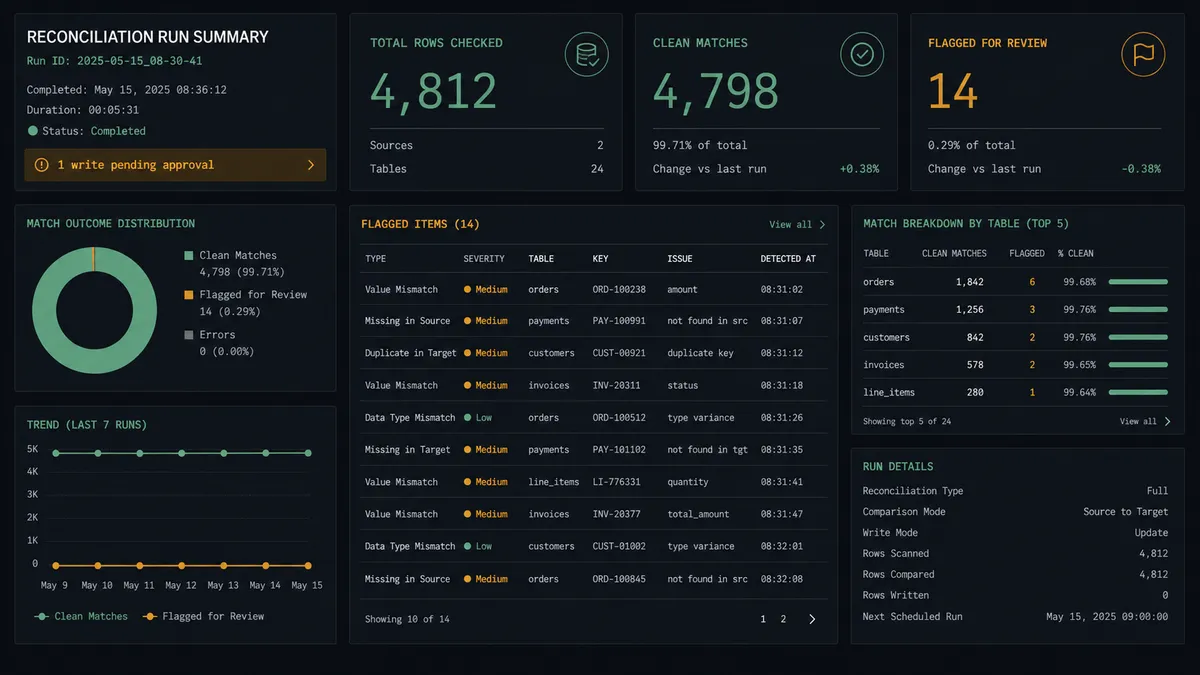
Nightly reconciliation with a Slack summary. The agent calls Select Rows against PostgreSQL to pull open invoices, compares them against payment records from another connector, and calls Update Rows for clean matches. It posts a batch summary to #finance-ops with Send Message to Channel: rows checked, rows reconciled, rows still open. The controller starts the day reading a message instead of building one.
Slack-triggered document intake with a database write. The Slack On File Shared trigger fires when a vendor drops a document into #vendor-docs. The agent extracts the structured data, calls Get Table Schema to confirm the target table matches, then calls Insert Row or Upsert Row to write the record into PostgreSQL. It replies in the thread with what it wrote.
Bulk write approval routed to the right person. When Update Rows or Delete Rows would affect more rows than usual, the agent invokes the human-in-loop subflow to send a Slack message with Approve and Cancel buttons to the data owner, not a general channel. The write only runs after that specific person responds, and the decision is logged.
Weekly metrics digest built from live PostgreSQL data. Every Monday, the agent runs Select Rows or Execute Query to pull the week’s execution counts and exception counts, then posts a formatted report to #operations using Block Kit. Leadership gets visibility without anyone pulling a report by hand.
Schema-drift alert before a silent failure. Before a scheduled write, the agent calls Get Table Schema to confirm the columns it expects still exist. If a column has been renamed or dropped, the agent sends a Slack message flagging the mismatch instead of writing to the wrong column or failing without explanation.
Common questions
Is it free to connect PostgreSQL and Slack on FlowRunner?
FlowRunner has a free plan with 100 executions a month, every integration included, and no credit card required, and new accounts get 14 days of Professional on top. Beyond the free plan, Growth is $45 per month for 12,000 executions. All tiers include unlimited users and unlimited workflows.
Can I self-host FlowRunner if my PostgreSQL data is sensitive?
Yes. FlowRunner offers a self-hosted Community Edition at no cost and an Enterprise self-hosted tier for multi-instance deployments. Your database credentials never leave your infrastructure either way.
Does the AI agent need my own OpenAI key?
FlowRunner uses a bring-your-own-key model for AI providers. You connect whichever LLM provider you prefer, including OpenAI or Anthropic, and the agent uses your key. FlowRunner never bills separately for AI model calls.
What happens when the agent is not sure whether a database write is safe?
The agent pauses the workflow and sends a Slack message with the SQL filter, the affected row count, and a sample of the rows it found. A person approves, edits the filter, or cancels directly from the message, and the write only runs after that response.
Does PostgreSQL have a trigger that can start the flow, or does Slack always kick things off?
PostgreSQL has no native triggers in FlowRunner; it is a database, not an event source. Flows either start on a schedule that queries PostgreSQL first, or start from a Slack trigger like On Channel Message or On File Shared and then read or write PostgreSQL as a step.
Can the agent post structured reports to Slack, not just approval requests?
Yes. The agent can call Send Message to Channel with Block Kit formatting to post a reconciliation summary, a weekly metrics digest, or a list of exceptions, separate from the individual approval requests it sends for risky writes.
Getting started
FlowRunner has a free plan with 100 executions a month, every integration included, and no credit card required, and new accounts get 14 days of Professional on top. Any real email address works; disposable domains are not accepted.
The PostgreSQL connector and the Slack connector are both available on every tier, including the trial. You can build the full flow, including the human-in-loop gate that pauses a risky write, before you spend a dollar.
Start at flowrunner.ai or book a 30-minute walkthrough at calendly.com/flowrunner/intro.
The integration pages have the full action reference if you want to plan the flow before you build: PostgreSQL on FlowRunner and Slack on FlowRunner.
Frequently asked questions
Is it free to connect PostgreSQL and Slack on FlowRunner?
FlowRunner has a free plan with 100 executions a month, every integration included, and no credit card required, and new accounts get 14 days of Professional on top. Beyond the free plan, Growth is $45 per month for 12,000 executions. All tiers include unlimited users and unlimited workflows.
Can I self-host FlowRunner if my PostgreSQL data is sensitive?
Yes. FlowRunner offers a self-hosted Community Edition at no cost and an Enterprise self-hosted tier for multi-instance deployments. Your database credentials never leave your infrastructure either way.
Does the AI agent need my own OpenAI key?
FlowRunner uses a bring-your-own-key model for AI providers. You connect whichever LLM provider you prefer, including OpenAI or Anthropic, and the agent uses your key. FlowRunner never bills separately for AI model calls.
What happens when the agent is not sure whether a database write is safe?
The agent pauses the workflow and sends a Slack message with the SQL filter, the affected row count, and a sample of the rows it found. A person approves, edits the filter, or cancels directly from the message, and the write only runs after that response.
Does PostgreSQL have a trigger that can start the flow, or does Slack always kick things off?
PostgreSQL has no native triggers in FlowRunner; it is a database, not an event source. Flows either start on a schedule that queries PostgreSQL first, or start from a Slack trigger like On Channel Message or On File Shared and then read or write PostgreSQL as a step.
Can the agent post structured reports to Slack, not just approval requests?
Yes. The agent can call Send Message to Channel with Block Kit formatting to post a reconciliation summary, a weekly metrics digest, or a list of exceptions, separate from the individual approval requests it sends for risky writes.