Snowflake Slack Integration: Warehouse Writes Wait for a Yes
Connect Snowflake and Slack so query results post to a channel automatically, and any MERGE, INSERT, or DDL against a production database pauses for a human decision in Slack.
How do you connect Snowflake to Slack?
You connect them by having a FlowRunner flow run Execute SQL against Snowflake on a schedule or trigger, then post the results to a channel with Send Message to Channel on Slack, using On Block Action to collect any decision a human needs to make before a write goes back into the warehouse. FlowRunner is a visual AI-agent orchestration platform where automations run autonomously and pause for human judgment on the steps that carry real consequence. The same connection can run as an AI agent that reads the query results, reasons about what it finds, and invokes a Slack approval step as a tool before it runs a MERGE, INSERT, or DDL statement against a production database.
The problem it solves
Snowflake holds the governed numbers the business runs on, but those numbers are locked behind a BI tool or a SQL console. An analyst runs the query, exports the result to a spreadsheet, and pastes the figures into an email or a status update for the team. That export step happens by hand, on the analyst’s schedule, which means the numbers the operations lead sees on Monday morning are already a day or two stale by the time anyone reads them.
The reverse direction has its own gap. When a workflow in another system produces data that needs to land back in the warehouse, someone has to decide whether that write is safe. A script that runs an unattended MERGE against a production table with no review step is one bad row away from a mess that takes hours to unwind. Ops teams end up choosing between two bad options: block every write behind a manual ticket and lose the speed automation was supposed to buy, or skip the review and hope nothing falls through the cracks. Neither gives them time back.
How it works: the connection
The flow starts on a schedule or an upstream trigger. The first action is Execute SQL against Snowflake, run with ? placeholders bound through the Parameters array so no value gets interpolated directly into the statement. For a reporting run, this is a SELECT that computes the day’s key figures against a virtual warehouse. Execute SQL returns the rows as plain objects keyed by column name, along with the total row count.
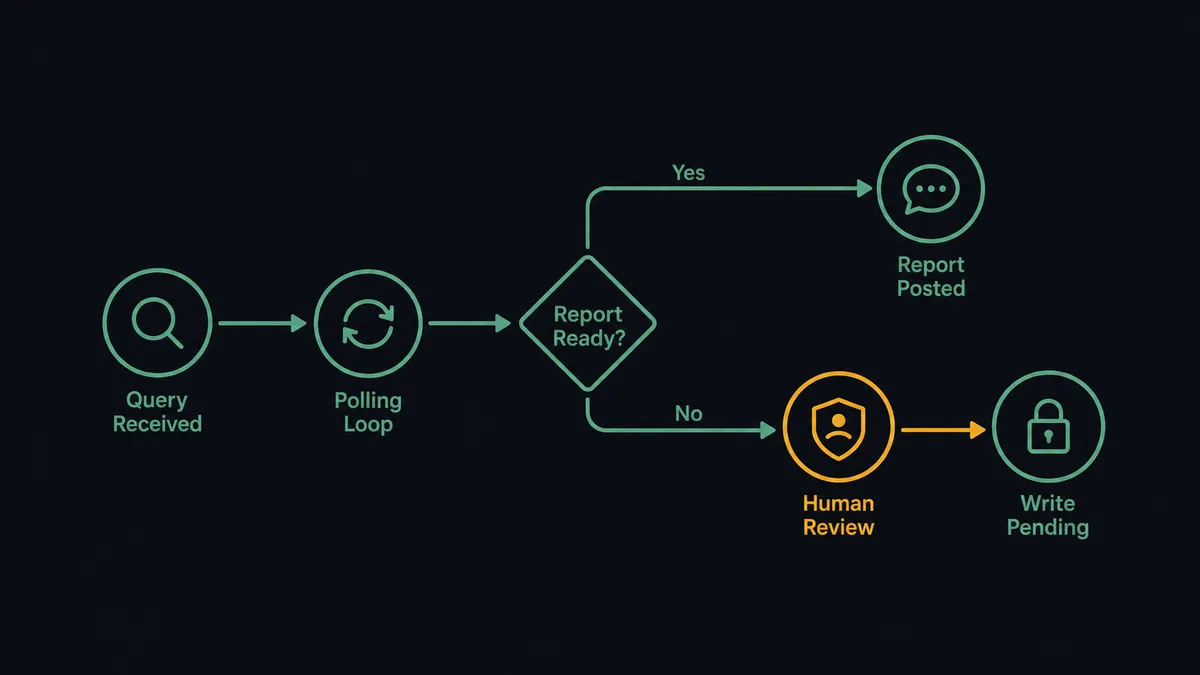
If the statement takes longer than the API’s synchronous window, Execute SQL returns a statement handle instead of rows. The agent calls Get Statement Results and polls by that handle until the data is ready, or calls Cancel Statement if the query needs to be aborted. The flow does not stall waiting on a slow warehouse query.
Once the results are in hand, Send Message to Channel posts the formatted figures to the team’s metrics channel in Slack. For a write-back scenario, the flow runs in the other direction: a record produced elsewhere gets staged into Snowflake with an INSERT or MERGE through Execute SQL, and Slack is used not to report a result but to ask a question before the write happens, using On Block Action to capture the answer from an interactive Approve or Cancel button.
Can an AI agent run it? (and why a human stays in the loop)
A plain sync tool runs the same query and posts the same message every time, with no judgment involved. An AI agent reads the returned rows, reasons about what it sees, and decides what to do next, choosing from Execute SQL, Get Statement Results, Send Message to Channel, and the rest of both connectors’ actions as tools available to it.
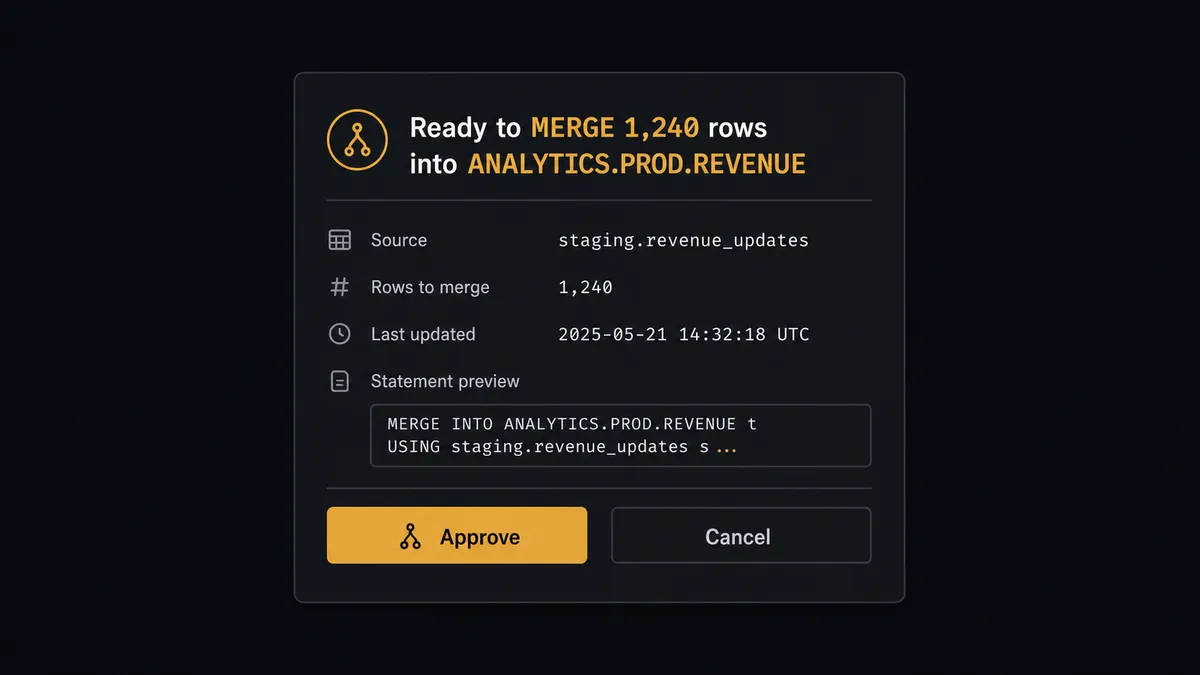
Here is a real decision moment. The agent runs Execute SQL and gets back an anomaly: a metric that crossed a control threshold the team watches. It has a proposed fix, a MERGE statement that would write 1,240 corrected rows into ANALYTICS.PROD.REVENUE. Because the target database is flagged production, the agent does not run the write on its own. It invokes a human-in-loop flow it has been given as a tool. That flow sends a Slack message: “Ready to MERGE 1,240 rows into ANALYTICS.PROD.REVENUE. Here is the statement and the source. Approve or cancel?” The message carries the full statement, not a summary, and Approve and Cancel buttons wired to On Block Action.
The write pauses there. A person reviews it, clicks a button, and the workflow resumes with that decision as input. The approver’s identity and the timestamp are captured in the run log automatically. This is the same pattern that shows up on the reporting side of the connection: routine POs and metrics move on their own, and the specific write that carries risk gets routed to a human, not because of a hardcoded dollar threshold, but because the agent evaluated the target and the data and decided it needed a second set of eyes. This is not a sync tool. The agent knows when to stop and ask.
FlowRunner vs n8n for connecting Snowflake and Slack
n8n gives technical teams a node-based canvas that can call the Snowflake SQL API and the Slack API directly, and its community has built templates for warehouse reporting and Slack notifications. For a team with engineers who already write SQL and JSON node configs, that flexibility is real and it is a fair reason to pick n8n.
Where it falls short for this pair is the write side of the connection. n8n can run a query and post a message, but it has no native concept of an agent that reads the query result, decides a specific write is risky, and pauses for a human as part of its own reasoning. Building that in n8n means hand-wiring an IF node on a hardcoded condition, which catches the cases you thought of in advance and misses the ones you didn’t.
| Feature | n8n | FlowRunner |
|---|---|---|
| Snowflake SQL API v2 with MERGE and DDL | Yes, via HTTP node | Yes, via Execute SQL with bound parameters |
| Long-running query polling by statement handle | Manual wait/retry logic | Yes, via Get Statement Results and Cancel Statement |
| Slack interactive buttons resuming a paused flow | Yes, via webhook wiring | Yes, native via On Block Action |
| AI agent reasoning about which writes need review | No native concept | Yes, agent evaluates context and decides |
| Human-in-loop as a callable tool, not a hardcoded IF | No | Yes, agent invokes approval flow by judgment |
| Unlimited users on every plan | Depends on self-hosting your own infrastructure | Yes, on every cloud tier |
Before and after
| Metric | Before | After |
|---|---|---|
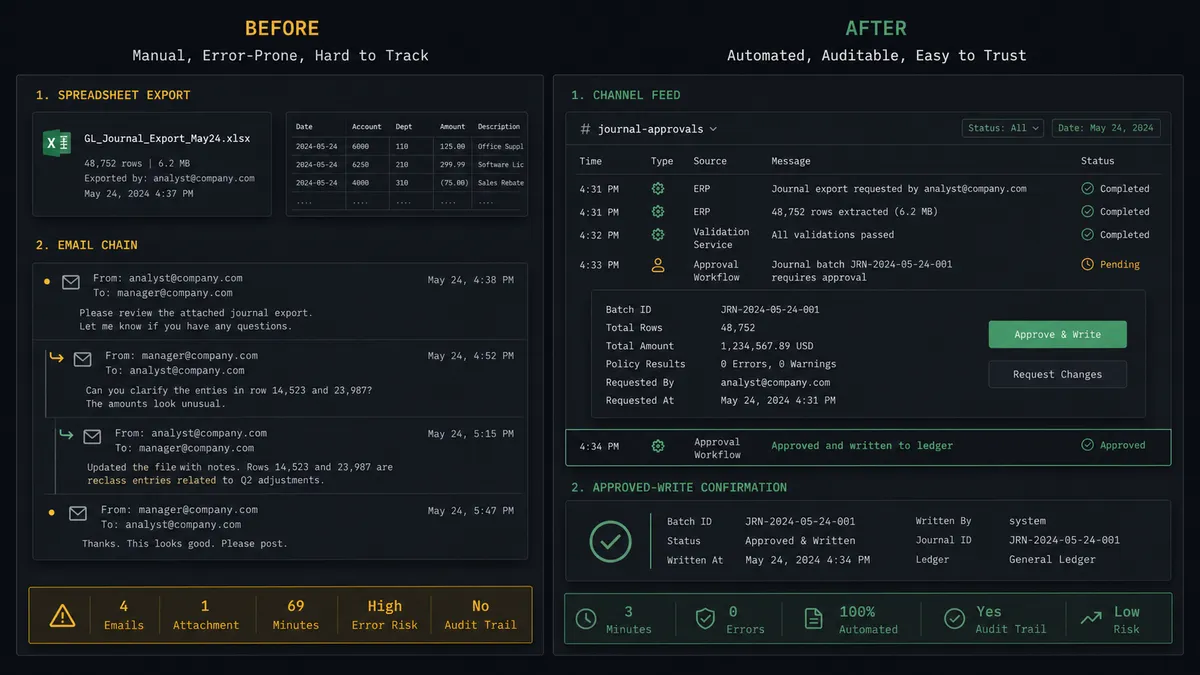
| Reporting delivery | Analyst exports query results and pastes figures into an email or status update | Agent runs the query and posts formatted figures to the channel automatically |
| Long query handling | Script stalls or times out waiting on the warehouse | Agent polls Get Statement Results by handle; Cancel Statement available |
| Production write review | No approval layer, or a manual ticket that slows the flow down | Agent pauses and posts to Slack before any MERGE, INSERT, or DDL on a production database |
| Decision speed | A review that requires a meeting or an email chain | Approve or Cancel from a phone in one Slack message |
| Audit trail | Export history and approvals scattered across email and spreadsheets | Statement, approver identity, and timestamp captured in the run log automatically |
What you can build
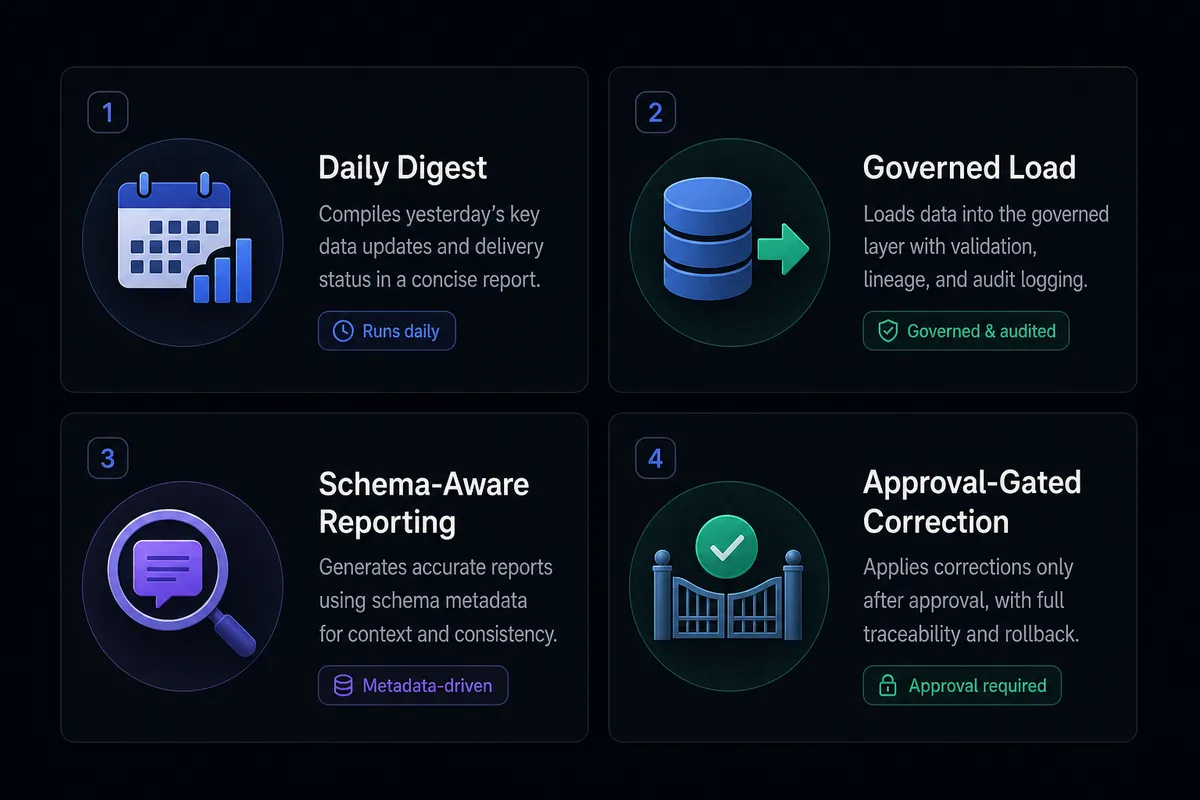
Daily metrics digest with anomaly escalation The agent runs Execute SQL each morning to compute key figures, posts the summary to a metrics channel with Send Message to Channel, and if a figure crosses a control threshold, sends a separate Slack message flagging the anomaly for review before any corrective write runs.
Governed load from an operational system into the warehouse An upstream flow event triggers Execute SQL to stage fresh records into a Snowflake table with an INSERT or MERGE. Because parameters are bound rather than interpolated, malformed source values cannot corrupt the load, and MERGE keeps the target table idempotent on re-runs.
Schema-aware reporting on demand A team member mentions the agent in Slack with On Mention. The agent calls Get Table Schema to confirm the target table’s columns, runs the relevant Execute SQL query, and replies in the thread with the result, so the team gets warehouse numbers without opening a BI tool.
Approval-gated production correction When a scheduled query surfaces a data quality issue, the agent proposes a MERGE to fix it, packages the statement and the affected row count, and routes it to the data lead in Slack using On Block Action. The correction runs only after the person approves it, and the decision is logged.
Common questions
Is it free to connect Snowflake and Slack on FlowRunner? FlowRunner has a free plan with 100 executions a month, every integration included, and no credit card required, and new accounts get 14 days of Professional on top. Beyond the free plan, Growth is $45 per month.
Can I self-host FlowRunner? Yes. A Community Edition is available at no cost for a single instance. Enterprise self-hosted includes multi-instance clustering and the full compliance suite.
Does the FlowRunner agent need my own OpenAI or AI provider key? Yes. FlowRunner uses a bring-your-own-keys model, so you connect the AI provider you already use. No provider is locked in.
What happens when the agent is not sure whether to write to Snowflake? The agent pauses on its own, assembles the SQL statement, the row count, and the source data, and posts it to a person in Slack with Approve and Cancel options. The write runs only after the person confirms, and the approver’s identity and timestamp are captured in the run log.
Can an agent handle a long-running Snowflake query before posting to Slack? Yes. When Execute SQL returns a statement handle instead of rows, the agent uses Get Statement Results to poll until the rows arrive, or Cancel Statement to abort it cleanly, before it ever reaches the Slack step.
Does FlowRunner support unlimited users and workflows? Yes. Every tier, including Growth at $45 per month, includes unlimited users and unlimited workflows.
Getting started
FlowRunner has a free plan with 100 executions a month, every integration included, and no credit card required, and new accounts get 14 days of Professional on top. Any real email address works; disposable domains are not accepted.
Connect both systems from the integrations library: Snowflake uses a programmatic access token against the SQL API v2, and Slack connects by authorizing your workspace. Both connectors are built and verified against the official APIs.
Start a trial at flowrunner.ai or book a 30-minute walkthrough at calendly.com/flowrunner/intro.
Frequently asked questions
Is it free to connect Snowflake and Slack on FlowRunner?
FlowRunner has a free plan with 100 executions a month, every integration included, and no credit card required, and new accounts get 14 days of Professional on top. Beyond the free plan, Growth is $45 per month.
Can I self-host FlowRunner?
Yes. A Community Edition is available at no cost for a single instance. Enterprise self-hosted includes multi-instance clustering and the full compliance suite.
Does the FlowRunner agent need my own OpenAI or AI provider key?
Yes. FlowRunner uses a bring-your-own-keys model, so you connect the AI provider you already use. No provider is locked in.
What happens when the agent is not sure whether to write to Snowflake?
The agent pauses on its own, assembles the SQL statement, the row count, and the source data, and posts it to a person in Slack with Approve and Cancel options. The write runs only after the person confirms, and the approver's identity and timestamp are captured in the run log.
Can an agent handle a long-running Snowflake query before posting to Slack?
Yes. When Execute SQL returns a statement handle instead of rows, the agent uses Get Statement Results to poll until the rows arrive, or Cancel Statement to abort it cleanly, before it ever reaches the Slack step.
Does FlowRunner support unlimited users and workflows?
Yes. Every tier, including Growth at $45 per month, includes unlimited users and unlimited workflows.