Can an AI Agent Keep Monday.com and Google Sheets in Sync?
Connect Monday.com and Google Sheets so sheet rows update board items and board status changes log back to the sheet, with a human approving any bulk pricing or status change.

How do you connect Monday.com to Google Sheets?
Connect them by pointing Google Sheets’ On New Row trigger at Monday.com’s Change Multiple Column Values action: when a new pricing or status row lands in a tracking sheet, the flow finds the matching board items with List Items and updates them, and the reverse direction works too, with Monday.com’s On Item Column Change trigger driving a Google Sheets Add Row or Update Row action to log every status change back to the sheet. FlowRunner is a visual AI-agent orchestration platform where automations run autonomously and pause for human judgment on the steps that carry real consequence. The same connection can run as a scripted sync, or it can run as an AI agent that reads each row, decides which board items it affects, and pauses for a person before a bulk change goes out.
The problem it solves
An operations lead keeps a tracking sheet for pricing updates, vendor changes, or status corrections that need to land on a Monday.com board. Today, someone opens the sheet, reads each row, finds the matching items on the board by hand, and updates the columns one at a time. If ten rows need the same price change applied to forty items, that’s forty manual edits, done under time pressure, with no record of who approved the change or why. A project manager on the other side of the workflow watches the board directly and has no idea a sheet even exists until a client asks why a status hasn’t updated.
The failure mode is not that the work doesn’t get done. It’s that it gets done inconsistently. One person fills in a column differently than another. A row gets missed because nobody was watching the sheet that day. A bulk price change goes out because someone assumed the whole batch was pre-approved, when only half of it was. None of it shows up as an error until a client, a vendor, or an auditor asks a question nobody can answer from memory. The team wants the sheet and the board to stay in sync without spending their week being the sync mechanism themselves, and they want the record of who approved what to live somewhere other than a Slack thread that scrolled away.
How it works: the connection
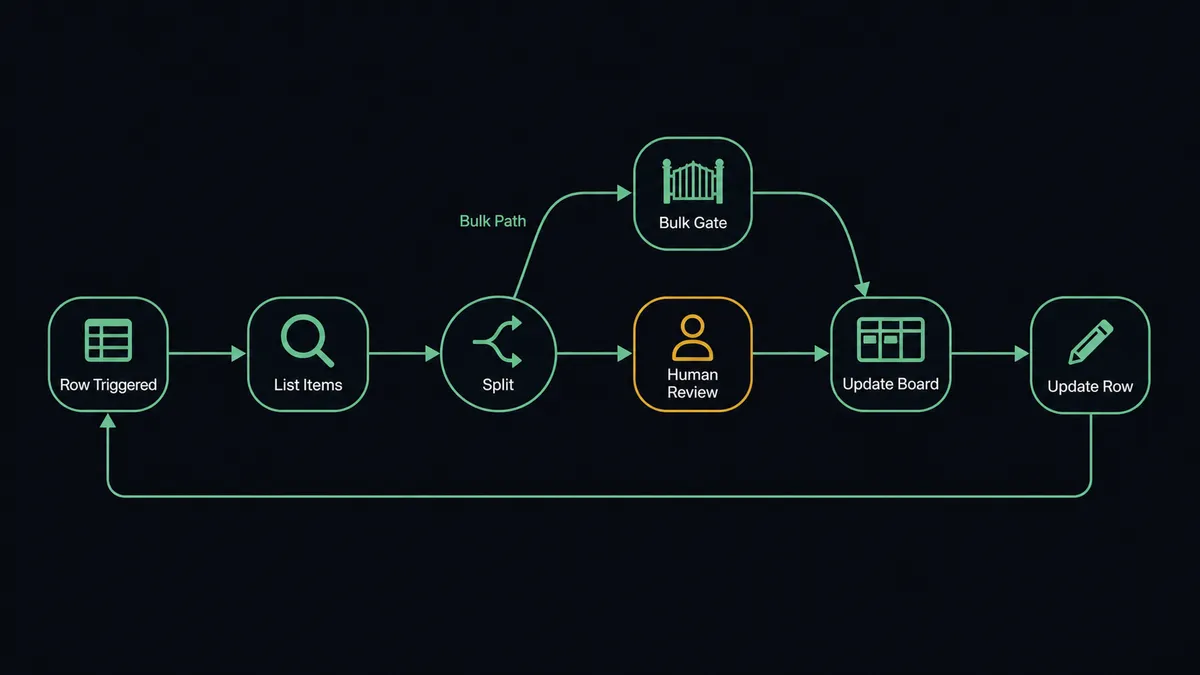
The flow starts when a row is added to a tracking sheet. Google Sheets’ On New Row trigger (or On New or Updated Row, if edits to existing rows should also fire the flow) picks up the new entry. The agent uses Load Header Row so it can address each column by name rather than by position, then reads the row’s values: which board, which item or items, what should change.
From there the agent calls List Items on Monday.com, filtering for the items the row describes. For a single item, it applies Change Column Value directly. For a batch, it prepares Change Multiple Column Values across every matching item. Once the update lands, the agent writes back to the source of truth on both ends: Update Row on Google Sheets marks the row as synced, and Create Update on Monday.com posts a note on the affected item recording what changed and why.
The reverse direction uses the same building blocks in the other order. Monday.com’s On Item Column Change trigger fires when a status column flips, say to “Done.” The agent confirms the change is genuine against the linked record, then calls Add Row or Update Row on Google Sheets to log the completion, so the tracking sheet becomes an up-to-date report without anyone opening the board or the spreadsheet to check. See the full action list on the Monday.com integration page and the Google Sheets integration page.
Can an AI agent run it? (and why a human stays in the loop)
A scripted sync applies every row it sees the same way. An agent reads the row, evaluates what it’s about to touch, and decides whether the change is routine or consequential. Change Column Value on a single item, updating one field to reflect one row, runs on its own. Change Multiple Column Values applied across a batch of items that a filter matched is a different kind of move: it’s expensive to reverse and it usually touches pricing or a client-facing status column.
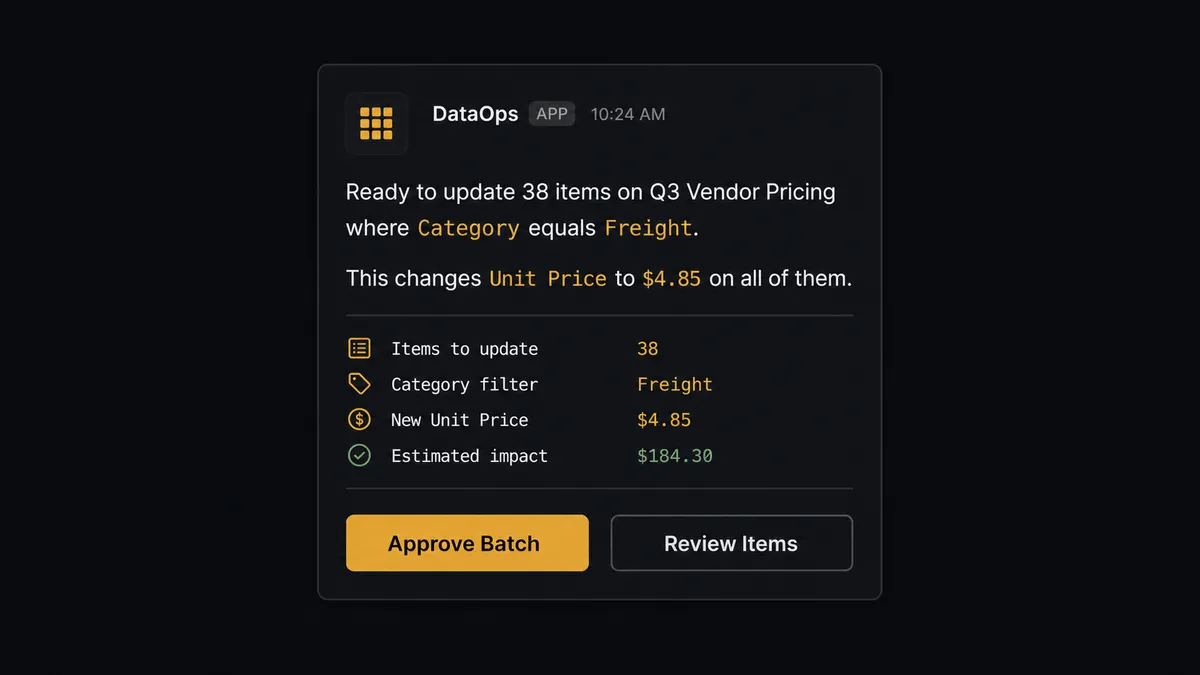
That’s the moment the agent stops. Before it writes a bulk change, it calls a human-in-loop flow as a tool, the same way it calls List Items or Update Row, and pauses. The board owner receives a message with the specifics packaged in: “Ready to update 38 items on Q3 Vendor Pricing where Category equals ‘Freight’. This changes Unit Price to $4.85 on all of them. Approve the batch?” The owner approves, rejects, or asks for a smaller scope, and the agent applies the updates item by item only after it hears back. On the Google Sheets side, the same discipline runs in reverse: if a row fails validation, a missing amount or an unrecognized status, the agent doesn’t push it downstream. It marks the row, flags the data owner, and reprocesses only what comes back approved.
This is not a sync tool guessing at a threshold. The agent decides what counts as routine versus consequential based on what it’s looking at, the same way a person would glance at a change and know whether it needs a second set of eyes. Prospects call this a digital andon cord: the agent knows when to stop and ask, and everything downstream waits for the person to answer before it moves.
FlowRunner vs Zapier for Monday.com and Google Sheets
Zapier is the tool most non-technical teams already use to move rows between a sheet and a board, and it’s a fair starting point: the trigger-to-action setup is quick, the interface is approachable, and most teams get a basic sync running in an afternoon. Where it stops is the moment a batch update needs a human decision before it runs. Zapier applies the action to whatever matched the trigger; it doesn’t reason about whether an update is routine or worth pausing for, and building that judgment in requires stacking Filters and Paths by hand for every scenario.
| FlowRunner | Zapier | |
|---|---|---|
| Human-in-loop on bulk or pricing changes | Native: the agent decides when to pause and routes to a person as a tool call | Not built in: requires manually chained Filter and Paths steps to approximate |
| Users included | Unlimited on every tier | Priced per user on higher tiers |
| AI provider | BYOK, connect your own OpenAI or Anthropic account | Built-in AI credits, usage-metered separately |
| Self-hosting | Available on Enterprise | Not offered |
| Pricing model | Transparent workflow-based execution tiers | Per-task pricing that scales with volume, less predictable at high row counts |
Before and after
| Category | Before | After |
|---|---|---|
| Intake sorting | Someone reads every new item and decides its group, owner, and priority by hand | Items that match the criteria are placed and prioritized the moment they arrive |
| Column consistency | Fields get filled differently depending on who touched the item | Every item is scored and filled the same way, so board data stays clean |
| Decision trail | Why an item was routed a certain way lives in someone’s memory | The agent posts an update recording the routing, so the trail stays on the board |
| Row activity | A new row sits until a person notices it and acts | A new or updated row triggers the right downstream automation |
| Reporting | Each report is produced by opening the sheet and downloading a file | Sheets are exported to a file and delivered without anyone opening them |
What you can build
Pricing rollout with sign-off. A pricing sheet gets a new row, the agent finds every matching item on the Monday.com board with List Items, and pauses for the board owner to approve before Change Multiple Column Values applies the new price across the batch.
Status-to-report pipeline. On Item Column Change fires when a Monday.com item flips to “Done,” and the agent logs the completion with Add Row on a reporting sheet, so a weekly Export Sheet run produces a report nobody had to assemble by hand.
Form intake to board, mirrored back. A form submission lands as a row via Add Row, the agent reads it and calls Create Item on the right board with pre-filled columns, then writes the new item’s status back to the sheet with Update Row once it’s placed.
Validated batch import. Import from CSV brings a bulk list of updates into a sheet, the agent validates each row against the mapped header with Load Header Row, and only rows that pass validation reach Monday.com; the rest are flagged for the data owner to fix.
Common questions
Is it free to connect Monday.com and Google Sheets on FlowRunner? Yes. FlowRunner has a free plan with 100 executions a month, every integration included, and no credit card required, and new accounts get 14 days of Professional on top.
Can I self-host the Monday.com and Google Sheets connection? Yes. FlowRunner offers a self-hosted Enterprise option for teams that need the flow running on their own infrastructure, alongside the cloud-hosted Growth, Professional, and Business tiers.
Does the agent need my own OpenAI key? FlowRunner uses a bring-your-own-key (BYOK) model, so you connect your own AI provider account (OpenAI, Anthropic, or others) and FlowRunner orchestrates the agent using your keys.
What happens when the agent isn’t sure about a Monday.com or Google Sheets update? The agent pauses the flow and routes the decision to a person through Slack, email, or whatever channel is configured, with the item or row and the reason for the pause included, then resumes once the person responds.
Does this replace the person who manages the board and the sheet? No. It removes the manual re-typing between the two systems so that person spends their time on the items and rows that actually need a decision, not on copying data back and forth.
Can the same flow run in both directions, sheet to board and board to sheet? Yes. One flow can watch Google Sheets for new rows and update Monday.com items, while a second flow watches Monday.com for status changes and logs them back to Google Sheets, and both can run under the same agent.
Getting started
Start on the free plan: 100 executions a month, every integration included, no credit card required, plus 14 days of Professional for new accounts. Connect the Monday.com integration and the Google Sheets integration, pick your trigger, and add the human-in-loop step before your first bulk update goes live. Sign up at flowrunner.ai or book a walkthrough at calendly.com/flowrunner/intro.
Frequently asked questions
Is it free to connect Monday.com and Google Sheets on FlowRunner?
Yes. FlowRunner has a free plan with 100 executions a month, every integration included, and no credit card required, and new accounts get 14 days of Professional on top.
Can I self-host the Monday.com and Google Sheets connection?
Yes. FlowRunner offers a self-hosted Enterprise option for teams that need the flow running on their own infrastructure, alongside the cloud-hosted Growth, Professional, and Business tiers.
Does the agent need my own OpenAI key?
FlowRunner uses a bring-your-own-key (BYOK) model, so you connect your own AI provider account (OpenAI, Anthropic, or others) and FlowRunner orchestrates the agent using your keys.
What happens when the agent isn't sure about a Monday.com or Google Sheets update?
The agent pauses the flow and routes the decision to a person through Slack, email, or whatever channel is configured, with the item or row and the reason for the pause included, then resumes once the person responds.
Does this replace the person who manages the board and the sheet?
No. It removes the manual re-typing between the two systems so that person spends their time on the items and rows that actually need a decision, not on copying data back and forth.
Can the same flow run in both directions, sheet to board and board to sheet?
Yes. One flow can watch Google Sheets for new rows and update Monday.com items, while a second flow watches Monday.com for status changes and logs them back to Google Sheets, and both can run under the same agent.