Sync Google Sheets Contacts to Klaviyo Profiles Automatically
Connect Google Sheets and Klaviyo so new contact rows upsert Klaviyo profiles and record consent automatically, with a human confirming any row where consent is missing or unclear.
How do you connect Klaviyo to Google Sheets?
Klaviyo connects to Google Sheets by pairing the On New Row trigger in Sheets with Create or Update Profile and Subscribe Profiles in Klaviyo, so a contact added to a tracked sheet becomes an upserted Klaviyo profile with recorded consent. FlowRunner is a visual AI-agent orchestration platform where automations run autonomously and pause for human judgment on the steps that carry real consequence. The same connection can run as a plain field-mapped sync, or as an AI agent that reads each row, decides whether consent is clear enough to record, and pauses for a human on the ones that aren’t. Either way, the sheet stops being a dead export and starts driving Klaviyo directly.
The problem it solves
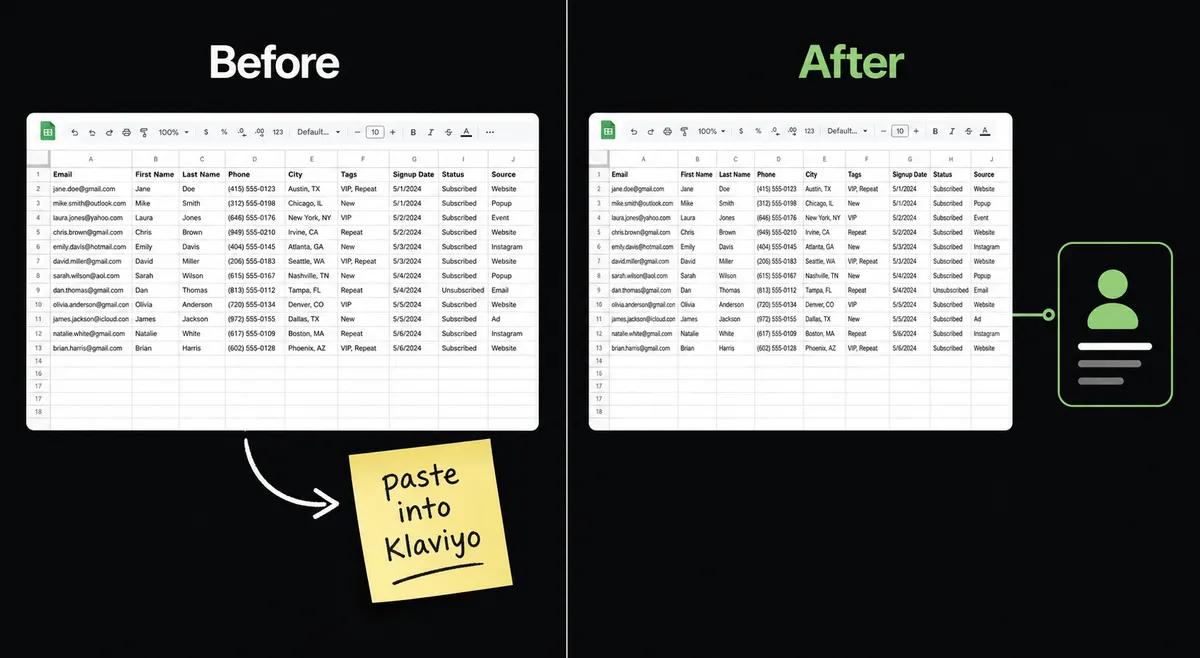
Marketing ops teams collect contacts in more places than Klaviyo touches: a trade show scan sheet, a partner referral list, a CSV a sales rep dropped into a shared drive. Someone, usually the lifecycle marketer or a marketing ops coordinator, has to open each sheet, copy the rows, and paste them into a Klaviyo list import. That import treats every row the same way, so consent gets recorded the same way too, even when the sheet itself never says whether the person actually opted in. Rows without a clear yes get subscribed anyway, because the import doesn’t know how to ask.
The reverse problem shows up in reporting. Revenue and send data live in Klaviyo, but the weekly marketing review happens in a spreadsheet, so someone exports Query Metric Aggregates results by hand, or worse, screenshots a dashboard and retypes the numbers. Both directions cost time back that a coordinator could spend on segmentation and copy, not data entry. And both directions have the same failure mode: a row falls through the cracks because nobody caught it before it either sent an unwanted email or vanished from the report.
How it works: the connection
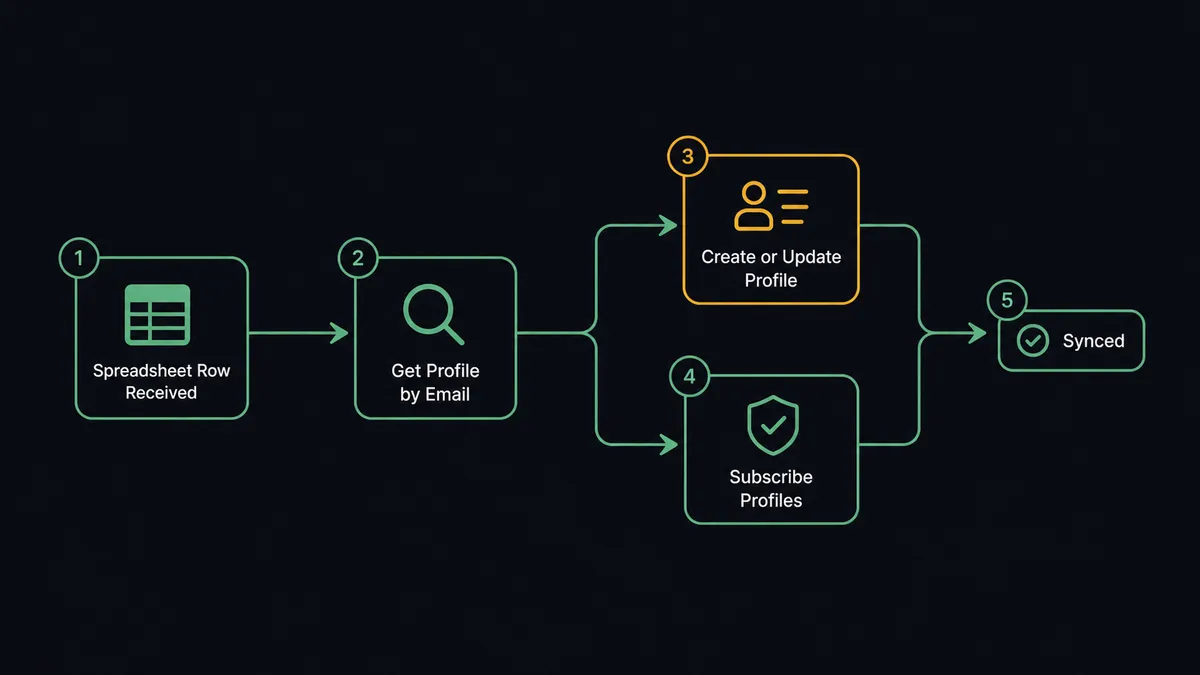
The flow starts when On New Row fires on the tracked contact sheet. The agent reads the row against the mapped header columns, then calls Get Profile by Email to check whether the contact already exists in Klaviyo. If the profile exists, Create or Update Profile merges the new fields in; if not, the same action creates it. That single upsert path means the sheet can hold brand-new contacts and updates to existing ones without two different flows to maintain.
Consent is handled as its own step, not folded into the profile write. Adding someone to a list and recording SUBSCRIBED consent are different operations in Klaviyo, and the flow keeps them distinct: Subscribe Profiles only fires when the row’s consent field is explicit, honoring double opt-in where the list requires it. Rows that pass the whole check post a confirmation back to the marketing channel; the agent also writes a status to the row with Update Cell so the sheet shows exactly what happened to every contact, not just the ones that made it through cleanly.
Can an AI agent run it? (and why a human stays in the loop)
An AI agent doesn’t just map columns to fields. It reads the row, the sheet’s header, and the contact’s existing Klaviyo history, and it decides which of its tools to use, Get Profile by Email, Create or Update Profile, Subscribe Profiles, in what order, based on what it finds. That’s the upgrade a plain field-mapped sync in Zapier or n8n can’t offer: the agent reasons about the data before it acts on it.
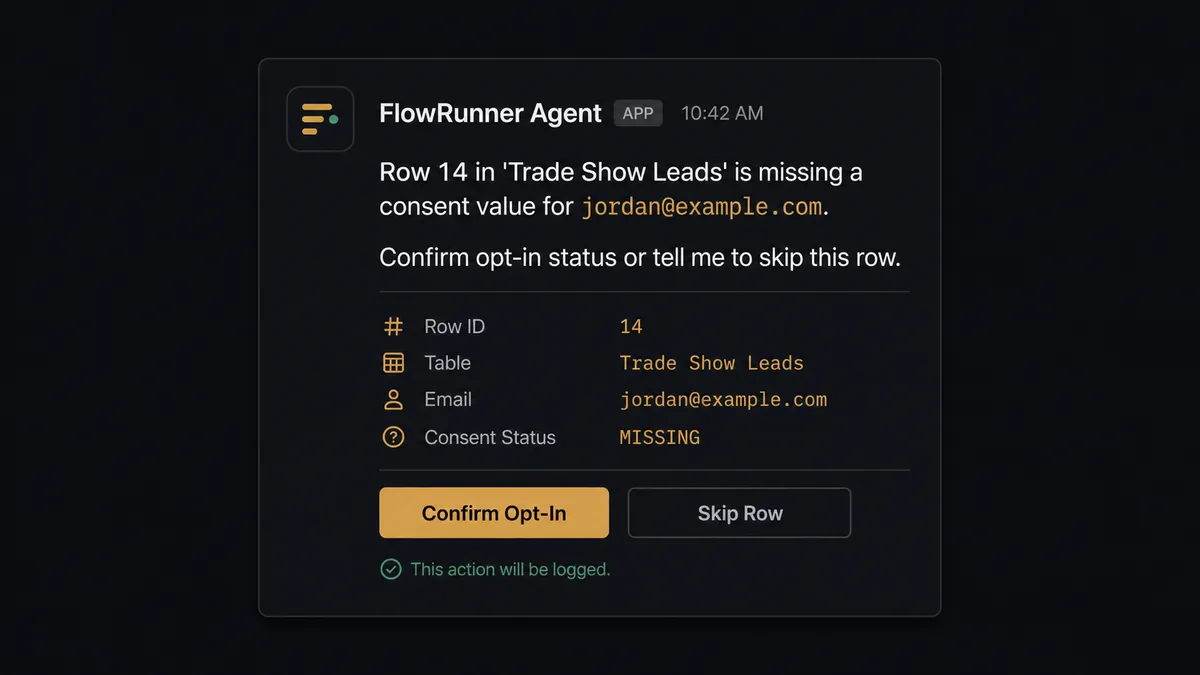
Consent is where that reasoning matters most, because it’s the one write in this flow that carries legal weight. If a row has a blank consent column, or a value the agent doesn’t recognize like “maybe” or “check with rep,” it does not default to subscribing the contact. It stops, flags the row in the sheet, and invokes a human-in-loop flow as a callable tool: a Slack message to the list owner that reads, “Row 14 in ‘Trade Show Leads’ is missing a consent value for [email protected]. Confirm opt-in status or tell me to skip this row.” The owner replies, and the agent resumes: Subscribe Profiles for a confirmed yes, or a skip status written back to the row with no consent action taken at all.
This is not a sync tool guessing at intent. It’s a digital andon cord: the agent knows when to stop and ask, and it packages the exact context, the row, the contact, the missing field, so the person answering doesn’t have to go dig for it.
FlowRunner vs Zapier
Zapier is a genuinely easy way to wire a Google Sheets row to a Klaviyo list add, and for teams that only need a straight field mapping with no exceptions, it does that job well. The gap shows up when a row is ambiguous. A Zapier Zap either subscribes the contact or it doesn’t; there’s no step where it evaluates the row, decides the data is unclear, and asks a person before writing consent.
| Dimension | Zapier | FlowRunner |
|---|---|---|
| Handling ambiguous consent rows | Applies the same mapping to every row, clean or not | Agent evaluates the row and pauses for a human before recording consent |
| Human-in-the-loop | Bolt-on, built from separate approval steps you assemble yourself | Native: a callable tool the agent invokes on its own judgment |
| Users included | Paid per user on most tiers | Unlimited users on every tier |
| AI provider | Uses Zapier’s built-in AI actions | BYOK: connect your own OpenAI or Anthropic key |
| Pricing model | Per-task pricing that scales with volume in ways that are hard to predict | Transparent workflow-based tiers with a fixed execution ceiling |
Before and after
| What changes | Before | After |
|---|---|---|
| Contact sync | Someone exports rows from a shared sheet and pastes them into a Klaviyo list import | New and updated rows upsert the matching profile automatically through Create or Update Profile |
| Consent recording | Imports subscribe everyone in the batch, whether the sheet says yes or not | Subscribe Profiles only fires on an explicit consent value, with unclear rows routed to a person |
| Row visibility | A new row sits until someone notices it | On New Row starts the sync the moment the row lands |
| Revenue reporting | Someone copies Klaviyo numbers into the weekly report sheet by hand | Query Metric Aggregates results write to the reporting sheet on schedule |
| Exception handling | A bad or ambiguous row is caught only if someone happens to check | The agent flags the row in the sheet and pages the owner before it reaches Klaviyo |
What you can build
Trade show and event lead import. A conference lead-scan sheet feeds On New Row, and the agent upserts each contact into Klaviyo, subscribing only the rows with a clear opt-in checkbox and routing the rest to the events coordinator.
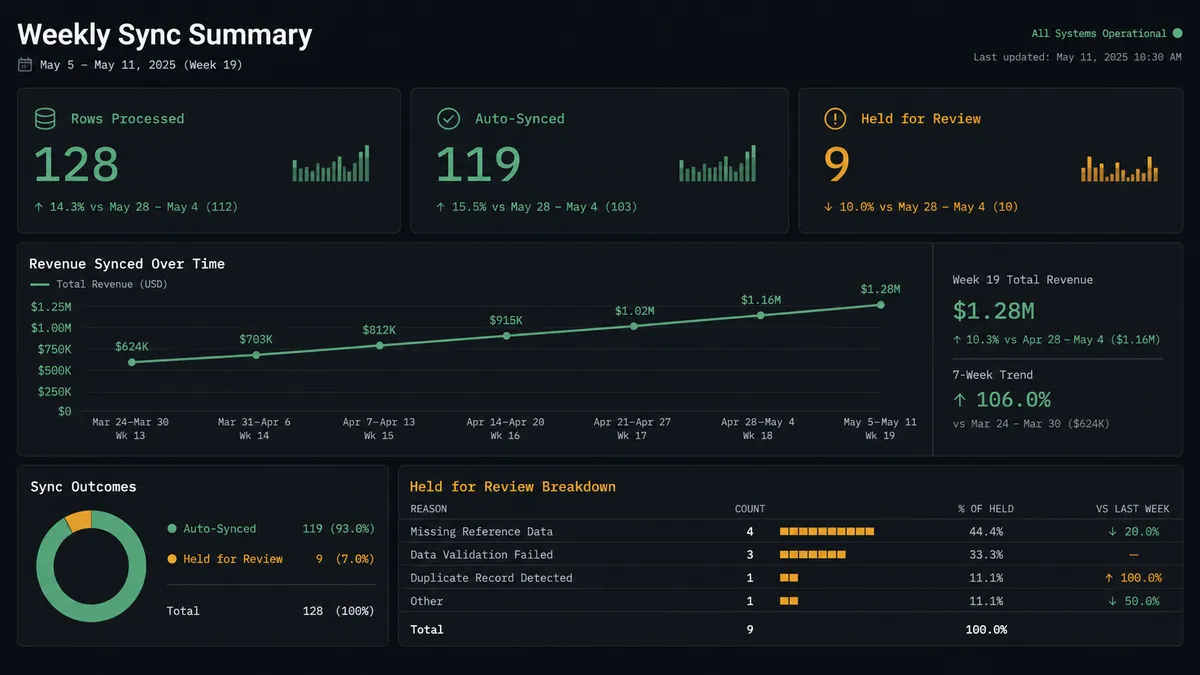
Weekly revenue digest. On a schedule, Query Metric Aggregates pulls revenue and unique buyers by campaign, and the agent writes the series into the reporting sheet, then posts a summary to the marketing Slack channel with any week-over-week drop flagged for a human look.
Suppression list reconciliation. A compliance sheet of do-not-contact requests feeds On New or Updated Row, and the agent runs Suppress Profiles for each entry, with GDPR erasure requests held for the privacy owner to confirm identity before Request Profile Deletion runs.
List cleanup after a campaign. Get Segment Profiles pulls a segment’s current members, the agent writes the list to a sheet for the lifecycle marketer to review, and confirmed removals flow back through Remove Profiles from List.
Getting started
FlowRunner has a free plan with 100 executions a month, every integration included, and no credit card required, and new accounts get 14 days of Professional on top. Connect Klaviyo and Google Sheets, pick On New Row as your trigger, and add the consent check as your first human-in-loop step.
Start free at flowrunner.ai, or book time to walk through the setup at calendly.com/flowrunner/intro.
Frequently asked questions
Is it free to connect Klaviyo and Google Sheets on FlowRunner?
Yes. FlowRunner has a free plan with 100 executions a month, every integration included, and no credit card required, and new accounts get 14 days of Professional on top.
Can I self-host this connection?
Yes. FlowRunner offers a self-hosted Community Edition for single-instance deployments and a self-hosted Enterprise tier with multi-instance clustering and the full compliance suite for teams that need contact data to stay on their own infrastructure.
Does the AI agent need my own OpenAI key?
Yes. FlowRunner runs on a bring-your-own-key model, so the agent uses the AI provider and API key you connect rather than a shared pool, which keeps usage and cost under your control.
What happens when the agent isn't sure a row is ready to sync?
The agent holds the row, marks it in the sheet, and messages the list owner with what is missing and what it plans to do next. Nothing gets pushed into Klaviyo as consent until a person confirms it.
Does this only work one direction, from Sheets to Klaviyo?
No. The same connection runs the other way too. Klaviyo revenue and campaign metrics from Query Metric Aggregates can write back into a reporting sheet on a schedule, so the spreadsheet stays current in both directions.
Will this double-subscribe contacts who are already in Klaviyo?
No. The agent looks up the profile with Get Profile by Email before writing, so existing profiles are updated in place through Create or Update Profile rather than duplicated.