Connect Brevo to Google Sheets: New Rows Become Contacts
Connect Brevo and Google Sheets so every new lead row becomes an enrolled Brevo contact, or run it as an AI agent that pauses for a human when a row fails validation.
How do you connect Brevo to Google Sheets?
Connect Brevo to Google Sheets by using Google Sheets’ On New Row trigger to fire whenever a lead or form response lands in a tracking sheet, then having FlowRunner call Create Contact (or Update Contact) and Add Contacts to List in Brevo to enroll that person, followed by Send Template Email to confirm. FlowRunner is a visual AI-agent orchestration platform where automations run autonomously and pause for human judgment on the steps that carry real consequence. The same connection can run as a straight sync, or as an AI agent that reads each row, decides whether it is clean enough to act on, and pauses for a human before a malformed row ever reaches Brevo.
What’s the manual process without automation?
Right now, a marketing ops manager or a sales rep is the integration. A form submission or a manually updated lead sheet sits in Google Sheets until someone opens it, copies the name and email, and pastes them into Brevo to create a contact and add it to the right list. If the buyer already exists, that person has to check first, or risk a duplicate. The confirmation or nurture email goes out separately, usually a few hours or a day after the row actually appeared, because someone has to notice it first.
Reporting has the same shape. Someone opens Brevo, pulls email and SMS statistics by hand, and pastes the numbers into a spreadsheet tracker every week. Exceptions, a row with a missing email, a lead with no company name, get processed anyway or get quietly skipped, and nobody finds out until a rep asks why a lead never got contacted. None of this is hard work. It is just work that falls through the cracks the moment the person doing it gets busy, and it does not scale past a handful of rows a day.
How does the Brevo to Google Sheets connection actually work?
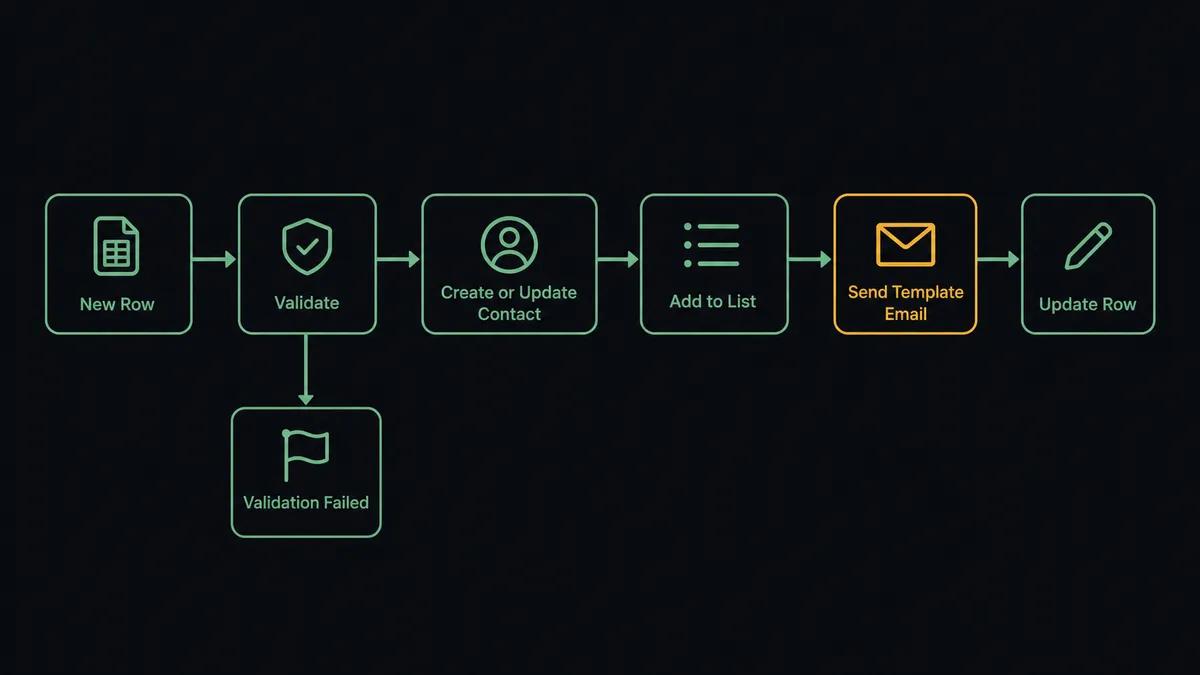
The trigger side of this pair lives in Google Sheets, since Brevo exposes actions but no triggers in FlowRunner. On New Row fires the moment a new lead lands in the tracking sheet; On New or Updated Row extends that to edits on existing rows. Before anything else runs, FlowRunner uses Load Header Row so the flow addresses columns by name (email, company, source) instead of by position, which keeps the mapping stable even if someone reorders columns later.
From there, the agent has the row’s data and Brevo’s contact and CRM actions as tools. It calls Create Contact to add a brand-new lead, or Update Contact if the person already exists, so buyers never get duplicated. It calls Add Contacts to List to enroll them in the right nurture audience, and Send Template Email to fire a personalized confirmation using a pre-built Brevo template. The flow closes the loop with Update Row, writing the enrollment status back into the sheet so the tracker always shows what actually happened, not just what was submitted.
The same actions work in reverse for reporting. On a schedule, the agent calls Get Email Statistics and Get SMS Statistics in Brevo, then Add Row to log that week’s numbers into a running Sheets tracker, or Export Sheet to produce a file the team never has to build by hand.
Can an AI agent run it, and why does a human stay in the loop?
A Zapier-style Zap maps the trigger to the action every time, in the same order, with no judgment involved. A FlowRunner agent reads the row first. It checks the row against the required fields the flow expects, an email address, a name, whatever the mapped header calls for, and it decides whether to process the row or stop.
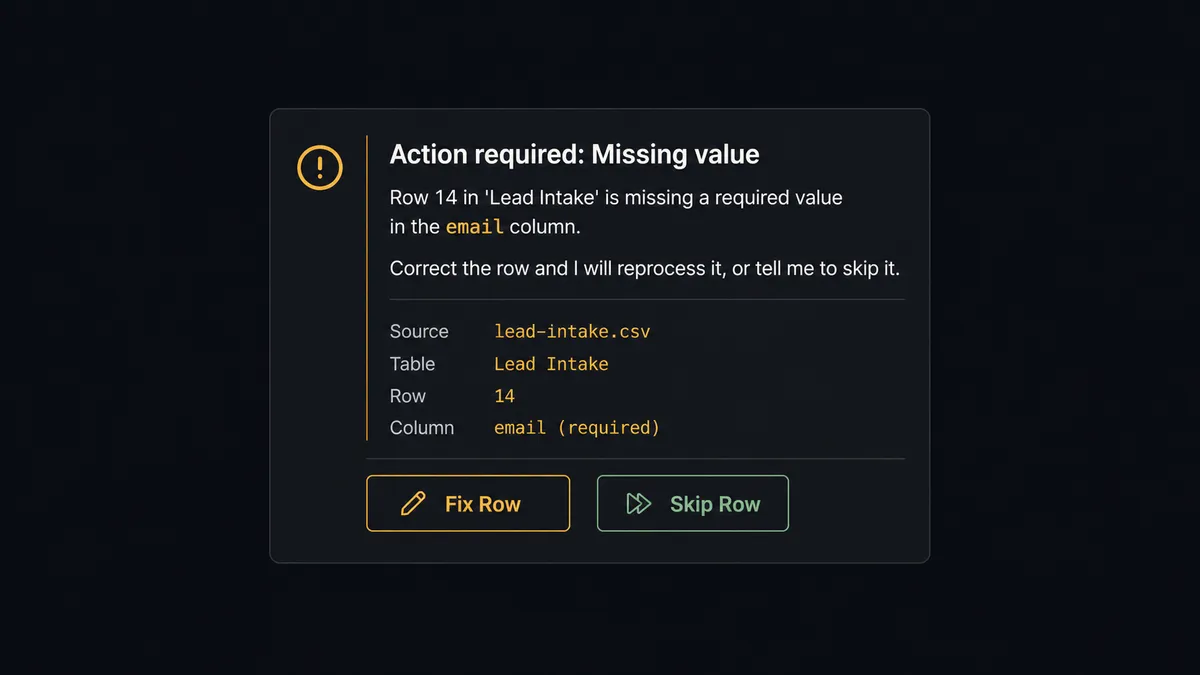
When a row is missing a required value, the agent does not push it into Brevo half-formed. It holds the row, marks it in the sheet, and sends the data owner a Slack message built from the actual context of the failure: “Row 14 in ‘Lead Intake’ is missing a required value in the email column. Correct the row and I will reprocess it, or tell me to skip it.” The owner fixes the row or tells the agent to move on, and only the approved rows get created as Brevo contacts. Clean rows keep flowing through automatically the entire time; nothing waits on a human unless it actually needs one.
The same pattern shows up on Brevo’s side of the flow. When a queued Send Template Email would go out to an unusually large list, the agent does not fire it automatically. It routes a Slack message to the marketing manager with the specifics, list name, contact count, template name, and waits for approval before the send executes. This is not a sync tool with a hardcoded threshold bolted on. The agent evaluates what it is looking at and decides, row by row and send by send, when the decision belongs to a person. Prospects call this a digital andon cord: the agent stops the line the moment it hits something it shouldn’t decide alone.
FlowRunner vs Zapier: what’s actually different for this pair?
Zapier earns its place here. Its app catalog and simple field-mapping UI make a single-step Zap from Google Sheets to Brevo fast to build, and for a two-person team wiring a lead sheet to a CRM for the first time, it is often the right first stop. Where it runs out of road is the moment a row needs judgment instead of a mapping, or the team needs more than a couple of collaborators without upgrading tiers.
| What matters for this pair | Zapier | FlowRunner |
|---|---|---|
| Human oversight on messy rows | Filters and Paths route data, they don’t reason about it | The agent evaluates each row and decides when to escalate to a person, with full context |
| Users on the workflow | Collaborator limits tighten on lower-priced plans | Unlimited users and workflows on every tier |
| AI provider | Zapier Agents run on Zapier-managed AI credits | BYOK: bring your own key to whichever AI provider you already use |
| Pricing model | Task-based; a high-volume Sheets trigger can burn through the task quota fast | Workflow-based execution tiers with transparent, predictable limits |
| Self-hosting | Cloud only | Free self-hosted Community Edition, plus a self-hosted Enterprise option |
Before and after connecting Brevo and Google Sheets
| What changes | Before | After |
|---|---|---|
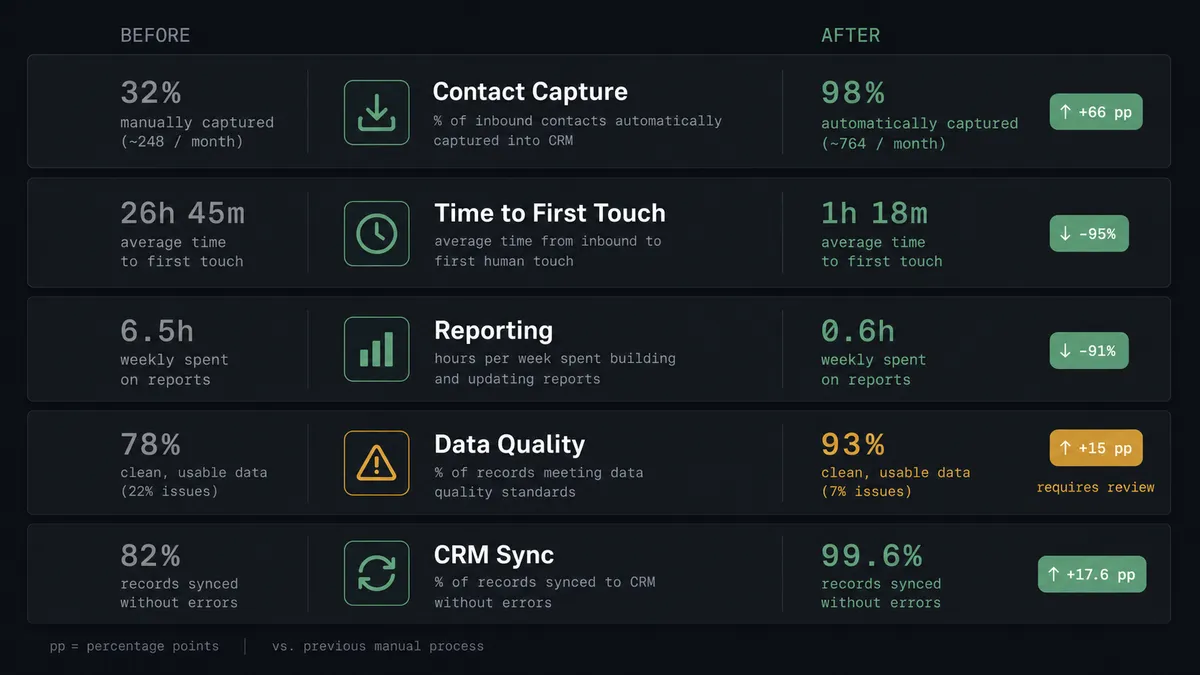
| Contact capture | New leads added to the sheet have to be re-entered into Brevo by hand | Every qualifying row becomes a Brevo contact automatically |
| Time to first touch | A row sits until someone notices and copies it over | The confirmation email and list enrollment fire in the same flow as the row landing |
| Reporting | Someone opens Brevo, pulls stats, and pastes them into a tracker each week | Email and SMS statistics land in the Sheets tracker on a schedule, unopened by a person |
| Data quality | Malformed rows get processed anyway or quietly skipped | Rows missing required fields are held and routed to the owner before they reach Brevo |
| CRM and list sync | Marketing email runs in one tool, contacts drift out of sync with the sheet | Contact records and list membership update from a single agent decision against current data |
What can you build with Brevo and Google Sheets together?
Lead intake to nurture enrollment. A new row in the lead sheet triggers Create Contact, Add Contacts to List, and Send Template Email in one flow, so a form submission becomes an enrolled, welcomed contact within seconds instead of by end of day.
Weekly performance tracker. The agent calls Get Email Statistics and Get SMS Statistics in Brevo, then Add Row writes that week’s numbers into a running Sheets tracker the marketing team already checks.
Validated form-to-CRM pipeline. On New or Updated Row checks required fields before the data ever reaches Brevo. Rows that fail go to the owner over Slack instead of becoming broken CRM records.
Scheduled report to email delivery. Export Sheet produces the current data as a file on a schedule, and Send Transactional Email delivers it as an attachment without anyone opening either tool.
Company and deal enrichment from a spreadsheet. When a row includes company details, the agent calls Create Company and Create Deal in Brevo, then Update Cell writes the new deal ID back into the sheet for the owner to track.
Common questions about connecting Brevo and Google Sheets
Is it free to connect Brevo and Google Sheets on FlowRunner? Yes. FlowRunner has a free plan with 100 executions a month, every integration included, and no credit card required, and new accounts get 14 days of Professional on top.
Can I self-host this Brevo and Google Sheets integration? Yes. FlowRunner’s Community Edition is free for a single self-hosted instance. Multi-instance clustering, full audit retention, and RBAC require the self-hosted Enterprise tier.
Does the agent need my own OpenAI key? FlowRunner runs on a bring-your-own-key model for AI providers, so you connect the key for whichever provider you use rather than paying FlowRunner for bundled model access.
What happens when the agent isn’t sure about a row? It holds the row instead of pushing it into Brevo, flags it in the sheet, and sends the data owner a Slack message naming the row and the missing field. The owner corrects it or tells the agent to skip it, and only approved rows get reprocessed.
Can I trigger this flow from Brevo instead of Google Sheets? Not directly. Brevo has no native triggers in FlowRunner, only actions, so the trigger side of this pair is Google Sheets (On New Row, On New or Updated Row, and three more) while Brevo supplies the messaging and CRM actions.
How is this different from a Zapier zap? A Zap maps a trigger to an action every time, the same way, with no judgment in between. A FlowRunner agent reads the row, decides whether it is clean enough to process, and pauses for a human on the rows that need a person, all inside unlimited users and workflows on every tier.
Getting started
Start on the free plan: 100 executions a month, every integration included, no credit card required, plus 14 days of Professional for new accounts. Connect Brevo and Google Sheets, pick the On New Row trigger, and have contacts enrolling themselves within the hour.
Build it yourself at flowrunner.ai, or book a walkthrough and we’ll map your actual lead sheet to Brevo with you on the call.
Frequently asked questions
Is it free to connect Brevo and Google Sheets on FlowRunner?
Yes. FlowRunner has a free plan with 100 executions a month, every integration included, and no credit card required, and new accounts get 14 days of Professional on top.
Can I self-host this Brevo and Google Sheets integration?
Yes. FlowRunner's Community Edition is free for a single self-hosted instance. Multi-instance clustering, full audit retention, and RBAC require the self-hosted Enterprise tier.
Does the agent need my own OpenAI key?
FlowRunner runs on a bring-your-own-key model for AI providers, so you connect the key for whichever provider you use rather than paying FlowRunner for bundled model access.
What happens when the agent isn't sure about a row?
It holds the row instead of pushing it into Brevo, flags it in the sheet, and sends the data owner a Slack message naming the row and the missing field. The owner corrects it or tells the agent to skip it, and only approved rows get reprocessed.
Can I trigger this flow from Brevo instead of Google Sheets?
Not directly. Brevo has no native triggers in FlowRunner, only actions, so the trigger side of this pair is Google Sheets (On New Row, On New or Updated Row, and three more) while Brevo supplies the messaging and CRM actions.
How is this different from a Zapier zap?
A Zap maps a trigger to an action every time, the same way, with no judgment in between. A FlowRunner agent reads the row, decides whether it is clean enough to process, and pauses for a human on the rows that need a person, all inside unlimited users and workflows on every tier.