How to Connect Hunter.io with HubSpot (With or Without an AI Agent)
Connect Hunter.io and HubSpot so FlowRunner agents discover and verify email addresses, then create contacts and deals in your CRM automatically, pausing for human approval before any found list enters a live campaign.
How do you connect Hunter.io to HubSpot?
You use a FlowRunner workflow where Hunter.io’s Domain Search or Email Finder action discovers and verifies email addresses, and HubSpot’s Create Contact and Create Deal actions write the qualified leads directly into your CRM. FlowRunner is a visual AI-agent orchestration platform where automations run autonomously and pause for human judgment on the steps that carry real consequence. The same connection can run as an AI agent that reasons about contact quality, checks for duplicates, and holds the list for a human sign-off before a single address enters a live outreach campaign.
The problem ops teams run into manually
Sales reps work from a list of target companies. Getting from a company name to a verified, role-filtered contact in HubSpot takes four or five manual steps: find a person’s name, guess at the email format, send a verification check somewhere, copy the address, open HubSpot, and create the contact. That sequence gets repeated for every company on the list. When reps are moving fast, steps get skipped. Addresses go into HubSpot unverified. Bounces damage the sending domain. Contacts land in the wrong lifecycle stage or skip the CRM entirely and live in a spreadsheet until a deal falls through.
The second problem is data trust. If the process of getting contacts into HubSpot is manual, the CRM becomes a mixed bag: some contacts verified, some guessed, some duplicated. Sales managers cannot rely on the pipeline view because they do not know how the data got there. Reporting gets qualified with phrases like “as far as we know” and “assuming the data is right.” Every decision made from that CRM carries that uncertainty.
How it works: the connection
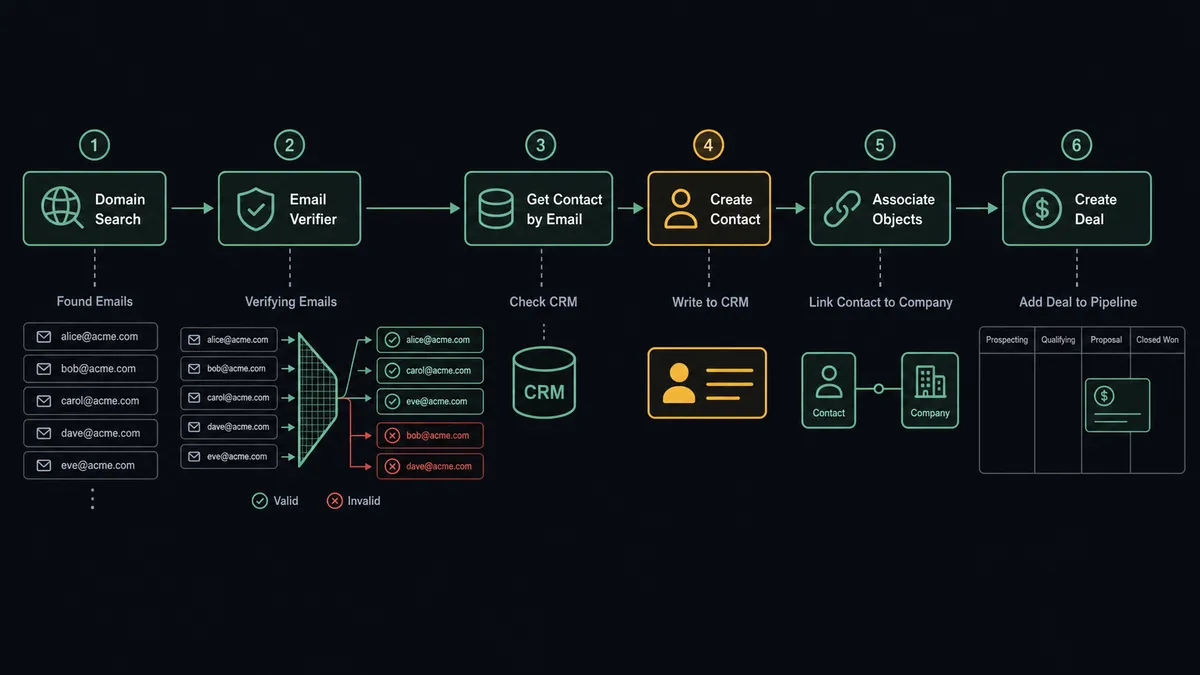
The workflow starts with a trigger: a new row added to a target account spreadsheet, a scheduled batch run, or an event from another system that signals a company worth pursuing.
The agent calls Domain Search with the company’s domain. Hunter returns the detected email pattern for that domain, the organization name, and every known address, each with a confidence score, the owner’s name, position, seniority, and department. A company with 40 employees at a target domain might return 12 known addresses. The agent filters by seniority and department to the roles that matter for the deal.
Next, the agent runs Email Verifier on each candidate. Hunter checks the address format, the MX records, and the SMTP response, and returns a status: valid, invalid, accept-all, webmail, disposable, or unknown. The agent drops anything that is not valid. A 12-address list might become 7 after verification. Those 7 addresses are the ones worth working.
Before writing anything to HubSpot, the agent calls Get Contact by Email for each address. If a contact already exists, the agent notes it and skips creation. If the contact is new, the agent calls Create Contact with the name, email, position, company, and any enrichment data available. It then calls Associate Objects to link the contact to the company record and Create Deal to open the opportunity in the right pipeline stage with the correct owner assignment.
The whole sequence runs without anyone touching a keyboard. A target company enters the account list and a set of verified, role-filtered, CRM-linked contacts comes out the other side.
Can an AI agent run it? (And why a human stays in the loop)
This is not a sync tool. The agent knows when to stop and ask.
The difference between a plain workflow and an AI agent running this connection is in how the agent handles ambiguity. A static workflow runs the same steps in the same order regardless of what it finds. An AI agent reads the data, reasons about it, and decides what to do next.
Consider what the agent sees when it runs Email Finder for a named executive at a target company. Hunter returns a best-guess address with a confidence score and a list of supporting sources. A score of 94 from three corroborating sources is meaningfully different from a score of 61 from a single source. A static workflow treats them the same. The agent does not.
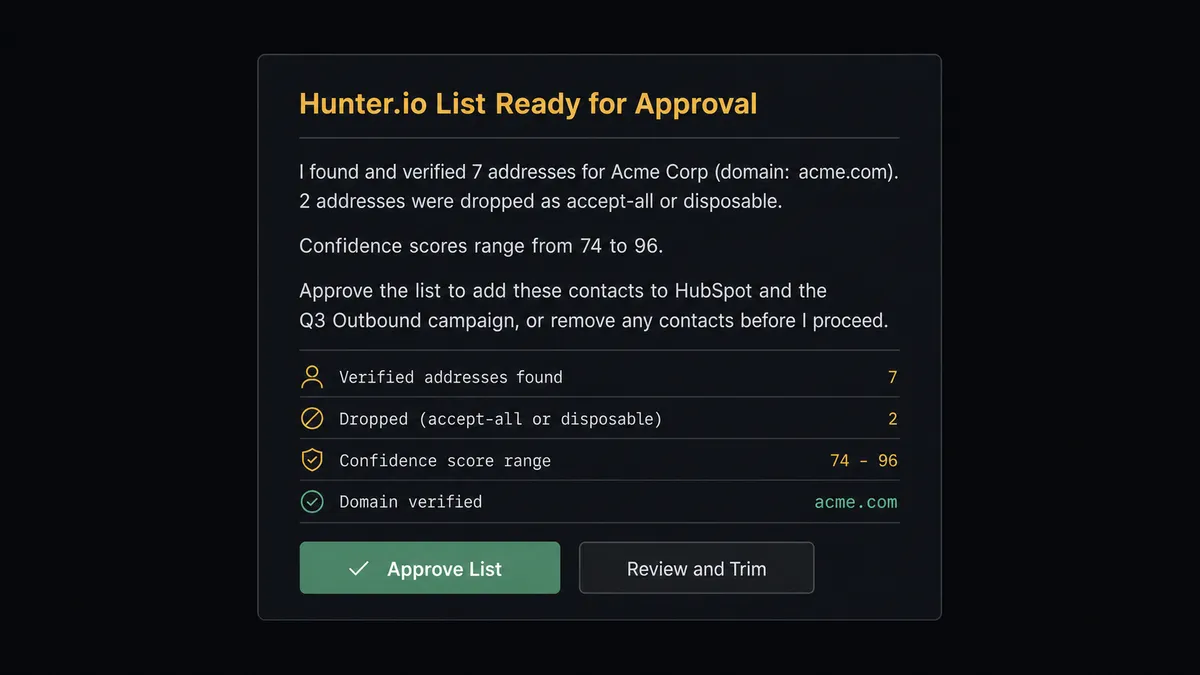
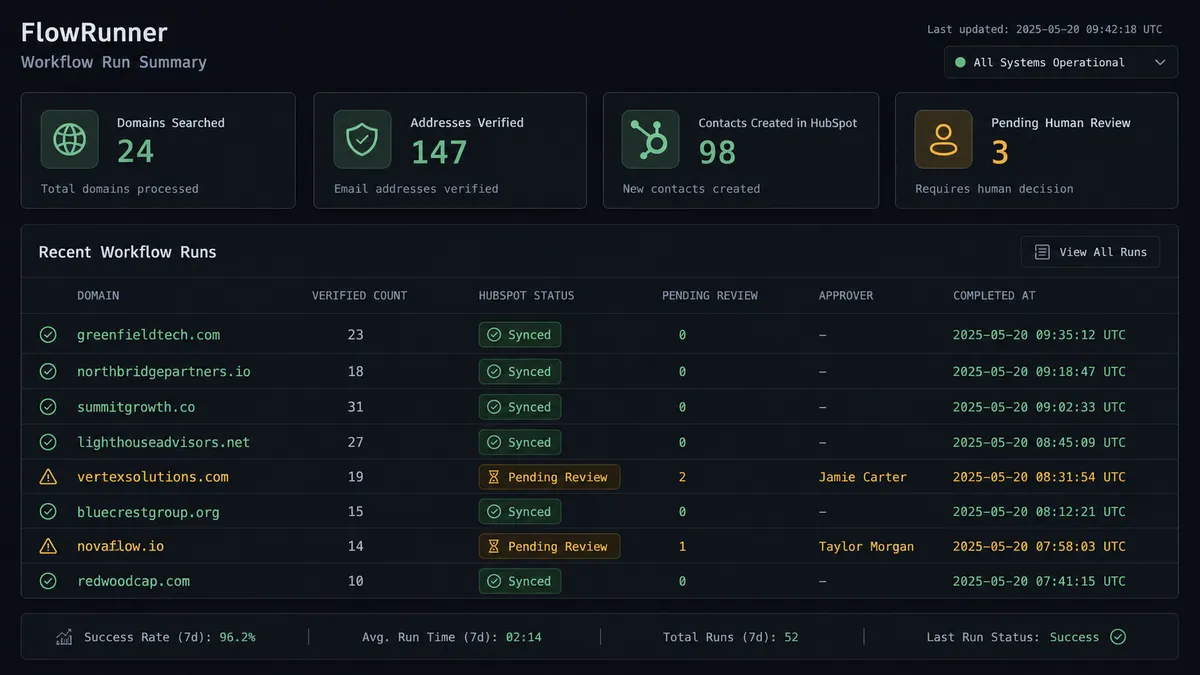
Before any verified list enters an outreach campaign, the agent invokes a human-in-loop flow as a callable tool. It messages the responsible rep through Slack: “I found and verified 7 addresses for Acme Corp. Confidence scores range from 74 to 96. Approve the list to add these contacts to HubSpot and the Q3 Outbound campaign, or remove any contacts before I proceed.” The rep sees the list, removes anyone who should not be contacted, and approves. The agent writes only the approved contacts to HubSpot and opens the deals.
The agent also handles the HubSpot side with context. When it detects two contacts matching the same email, it does not silently pick one. It routes the ambiguity to a CRM admin with the full picture: “I found two records matching this email. Which should I associate this deal with?” The admin decides. The decision, the admin’s identity, and the timestamp go into the audit trail.
This is the digital andon cord in practice. The agent stops the line when it hits a step that a human should own.
FlowRunner vs Zapier
Zapier is the tool most non-technical sales teams reach for first. It is genuinely good at simple, linear connections: form submitted, contact created, done. For a Hunter-to-HubSpot flow that stays predictable, Zapier gets the job done with minimal setup.
The gap opens when the workflow needs to reason. Zapier runs fixed sequences. It cannot evaluate a Hunter confidence score and decide to hold a low-confidence address for review. It cannot invoke a human approval as part of the agent’s own decision-making. It cannot check for HubSpot duplicates and route the ambiguity to an admin based on what it finds. Those steps require logic that Zaps do not carry.
| Feature | Zapier | FlowRunner |
|---|---|---|
| Connect Hunter.io to HubSpot | Yes, with pre-built Zaps | Yes, with visual workflow builder |
| Duplicate check before creating contacts | Requires multi-step Zap with filters | Agent calls Get Contact by Email before every create |
| Human approval before campaign send | Not available as native agent decision | Agent invokes approval as a callable tool based on its own reasoning |
| AI agent with bring-your-own key | Not available | Native; connect your own AI provider key |
| Audit trail with decision attribution | Not available | Every human decision logged with identity and timestamp |
| Unlimited users on every plan | No (seat-based pricing) | Yes, all tiers |
Before and after
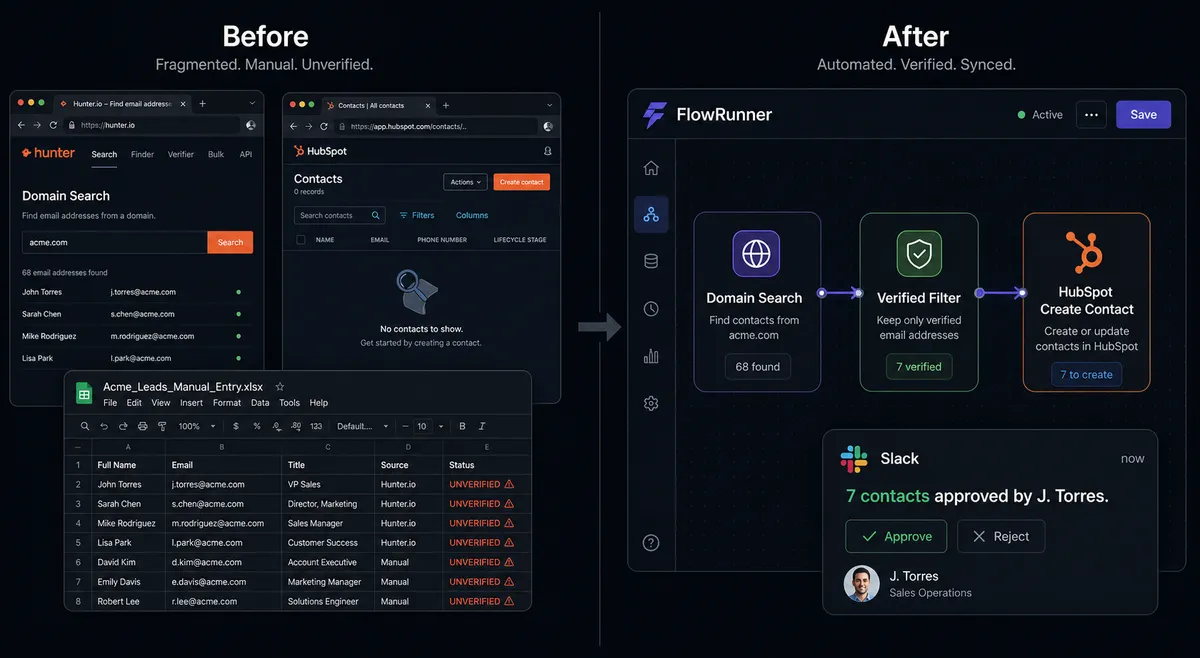
| Category | Before | After |
|---|---|---|
| Time to build a verified contact list | 20-40 minutes per target company, done manually by a rep | Under 2 minutes per domain, run automatically by the agent |
| Email deliverability | Addresses sent unverified; bounces discovered after the fact | Every address verified for format, MX, and SMTP before entering HubSpot |
| CRM data quality | Mixed: some contacts verified, some guessed, duplicates common | Deduplication check on every inbound; agent skips creates for existing records |
| Human accountability | No record of who added which contact or why | Every approval, trim decision, and duplicate resolution logged with name and timestamp |
| Campaign risk | Unverified or low-confidence addresses enter campaigns | Human sign-off required before any list reaches a send |
| Rep time spent on data entry | Significant; CRM updates only when reps remember to do it | Zero for routine contact and deal creation; reps focus on conversations |
What you can build
Account-to-contact mapping at scale. When a sales team finalizes a target account list, an agent runs Domain Search across every domain in the batch, verifies each result, and writes approved contacts to HubSpot as leads before the first outreach email goes out. The rep opens the account and finds a verified, role-filtered contact list instead of a blank field.
Named-person lookup for warm referrals. An agent working a referral already has a name and company but not an email address. It calls Email Finder with the person’s name and domain, gets the best-guess address with a confidence score, runs Email Verifier to confirm the mailbox is live, and creates or updates the contact in HubSpot. The rep reaches the right inbox on the first try.
Coverage check before a large prospecting push. Before committing Hunter credits to a batch of 200 target domains, an agent runs Email Count on each domain and segments by coverage depth. Domains with thin coverage get flagged for a different approach; domains with strong coverage move to full Domain Search. Credits go where they will actually produce contacts.
Stalled-deal reactivation. Every Friday, an agent queries HubSpot with Get All Deals filtered to the Negotiation stage and inactive for 14 days. For each stalled deal, it checks the associated contacts with Get Contacts at Company, runs a fresh Hunter verification on the primary contact to confirm the address is still deliverable, and sends the deal owner a Slack message with the contact status and a prompt to update the stage or flag for review.
Inbound lead enrichment and routing. A form submission fires the workflow. The agent calls Get Contact by Email to check for an existing record. If none exists, it uses Email Verifier to confirm the submitted address is deliverable, creates the contact with Create Contact, associates it with the company using Associate Objects, and opens a deal with Create Deal in the inbound pipeline. Total time from form submission to CRM record: under 30 seconds.
Common questions
Is it free to connect Hunter.io and HubSpot on FlowRunner? FlowRunner has a free plan with 100 executions a month, every integration included, and no credit card required, and new accounts get 14 days of Professional on top. No credit card is required to start. Beyond the free plan, Growth tier is $45 per month.
Can I self-host FlowRunner if I want to keep contact data on my own infrastructure? Yes. FlowRunner offers a self-hosted Community Edition at no cost and an Enterprise self-hosted tier with full compliance features. You run the orchestration engine on your own infrastructure.
Does the AI agent need my own OpenAI key to run this workflow? FlowRunner uses a bring-your-own-key model for AI providers. You connect your own key from whichever AI provider you choose. FlowRunner orchestrates the agent; you control which model it uses.
What happens when the agent finds a potential duplicate contact in HubSpot? The agent calls Get Contact by Email before creating any new record. If a match exists, it routes the ambiguity to a CRM admin via Slack rather than silently creating a duplicate. The admin resolves it; the agent documents the decision.
Can the agent run Hunter.io verification on a bulk list of domains? Yes. The agent can call Email Count across a batch of domains as a cheap coverage check, then run Domain Search and Email Verifier only on the domains where Hunter has strong coverage. This prevents spending credits on thin datasets.
What is FlowRunner’s human-in-loop feature, and how is it different from a simple approval step? FlowRunner’s human-in-loop is a callable tool the agent invokes based on its own reasoning, not a hardcoded threshold. The agent evaluates context and decides when to pause. It packages the full decision context, messages a human on Slack or email, waits for a response, then resumes. The decision, the decider, and the timestamp are all captured in the audit trail.
Getting started
FlowRunner has a free plan with 100 executions a month, every integration included, and no credit card required, and new accounts get 14 days of Professional on top. Any real email address works; disposable domains are not accepted.
To build this connection, start with the Hunter.io integration page at /integrations/hunter and the HubSpot integration page at /integrations/hubspot. Both pages list every available action with descriptions you can use directly as agent tools.
Start a free account at flowrunner.ai or book a 30-minute walkthrough at calendly.com/flowrunner/intro to see the Hunter-to-HubSpot flow running on real data.
Frequently asked questions
Is it free to connect Hunter.io and HubSpot on FlowRunner?
FlowRunner has a free plan with 100 executions a month, every integration included, and no credit card required, and new accounts get 14 days of Professional on top. No credit card is required to start. Beyond the free plan, Growth tier is $45 per month.
Can I self-host FlowRunner if I want to keep contact data on my own infrastructure?
Yes. FlowRunner offers a self-hosted Community Edition at no cost and an Enterprise self-hosted tier with full compliance features. You run the orchestration engine on your own infrastructure.
Does the AI agent need my own OpenAI key to run this workflow?
FlowRunner uses a bring-your-own-key model for AI providers. You connect your own key from whichever AI provider you choose. FlowRunner orchestrates the agent; you control which model it uses.
What happens when the agent finds a potential duplicate contact in HubSpot?
The agent calls Get Contact by Email before creating any new record. If a match exists, it routes the ambiguity to a CRM admin via Slack rather than silently creating a duplicate. The admin resolves it; the agent documents the decision.
Can the agent run Hunter.io verification on a bulk list of domains?
Yes. The agent can call Email Count across a batch of domains as a cheap coverage check, then run Domain Search and Email Verifier only on the domains where Hunter has strong coverage. This prevents spending credits on thin datasets.
What is FlowRunner's human-in-loop feature, and how is it different from a simple approval step?
FlowRunner's human-in-loop is a callable tool the agent invokes based on its own reasoning, not a hardcoded threshold. The agent evaluates context and decides when to pause. It packages the full decision context, messages a human on Slack or email, waits for a response, then resumes. The decision, the decider, and the timestamp are all captured in the audit trail.