How to Connect Gmail with Salesforce Pro (With or Without an AI Agent)
Connect Gmail and Salesforce Pro so inbound emails automatically create leads, convert contacts, and log communications, with an AI agent that pauses for human judgment before irreversible CRM writes.
How do you connect Gmail to Salesforce Pro?
You connect Gmail to Salesforce Pro by setting a Gmail trigger, On New Email or On New Thread, that fires when inbound mail arrives, then mapping the message data to a Salesforce Pro Create Lead or Update Lead action so the CRM record is created immediately. FlowRunner is a visual AI-agent orchestration platform where automations run autonomously and pause for human judgment on the steps that carry real consequence. The same connection can run as an AI agent that reads sender context, scores the lead, and invokes a human approval before any irreversible Salesforce write like Convert Lead to Contact.
The inbox is where pipeline leaks
Every sales team has a version of this problem. Inbound emails arrive: demo requests, referrals, replies to outbound sequences, conference follow-ups. Someone is supposed to read each one, decide if it is a real lead, open Salesforce, create the record, and route it to the right rep. That person is usually an SDR who has twelve other things open. The email sits. The lead cools. By the time the record lands in Salesforce, the context is thin and the timing is wrong.
The Salesforce side has its own friction. Lead conversion is a deliberate action in Salesforce. It creates or merges a contact, account, and opportunity, and it cannot be undone cleanly. Without a consistent gate, different reps convert at different points in the process. Some convert too early and pollute the pipeline with unqualified contacts. Some wait too long and miss the window. There is no paper trail of who decided what, or why.
The problem is not that people are bad at this work. It is that the work is repetitive, time-sensitive, and fragmented across two systems that do not talk to each other. That is exactly the kind of work an agent handles well.
How it works: the connection
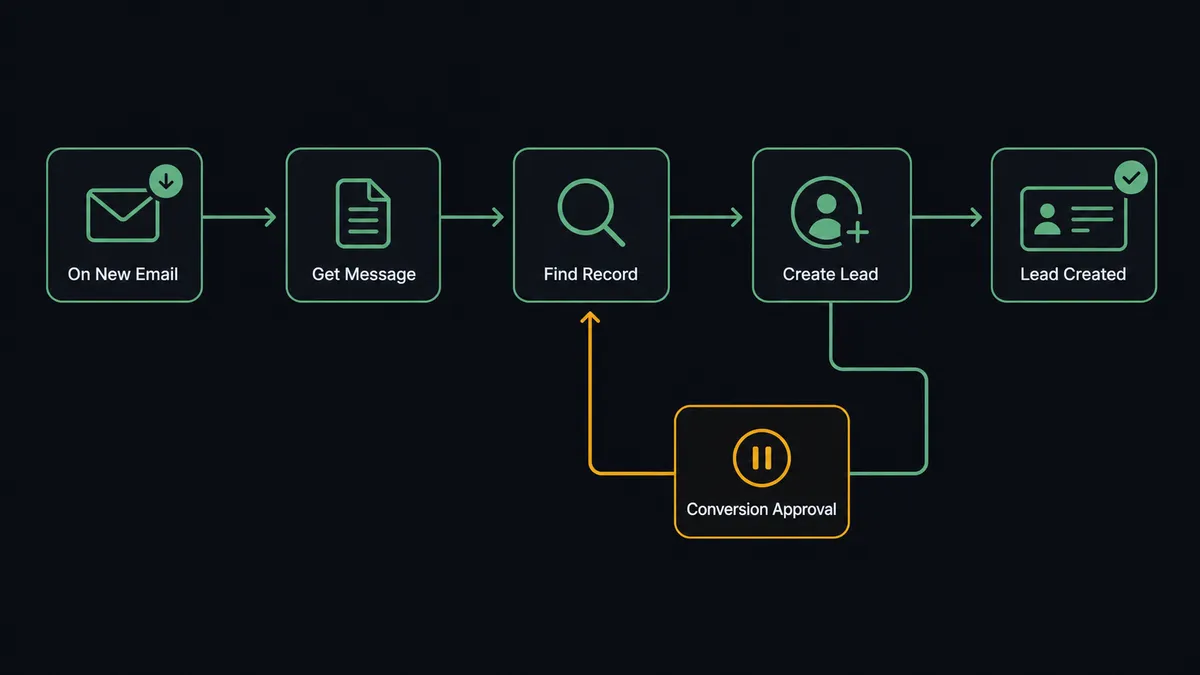
When an email arrives in the monitored Gmail mailbox, the On New Email trigger fires. The agent calls Get Message to read the full body, sender name, and email address. It then calls Find Record in Salesforce Pro using the sender’s email as the lookup key.
If a matching record exists, the agent calls Update Lead to add the new context: the email subject, body summary, and timestamp. It also calls Add Label To Message in Gmail so the thread is marked as handled and linked to the Salesforce record by convention.
If no matching record exists, the agent calls Create Lead and maps the fields: sender name to First Name and Last Name, email address to Email, subject line to Lead Source Description, and a body summary to Description. It then calls Add Contact to Campaign or Add Lead to Campaign if the flow has a nurture campaign configured for inbound leads of this type.
At each stage, the agent also calls Gmail actions to keep the inbox organized. Add Label To Message marks the thread. For recognized patterns, Send Message sends a templated acknowledgment to the original sender. The CRM record exists within seconds of the email arriving, with no one downloading anything or switching tabs.
Can an AI agent run it? (and why a human stays in the loop)
A basic trigger-action connection creates the lead. An AI agent decides what to do with it.
The difference is in how the agent handles variation. A Zapier connection creates a lead every time an email arrives at a specific address, using fixed field mappings. The agent reads the email body, evaluates the sender against existing Salesforce records, and makes a call about what the right action is for this specific message. That judgment is based on context the agent assembles at runtime, not rules you hard-coded.
The moment that matters most is lead conversion. Convert Lead to Contact is irreversible. It creates a contact, merges or creates an account, and opens an opportunity. Once that runs, undoing it is messy. A rule-based system either converts everything above a score threshold or makes you add exception handling for every edge case you can think of.
The agent handles it differently. It scores the lead based on firmographic criteria from the email and any enrichment data it can retrieve. Then it decides whether the conversion makes sense, not just whether the score crossed a number. A lead from a company with three employees and a Gmail address might score 72 but the agent flags it for review because the company profile does not match the ICP. A lead from a named account in an active territory scores 65 but the agent routes it for fast conversion because the domain matches a target account.
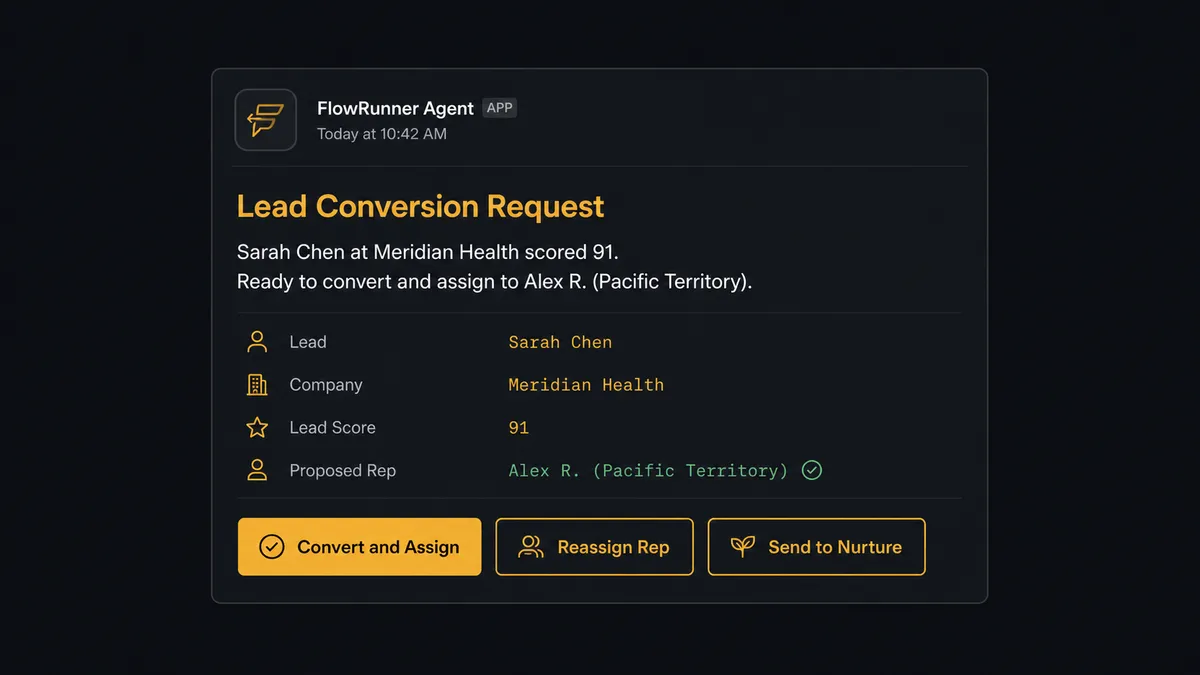
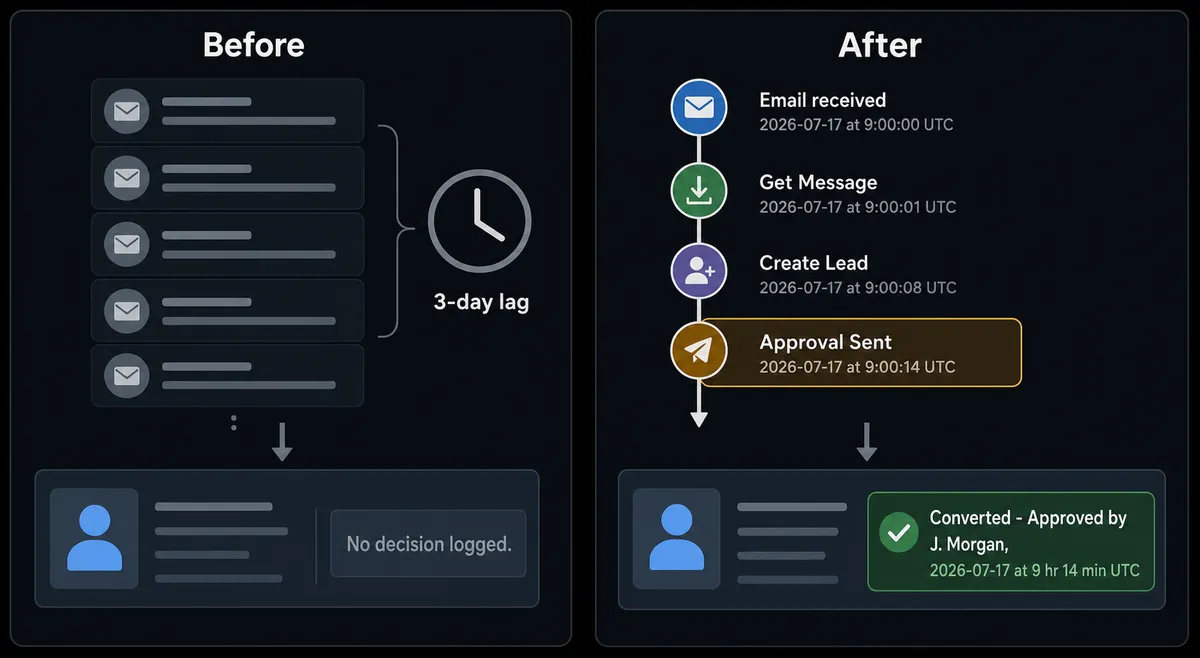
When the agent decides a conversion is warranted, it does not run it unilaterally. It pauses and routes the request to the sales manager via Slack: “Lead [Name] at [Company] scored 87. Ready to convert and assign to [Rep Name]. Confirm or reassign?” The manager sees the full context, clicks to approve or redirect, and the agent executes. The decision, the decider’s name, and the timestamp go into a Create Note on the Salesforce record.
This is what prospects call a digital andon cord. The agent stops the line when it reaches a step that carries real consequence. It does not improvise on those steps, and it does not drop them. It holds them until a human with authority makes the call.
FlowRunner vs Zapier
Zapier is the right choice for teams that want a simple, reliable trigger-action connection with minimal setup. Its Gmail and Salesforce integrations are mature, the interface is approachable, and for a basic “new email creates a lead” workflow, it works without any configuration complexity.
The differences become meaningful when the workflow needs judgment.
| Feature | Zapier | FlowRunner |
|---|---|---|
| Basic Gmail to Salesforce connection | Yes, reliable and well-documented | Yes, with real-time trigger and mapped fields |
| AI agent that reads email body and reasons about the lead | No. Zapier runs fixed step sequences | Yes. Agent reads context, scores, and decides |
| Human-in-loop as a callable tool for the agent | No. Zapier has approval steps but not agent-invoked oversight | Yes. Agent invokes a human approval flow as a tool at runtime |
| SOQL query for deduplication and reporting | No | Yes. Custom SOQL Query and Find Records by Query are native actions |
| Lead conversion with logged approval | No native gate | Yes. Agent pauses, routes to approver, logs decision and approver identity |
| Unlimited users on every tier | No. Zapier charges per user or team seat | Yes. All FlowRunner tiers include unlimited users |
| Bring your own AI provider key | No | Yes. BYOK model across supported providers |
Zapier is a sync tool. FlowRunner is an orchestration layer. For teams whose Gmail-to-Salesforce workflow needs to handle variation, make decisions, and leave an audit trail on consequential steps, the distinction matters.
Before and after
| Category | Before | After |
|---|---|---|
| Lead capture speed | SDR reads email, researches sender, opens Salesforce, creates record manually | Lead created in Salesforce within seconds of email arriving |
| Duplicate records | SDR checks manually, sometimes misses existing records | Agent calls Find Record before every Create Lead; existing records are updated, not duplicated |
| Lead conversion consistency | Different reps convert at different stages, no standard gate | Every conversion routes through a manager approval with the decision logged |
| Inbox organization | Threads sit unlabeled until someone acts | Agent applies labels and sends acknowledgments as flow steps |
| Attribution visibility | Revenue ops runs manual SOQL queries to build campaign reports | Agent runs Custom SOQL Query on a schedule and posts attribution data to the ops channel |
| Audit trail | Decisions tracked in email threads, if at all | Every conversion decision logged as a Salesforce note with approver identity and timestamp |
What you can build
Inbound lead capture from any email campaign. When a reply arrives from an outbound sequence, the agent reads the body for buying signals, creates or updates the Salesforce lead, and moves it to the right campaign with Add Lead to Campaign. Hot replies get routed to the rep with a Slack notification; polite declines get labeled and logged without cluttering the pipeline.
Deal desk document processing. When a vendor or partner emails a signed document, Gmail fires On New Attachment. The agent calls Save Attachment to move the file to flow storage, then calls Create File and Add File to Record in Salesforce to attach it to the relevant opportunity. The sales rep sees the document in Salesforce the moment it arrives, with a Create Note logging the receipt.
Referral email to contact pipeline. When a referral email arrives from a known partner domain, On New Thread fires. The agent calls Get Message, extracts the referred contact’s details, calls Create Contact in Salesforce, and adds them to the referral campaign with Add Contact to Campaign. It calls Send Message in Gmail to thank the referrer with a templated note.
Weekly campaign attribution reporting. On a schedule, the agent runs a Custom SOQL Query against closed opportunities to pull campaign association data. It formats the results and posts the attribution summary to the revenue ops Slack channel. Marketing gets accurate ROI numbers without anyone pulling spreadsheets.
Exception triage for unrecognized senders. When an email arrives outside the configured intake rules, the agent applies a triage label with Add Label To Message and routes the full thread to the ops lead. The agent does not guess, auto-reply, or create a record. The person decides what to do with it. Known patterns run automatically; everything else gets a human.
Common questions
Is it free to connect Gmail and Salesforce Pro on FlowRunner? FlowRunner has a free plan with 100 executions a month, every integration included, and no credit card required, and new accounts get 14 days of Professional on top. Beyond the free plan, Growth starts at $45 per month and includes unlimited users and workflows.
Can I self-host FlowRunner? Yes. FlowRunner offers a free Community Edition for self-hosted single-instance deployments and an Enterprise self-hosted tier for multi-instance clustering with full compliance features.
Does the AI agent need my own OpenAI key? FlowRunner uses a bring-your-own-key (BYOK) model. You connect your preferred AI provider key, whether that is OpenAI, Anthropic, or another supported provider. Your key, your cost, your data.
What happens when the agent is not sure about a lead conversion? The agent pauses the workflow and routes the conversion request to the designated approver via Slack or email, including the lead’s name, company, score, and recommended rep assignment. The approver clicks to confirm or reassign. The agent acts only after a human responds, and logs the decision with the approver’s identity and timestamp.
Will the agent create duplicate leads in Salesforce? Before creating a lead, the agent calls Find Record to check for an existing record matching the sender’s email address. If a match exists, the agent updates the existing record or routes the thread to the owning rep rather than creating a duplicate.
Can the agent handle emails from unknown senders? Yes. When an email arrives from a sender outside the expected intake rules, the agent applies a triage label in Gmail and routes the message to a person for a decision rather than guessing. Recognized patterns flow through automatically; exceptions get a human before the agent commits to any action.
Getting started
FlowRunner has a free plan with 100 executions a month, every integration included, and no credit card required, and new accounts get 14 days of Professional on top.
Connect both integrations from the FlowRunner integrations library: Gmail and Salesforce Pro. Both authorize via OAuth2 and are active on the Growth plan.
Start the trial at flowrunner.ai or book a 30-minute walkthrough at calendly.com/flowrunner/intro to see the Gmail-to-Salesforce agent running on a live account.
Frequently asked questions
Is it free to connect Gmail and Salesforce Pro on FlowRunner?
FlowRunner has a free plan with 100 executions a month, every integration included, and no credit card required, and new accounts get 14 days of Professional on top. Beyond the free plan, Growth starts at $45 per month and includes unlimited users and workflows.
Can I self-host FlowRunner?
Yes. FlowRunner offers a free Community Edition for self-hosted single-instance deployments and an Enterprise self-hosted tier for multi-instance clustering with full compliance features.
Does the AI agent need my own OpenAI key?
FlowRunner uses a bring-your-own-key (BYOK) model. You connect your preferred AI provider key, whether that is OpenAI, Anthropic, or another supported provider. Your key, your cost, your data.
What happens when the agent is not sure about a lead conversion?
The agent pauses the workflow and routes the conversion request to the designated approver via Slack or email, including the lead's name, company, score, and recommended rep assignment. The approver clicks to confirm or reassign. The agent acts only after a human responds, and logs the decision with the approver's identity and timestamp.
Will the agent create duplicate leads in Salesforce?
Before creating a lead, the agent calls Find Record to check for an existing record matching the sender's email address. If a match exists, the agent updates the existing record or routes the thread to the owning rep rather than creating a duplicate.
Can the agent handle emails from unknown senders?
Yes. When an email arrives from a sender outside the expected intake rules, the agent applies a triage label in Gmail and routes the message to a person for a decision rather than guessing. Recognized patterns flow through automatically; exceptions get a human before the agent commits to any action.