How to Connect Freshdesk with Slack (With or Without an AI Agent)
Connect Freshdesk and Slack so new support tickets post to your team channel automatically, or run it as an AI agent that triages tickets, drafts replies, and pauses for a human before anything reaches the customer.
How do you connect Freshdesk to Slack?
You connect Freshdesk to Slack by using a FlowRunner workflow where a new support ticket triggers a Send Message to Channel action, posting the ticket subject, priority, and requester to your team’s support channel the moment Create Ticket runs. FlowRunner is a visual AI-agent orchestration platform where automations run autonomously and pause for human judgment on the steps that carry real consequence. The same connection can run as an AI agent that searches for the sender with Search Contacts, triages the ticket, drafts a reply using Add Note, and pauses in Slack for a support lead’s approval before Add Reply sends anything to the customer.
The problem support teams are trying to solve
Support tickets arrive across email, chat, and forms. Someone on your team manually checks each one, looks up the requester, decides on priority, assigns the group, and then either handles the reply themselves or forwards it. That process works at five tickets a day. At fifty, exceptions start falling through the cracks. A high-priority ticket from a long-standing customer sits in the queue because no one noticed the source. A reply goes out before a manager could review it. A contact gets duplicated because no one checked Freshdesk before creating a new record.
The fix most teams try is a simple Slack notification: something fires and a message lands in the channel. The team still has to open Freshdesk, look up the sender, assign the ticket, write the reply, and send it. The notification moved the discovery step to Slack. It did not move the work. The result is two systems open at once and a process that is faster to notice but no faster to resolve.
How it works: the Freshdesk and Slack connection
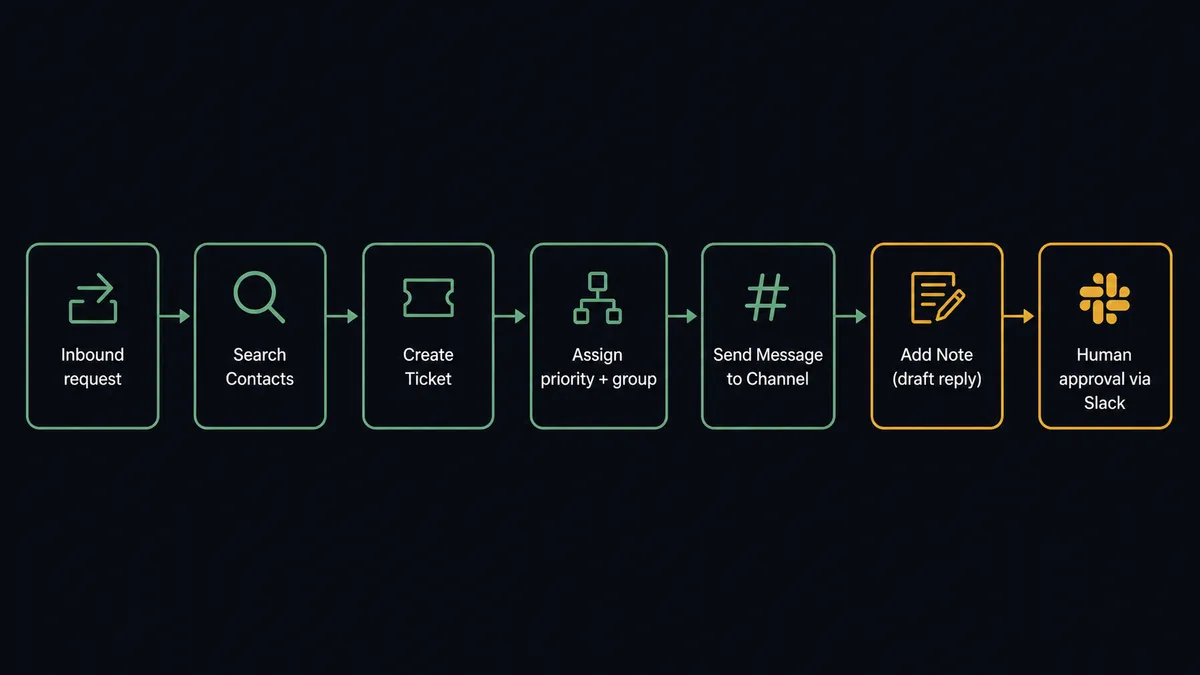
The connection runs in this sequence. A support request arrives and becomes the trigger for a FlowRunner workflow. The agent calls Search Contacts to find the requester in Freshdesk. If the contact exists, it pulls their record. If not, it creates one with Create Contact. Then Create Ticket opens the case with the subject, HTML body, requester, priority, and group assignment set from the routing rules the flow defines.
Once the ticket exists, the agent calls Send Message to Channel and posts a structured update to the support channel: ticket subject, assigned priority, assigned group, requester name, and a direct link to the ticket in Freshdesk. The team sees the case immediately without opening Freshdesk to check the queue.
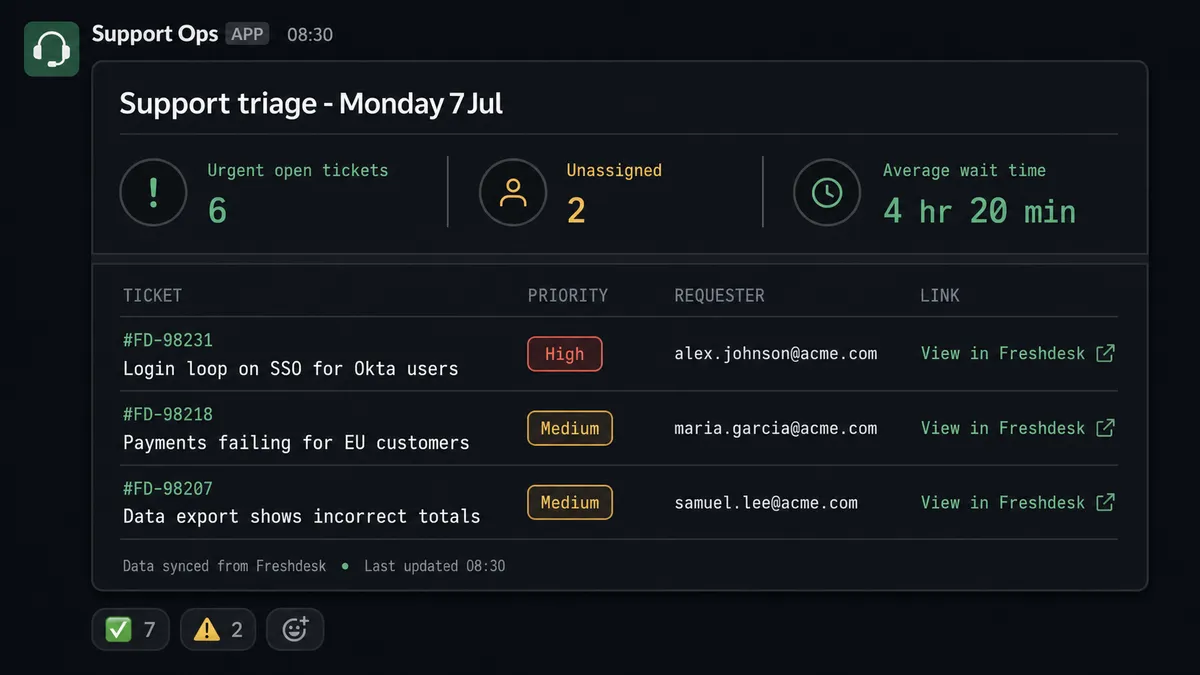
For update workflows, the agent can call List Tickets or Search Tickets on a schedule. Search Tickets accepts the Freshdesk query language, so a flow can pull precisely the tickets it needs: priority:4 AND status:2 for urgent open cases, for example. The agent then posts a triage summary to Slack or creates individual messages for each case.
Can an AI agent run it? (And why a human stays in the loop)
A basic Slack notification moves your discovery step. An AI agent moves the work itself, including the decision about when a person needs to be involved.
Here is the difference in practice. A ticket arrives from a customer who has had two escalated complaints in the past 90 days. The agent calls Search Contacts and finds the record. It calls List Ticket Conversations on their previous tickets and reads the history. It opens the new case with Create Ticket, sets priority to urgent, and assigns it to the senior support group. Then it drafts a proposed reply using the ticket body and conversation history as context.
At this point the agent does not call Add Reply. It calls Add Note to save the draft as an internal note, visible only to agents. Then it invokes the human-in-loop flow as a tool.
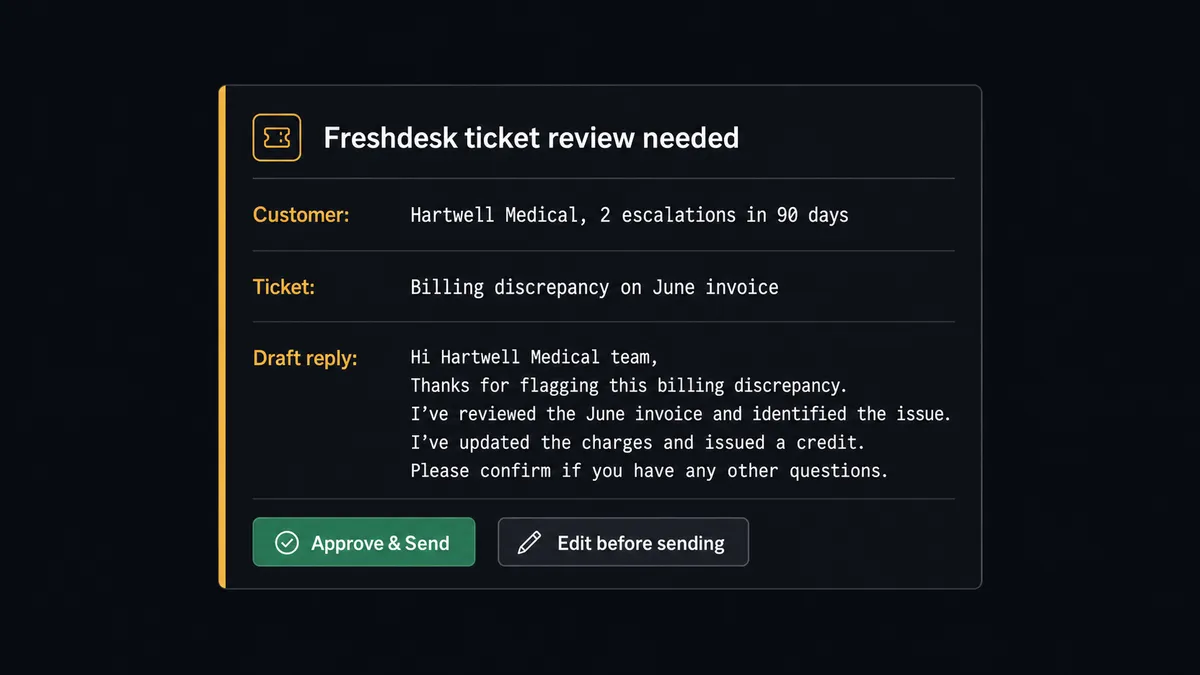
That flow sends a Send Direct Message to the support lead in Slack. The message includes the ticket subject, the customer’s recent history, the draft reply the agent wrote, and two options: approve or edit. The support lead reads it, sees the context the agent packaged, and approves or sends back a revision. On approval the agent calls Add Reply and the response reaches the customer. On an edit, the revised text goes to Add Reply instead. The agent does not send anything to the customer without a person’s sign-off.
The agent’s reasoning is not a hardcoded rule. It did not escalate because the ticket exceeded a dollar threshold. It escalated because the customer’s history suggested judgment was warranted. A first-time inquiry about a standard feature might get a direct Add Reply with no pause. The agent decides based on context, not a flowchart.
This is the “digital andon cord” framing FlowRunner customers use: the agent stops the line when it hits uncertainty. Your support team handles the exceptions. The agent handles intake, lookup, triage, and drafting at scale.
FlowRunner vs Zapier for this connection
If your support team is already using Zapier to connect Freshdesk and Slack, here is an honest comparison.
Zapier is good at this. It has a large library of Freshdesk and Slack triggers and actions, a straightforward setup, and a large community of users who have built similar workflows. For a simple “new ticket fires a Slack notification” connection, Zapier works and works quickly.
| Feature | Zapier | FlowRunner |
|---|---|---|
| Basic Freshdesk to Slack notifications | Yes | Yes |
| AI agent that triages tickets and drafts replies | No | Yes |
| Human-in-loop approval before replies reach customers | Not native; requires workaround | Native: agent invokes it as a callable tool |
| Unlimited users on every tier | No (user limits on most tiers) | Yes |
| Pricing model | Per-task execution; scales with volume | Per-workflow execution; transparent tiers |
| BYOK for AI model | No | Yes |
| Self-hosted option | No | Yes (Community Edition free) |
The difference matters most when the workflow has consequences. A Slack notification for a new ticket is low-stakes. A reply that reaches a customer on a billing dispute or an escalated complaint is not. Zapier does not have a native mechanism for an agent to pause, package context, and ask a human before continuing. FlowRunner’s human-in-loop capability is built into the orchestration layer, not bolted onto the notification step.
Before and after
| Metric | Before | After |
|---|---|---|
| Ticket creation | Someone manually retypes each inbound request into Freshdesk | Create Ticket opens the case with priority, group, and requester already set |
| Sender lookup | An agent searches for the contact before they can open the ticket | Search Contacts resolves the requester in the flow before the ticket exists |
| Team visibility | Team discovers new tickets by checking the queue | Send Message to Channel posts subject, priority, and requester to Slack on arrival |
| Reply handling | Automated replies go to customers with no human check | Add Note drafts the reply; a person approves before Add Reply sends it |
| Triage backlog | Someone builds the high-priority ticket list by hand | Search Tickets queries urgent open cases and posts the list to Slack on a schedule |
What you can build
New ticket to Slack, requester resolved. When a support request arrives, the agent calls Search Contacts, opens the case with Create Ticket, and sends a Send Message to Channel post with the subject, priority, assigned group, and a direct link to the ticket. The team sees it immediately with full context.
Urgent ticket triage digest. On a morning schedule, the agent runs Search Tickets with priority:4 AND status:2, compiles the list of urgent open cases, and posts a structured summary to the support channel. Leads see the day’s backlog without pulling a report.
Human-reviewed customer replies. The agent reads the ticket, calls List Ticket Conversations to understand the history, drafts a proposed reply, saves it with Add Note, and sends a Send Direct Message to a support lead for approval before Add Reply fires. No customer-facing message leaves without a person’s eyes on it.
Slack mention triggers ticket lookup. When a team member mentions the FlowRunner agent in a support channel with a ticket ID, the On Mention trigger fires. The agent calls Get Ticket, formats the key fields, and posts the ticket details in a Slack thread so the team has context without leaving the conversation.
Company-level ticket escalation. When Search Tickets finds multiple open tickets from the same company domain in a short window, the agent calls Get Company to pull the account context and posts a consolidated escalation card to the account manager’s Slack DM using Send Direct Message, with the full case list attached.
Common questions
Is it free to connect Freshdesk and Slack on FlowRunner?
FlowRunner has a free plan with 100 executions a month, every integration included, and no credit card required, and new accounts get 14 days of Professional on top. After that, Growth is $45 per month with 12,000 executions and unlimited users.
Does FlowRunner need my own OpenAI key to run this?
Yes. FlowRunner uses a bring-your-own-key model for AI providers. You connect your own API key from OpenAI, Anthropic, or another supported provider. FlowRunner orchestrates the agent; you control and pay for the model directly.
Can I self-host FlowRunner?
Yes. FlowRunner offers a free Community Edition for self-hosted, single-instance deployments, and an Enterprise self-hosted tier for multi-instance clustering with full compliance features. The cloud tiers run on FlowRunner’s infrastructure.
What happens when the agent is not sure whether to reply to a customer?
The agent pauses the workflow and sends a Slack message to the support lead with the ticket, the requester’s history, and the draft reply it prepared. The support lead reviews and approves, edits, or discards. Nothing reaches the customer until a person says so.
Can the agent handle tickets from multiple Freshdesk groups?
Yes. Create Ticket and Search Tickets both accept group assignment. You can route tickets to different Slack channels based on the group, priority, or any custom field Freshdesk exposes through List Ticket Fields.
Do I need a developer to set this up?
No. FlowRunner is a visual, no-code workflow builder. You connect your Freshdesk API key and authorize Slack via OAuth, then configure the trigger, action, and any routing logic in the visual editor. No code required.
Getting started
FlowRunner has a free plan with 100 executions a month, every integration included, and no credit card required, and new accounts get 14 days of Professional on top. Corporate email required.
Start with the Freshdesk integration page and the Slack integration page to see the full list of actions and triggers for each connector.
When you are ready to build, go to flowrunner.ai and start the workflow in the visual editor. If you want to walk through the setup with someone first, book a 30-minute intro at calendly.com/flowrunner/intro.
Frequently asked questions
Is it free to connect Freshdesk and Slack on FlowRunner?
FlowRunner has a free plan with 100 executions a month, every integration included, and no credit card required, and new accounts get 14 days of Professional on top. After that, Growth is $45 per month with 12,000 executions and unlimited users.
Does FlowRunner need my own OpenAI key to run this?
Yes. FlowRunner uses a bring-your-own-key model for AI providers. You connect your own API key from OpenAI, Anthropic, or another supported provider. FlowRunner orchestrates the agent; you control and pay for the model directly.
Can I self-host FlowRunner?
Yes. FlowRunner offers a free Community Edition for self-hosted, single-instance deployments, and an Enterprise self-hosted tier for multi-instance clustering with full compliance features. The cloud tiers run on FlowRunner's infrastructure.
What happens when the agent is not sure whether to reply to a customer?
The agent pauses the workflow and sends a Slack message to the support lead with the ticket, the requester's history, and the draft reply it prepared. The support lead reviews and approves, edits, or discards. Nothing reaches the customer until a person says so.
Can the agent handle tickets from multiple Freshdesk groups?
Yes. Create Ticket and Search Tickets both accept group assignment. You can route tickets to different Slack channels based on the group, priority, or any custom field Freshdesk exposes through List Ticket Fields.
Do I need a developer to set this up?
No. FlowRunner is a visual, no-code workflow builder. You connect your Freshdesk API key and authorize Slack via OAuth, then configure the trigger, action, and any routing logic in the visual editor. No code required.