How to Connect Dropcontact with Pipedrive (With or Without an AI Agent)
Connect Dropcontact and Pipedrive to enrich B2B contacts with verified emails and company data, then write clean records into your CRM automatically, with a human in the loop before any bulk outreach goes out.
How do you connect Dropcontact to Pipedrive?
You connect Dropcontact and Pipedrive by building a flow in FlowRunner that calls Enrich Contacts (Batch) or Enrich and Wait on a list of raw leads, then writes the verified records into Pipedrive using Create Person, Create Organization, and Create Deal. FlowRunner is a visual AI-agent orchestration platform where automations run autonomously and pause for human judgment on the steps that carry real consequence. The same connection can run as an AI agent that reads each enriched contact, decides how to route it into Pipedrive, and pauses for a human review before any bulk outreach list goes live.
The problem it solves
When leads arrive from a trade show scanner, a form submission, or a list import, they rarely arrive with reliable email addresses. Someone on the team has to open each row, search LinkedIn, guess the format, and verify before the contact is worth reaching out to. For a list of 100 leads, that is a full day of work before the first email goes out. The contacts that get cleaned first get outreach; the rest fall through the cracks.
The compliance dimension makes it worse for teams operating under EU rules. Buying a list from a data broker is fast but exposes the company to GDPR risk. Manual lookup from unverifiable sources is slow and inconsistently documented. The result is a pipeline full of contacts nobody is confident to contact, and a compliance officer who has to take someone’s word that the data is clean.
How it works: the connection
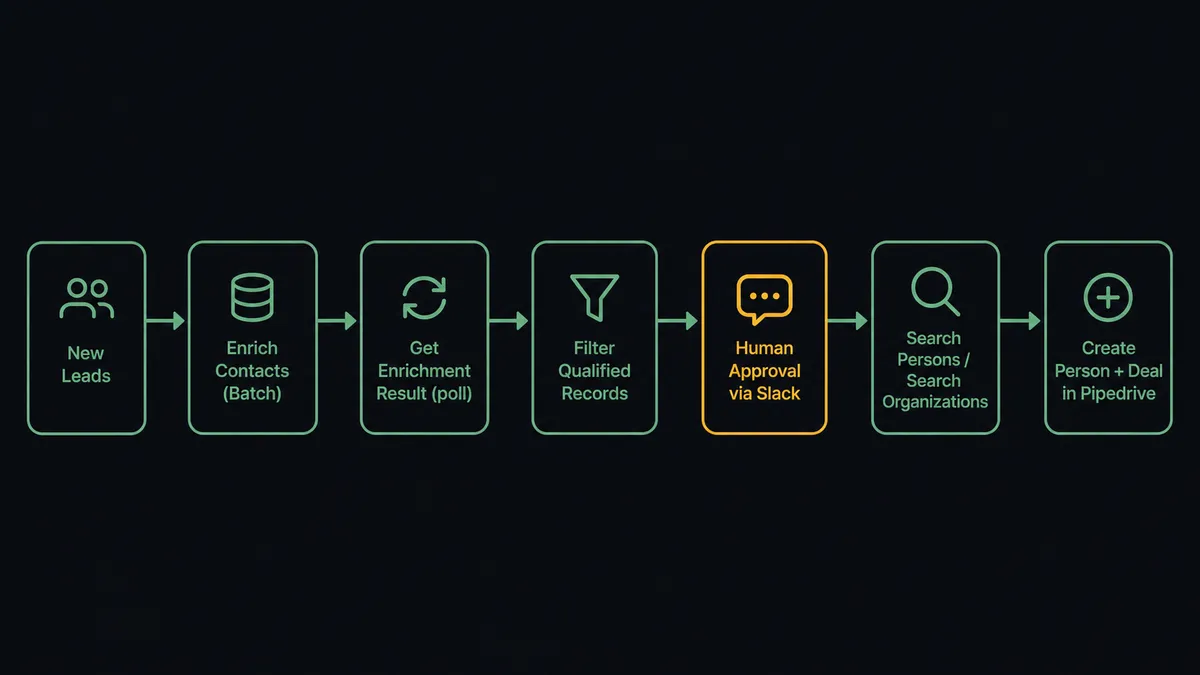
The integration runs in three phases. First, the flow captures the lead batch from wherever it originates: a form webhook, a spreadsheet row, or an inbound CRM lead. Second, the agent submits the batch to Dropcontact.
For lists of up to 250 contacts, the agent calls Enrich Contacts (Batch), which queues the work and returns a request_id. The agent then polls Get Enrichment Result until the data is ready. Each enriched record comes back with a qualified professional email, phone number, company name, and, when the SIREN option is enabled, French legal identifiers including the SIREN number, NAF code, VAT number, and registered address.
For single-contact flows, the agent calls Enrich and Wait instead. This action handles the polling internally and returns either the completed enriched record or a pending status the agent can retry with Get Enrichment Result. The agent does not have to manage the request_id lifecycle.
Third, the agent writes the qualified records into Pipedrive. It calls Search Persons by email first, then Create Person or Update Person with the verified data. It calls Search Organizations to find an existing account, or Create Organization if none exists. It then calls Create Deal in the appropriate pipeline with the right stage and value. A Create Activity step schedules the first outreach call, and a Create Note records the enrichment source and batch summary.
Can an AI agent run it? (and why a human stays in the loop)
The connection above is a rule-based flow: every lead goes through enrichment, every enriched contact gets written to Pipedrive, every deal lands in the same pipeline. That works for clean, predictable inputs. It breaks on the exceptions.
A FlowRunner AI agent reads the enriched data before writing anything. It can reason about what it finds: a contact from a company it has never seen before, a French legal entity where the SIREN lookup returned a VAT mismatch, a batch where 60 of 100 contacts came back without a qualified email. The agent does not silently write the 40 that worked and discard the 60 that failed. It makes a decision.
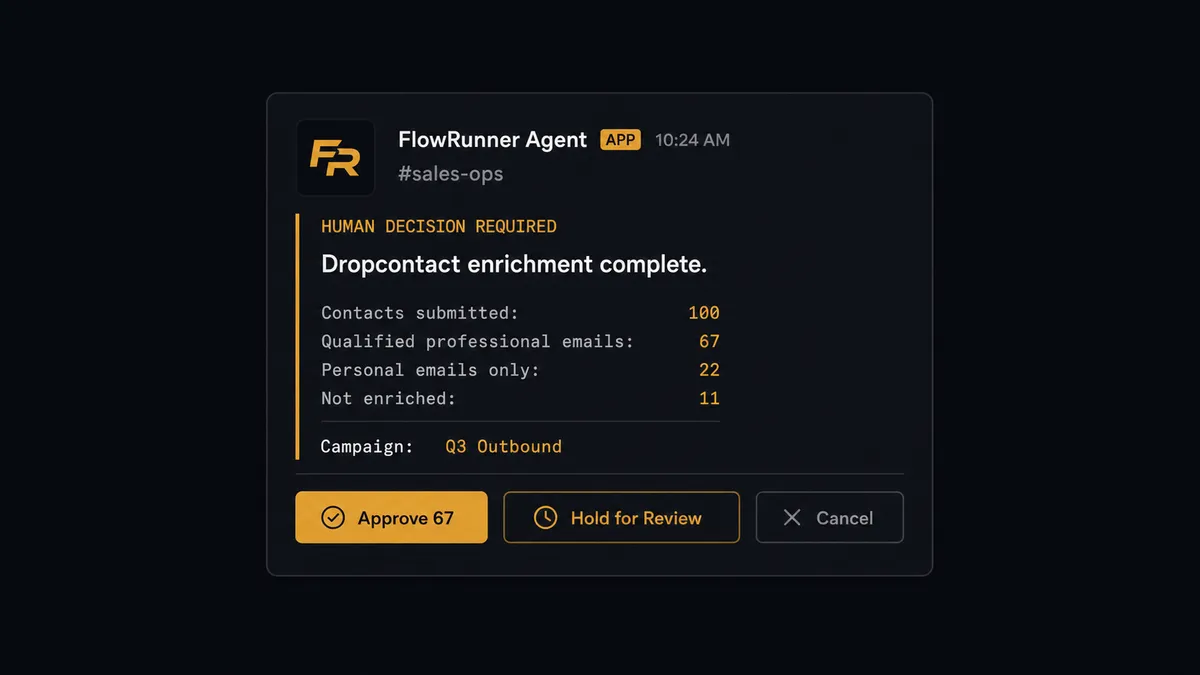
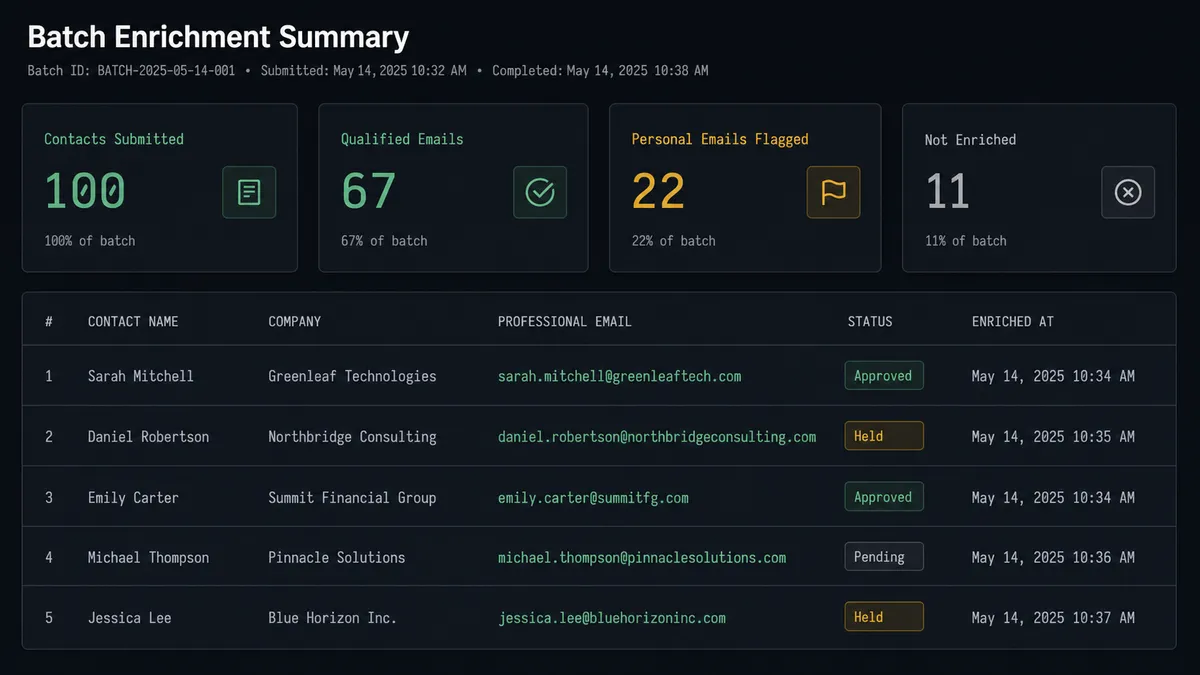
The human-in-loop step is the agent invoking a separate approval flow as a callable tool. That flow sends a Slack message to the list owner: “I enriched 100 contacts through Dropcontact. 67 returned a qualified professional email. 22 returned a personal email only, and 11 could not be enriched. Here is the list. Approve this batch for the [Campaign] outreach sequence, hold the unqualified contacts, or cancel.” The list owner sees the breakdown, reviews the flagged records, and responds. The agent does not fire any outreach until it receives that approval. The approver’s identity, their decision, and the timestamp are all captured in the audit trail.
This is the digital andon cord applied to contact data. The agent stops the line before enriched contacts become sent emails. The agent did the enrichment at scale. The human owns the decision to reach real people.
FlowRunner vs Zapier
Zapier handles this connection well for teams that want a simple, trigger-action flow: a new row in a Google Sheet fires Dropcontact enrichment, and the result gets written to Pipedrive. Zapier’s strength is speed of setup and a large library of pre-built zaps. For straightforward, linear flows it is genuinely fast to configure.
The differences show up at the decision layer. When the enrichment returns partial data, when a contact’s company has a SIREN mismatch, or when a list is about to feed an outreach sequence, Zapier runs the next action in the chain. It does not reason about what it found. The human-in-loop step in Zapier is a conditional branch: if a field equals a value, send a notification. The threshold is hardcoded. The reasoning is not.
| Capability | Zapier | FlowRunner |
|---|---|---|
| Dropcontact enrichment | Supported via Zap | Supported via Enrich Contacts (Batch), Get Enrichment Result, Enrich and Wait |
| Pipedrive write | Supported | Full object model: persons, organizations, deals, leads, activities, notes, tasks, files |
| Human-in-loop | Conditional branch with hardcoded threshold | AI agent decides when to escalate based on context; approval is a callable tool |
| Audit trail | No built-in audit or approver record | Decision, approver identity, and timestamp captured per run |
| Users and workflows | Per-seat or per-Zap pricing | Unlimited users and unlimited workflows on every tier |
| Self-host option | No | Yes, Community Edition free; Enterprise custom |
Before and after
| Category | Before | After |
|---|---|---|
| Lead list preparation | Manual email lookup and verification before any outreach; a day of work per 100-contact list | Enrich Contacts (Batch) cleans up to 250 records in one asynchronous pass |
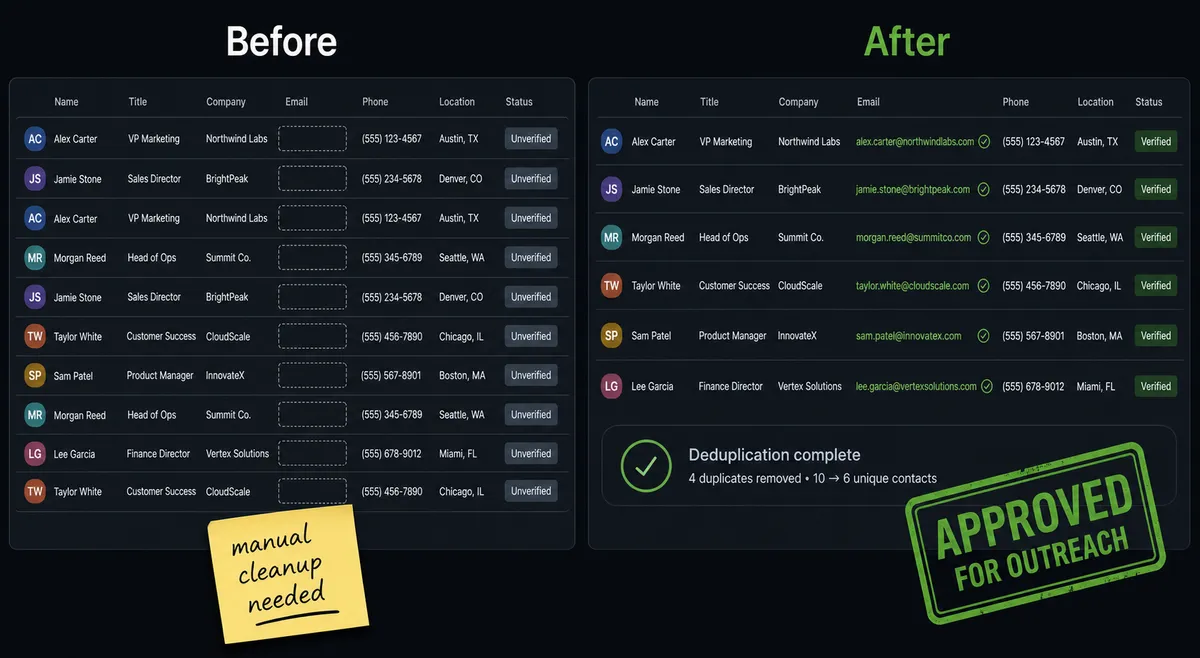
| CRM data quality | Duplicate persons and organizations created because no dedup check runs before entry | Search Persons and Search Organizations run before every Create, preventing duplicates |
| EU compliance | Enrichment sources of unclear provenance; no documented chain of data origin | Dropcontact GDPR-compliant enrichment; audit trail records who approved each list and when |
| Outreach gating | Depends on individual reps remembering to verify before sending | Agent pauses for human approval before any list advances to outreach |
| French legal data | Separate SIREN lookup by finance or compliance team | SIREN, NAF, VAT, and registered address appended during enrichment with the SIREN option enabled |
What you can build
Trade show import pipeline. A list from a badge scanner arrives after an event with names and companies but no reliable emails. The agent submits the batch with Enrich Contacts (Batch), polls Get Enrichment Result, filters the qualified records, and writes each one into Pipedrive with Create Person, Create Organization, and Create Deal. Before any outreach sequence runs, it messages the sales lead for list approval.
Inbound form lead enrichment. A single lead submits a form with a name and company. The agent calls Enrich and Wait to get the professional email in one step, then calls Search Persons to check for an existing record, creates the person and deal if new, and schedules the first call with Create Activity. The rep gets a notification with the enriched contact context.
French account onboarding. A new B2B account from France needs legal identifiers for invoicing. The agent enriches the contact with the SIREN option enabled, retrieves the SIREN number, NAF code, and VAT number alongside the professional email, and writes them all to a Pipedrive organization using Create Organization and Update Organization. Finance gets the fields they need without a separate lookup.
Bulk CRM import with duplicate resolution. A list of prospects from a tracker is imported. The agent enriches each row, then calls Search Persons and Search Organizations before any write. Where an existing match is found, it calls Update Person instead of Create Person. After the batch, it creates a summary note with Create Note and posts the results: records created, records merged, records flagged for review.
Exception escalation on low-confidence enrichment. The agent reviews the enriched results and finds a set of contacts where Dropcontact returned a personal email rather than a professional one, or where the enrichment confidence was low. Instead of writing those contacts directly to Pipedrive, the agent assembles them into a review queue and sends the list owner a Slack message asking whether to hold, manually verify, or discard them. Only the approved contacts advance.
Common questions
Is it free to connect Dropcontact and Pipedrive on FlowRunner? FlowRunner has a free plan with 100 executions a month, every integration included, and no credit card required, and new accounts get 14 days of Professional on top. Both the Dropcontact and Pipedrive connectors are included at every tier.
Can I self-host FlowRunner? Yes. FlowRunner offers a free Community Edition for self-hosted, single-instance deployments. Enterprise self-hosted includes multi-instance clustering and the full compliance suite.
Does the AI agent need my own API keys for Dropcontact and Pipedrive? Yes. FlowRunner uses a Bring Your Own Keys model. You connect your own Dropcontact API key and your own Pipedrive OAuth2 account. Your credentials stay under your control.
What happens when the agent is not sure whether to write a contact to Pipedrive? The agent pauses and routes the decision to a human through Slack, email, or another channel you configure. It packages the enriched contact data and the reason for escalation. The human approves or rejects, and the agent resumes with that decision recorded in the audit trail.
Does Dropcontact work with EU contact data? Yes. Dropcontact is GDPR-compliant and EU-focused. It does not buy or resell personal data. For contacts based in France, you can enable SIREN enrichment to also retrieve the SIREN number, NAF code, VAT, and registered address.
How does FlowRunner handle the asynchronous enrichment pattern Dropcontact uses? Dropcontact enrichment runs asynchronously. The FlowRunner agent calls Enrich Contacts (Batch), receives a request_id, then polls Get Enrichment Result until the data is ready. For single contacts, the agent can call Enrich and Wait, which handles the polling internally and returns either completed data or a pending status the agent can retry.
Getting started
FlowRunner has a free plan with 100 executions a month, every integration included, and no credit card required, and new accounts get 14 days of Professional on top. Every tier includes unlimited users and unlimited workflows, so your whole sales and operations team runs on the same plan from day one.
Connect both integrations from the FlowRunner integration library: /integrations/dropcontact and /integrations/pipedrive. Build your first enrichment flow in the visual editor, add the human approval step, and turn it on.
Start your free trial at flowrunner.ai or book a 30-minute walkthrough at calendly.com/flowrunner/intro.
Frequently asked questions
Is it free to connect Dropcontact and Pipedrive on FlowRunner?
FlowRunner has a free plan with 100 executions a month, every integration included, and no credit card required, and new accounts get 14 days of Professional on top. Both the Dropcontact and Pipedrive connectors are included at every tier.
Can I self-host FlowRunner?
Yes. FlowRunner offers a free Community Edition for self-hosted, single-instance deployments. Enterprise self-hosted includes multi-instance clustering and the full compliance suite.
Does the AI agent need my own API keys for Dropcontact and Pipedrive?
Yes. FlowRunner uses a Bring Your Own Keys model. You connect your own Dropcontact API key and your own Pipedrive OAuth2 account. Your credentials stay under your control.
What happens when the agent is not sure whether to write a contact to Pipedrive?
The agent pauses and routes the decision to a human through Slack, email, or another channel you configure. It packages the enriched contact data and the reason for escalation. The human approves or rejects, and the agent resumes with that decision recorded in the audit trail.
Does Dropcontact work with EU contact data?
Yes. Dropcontact is GDPR-compliant and EU-focused. It does not buy or resell personal data. For contacts based in France, you can enable SIREN enrichment to also retrieve the SIREN number, NAF code, VAT, and registered address.
How does FlowRunner handle the asynchronous enrichment pattern Dropcontact uses?
Dropcontact enrichment runs asynchronously. The FlowRunner agent calls Enrich Contacts (Batch), receives a request_id, then polls Get Enrichment Result until the data is ready. For single contacts, the agent can call Enrich and Wait, which handles the polling internally and returns either completed data or a pending status the agent can retry.