How to Connect DocuSign with Salesforce Pro (With or Without an AI Agent)
Connect DocuSign and Salesforce Pro on FlowRunner so a signed envelope triggers instant CRM updates, record creation, and optional human approval before irreversible steps.
How do you connect DocuSign to Salesforce Pro?
Use FlowRunner’s On Envelope Completed trigger to fire when a DocuSign envelope is fully signed, then run Salesforce Pro actions, Update Record, Convert Lead to Contact, Create Record, or Send Email, based on the data in that envelope. FlowRunner is a visual AI-agent orchestration platform where automations run autonomously and pause for human judgment on the steps that carry real consequence. The same connection that syncs a signature to a CRM update can run as an AI agent that reads the deal, reasons about what to do next, and asks a sales manager before converting a lead or closing an opportunity.
The problem with manual post-signature handoffs
A contract gets signed. Then nothing happens automatically. The rep checks DocuSign, sees the completed envelope, opens Salesforce, finds the opportunity, and manually updates the stage to Closed Won. Then they create the customer in the billing system. Then they send the welcome email. Then they attach the signed PDF to the record. Each step is a manual handoff, and each handoff is a point where work falls through the cracks.
The Salesforce side has its own version of this problem. Lead conversion is irreversible. When a sales rep converts a lead in Salesforce, it creates or merges a contact, an account, and an opportunity in one operation that cannot be undone cleanly. Most teams have policies about when to convert, but those policies live in people’s heads. Different reps convert leads at different points in the process. Territory disputes happen when conversions are made without manager sign-off. The manual process is not just slow, it is inconsistent.
How it works: the connection between DocuSign and Salesforce Pro
The trigger is On Envelope Completed. It fires the moment all required signatures are collected and the envelope is fully executed. No polling, no dashboard monitoring. The envelope is done and the flow starts immediately.
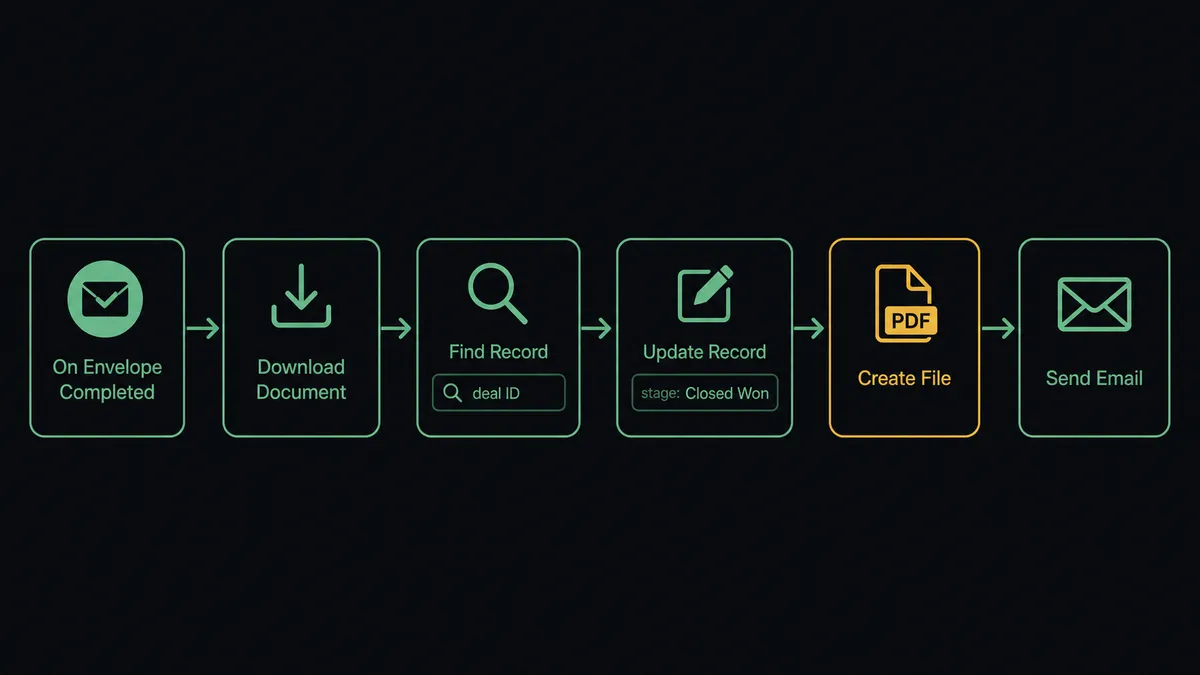
From that trigger, a FlowRunner agent has the full Salesforce Pro action library available as tools. The most common sequence:
- Agent runs Download Document to retrieve the signed PDF.
- Agent runs Find Record to locate the matching Salesforce opportunity by deal ID or contact email.
- Agent runs Update Record to move the opportunity stage to Closed Won.
- Agent runs Create File to attach the signed document directly to the Salesforce opportunity record.
- Agent runs Send Email to send the customer their countersigned agreement.
- Agent runs Create Enhanced Note to log the completion event, the timestamp, and the document path in the opportunity’s activity feed.
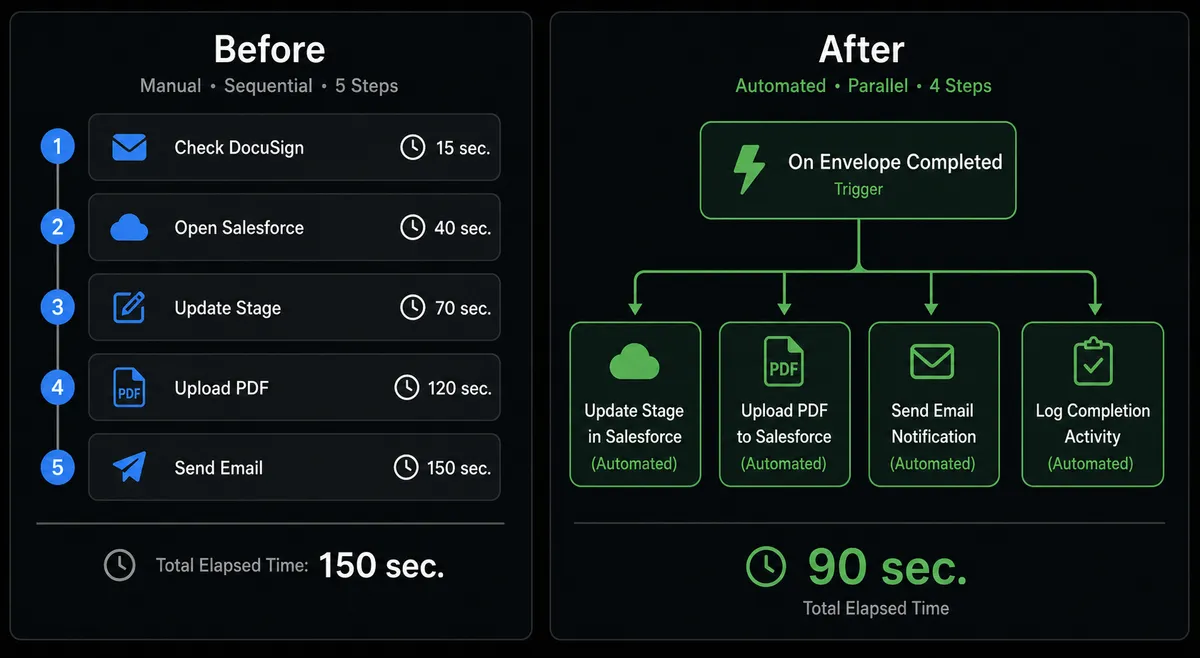
From signature to fully updated Salesforce record: under 90 seconds. No rep involvement required for a standard close.
For deals where a prospect has not yet been converted from a lead, the agent runs Find Record to check whether a contact and opportunity already exist in Salesforce. If not, it stages the Convert Lead to Contact action, but it does not run it automatically. That step carries weight.
Can an AI agent run it? (and why a human stays in the loop)
Yes, and this is where FlowRunner’s approach differs from a simple trigger-action tool. A FlowRunner AI agent does not follow a fixed script. It reads the signed envelope data, evaluates the deal context, and decides which Salesforce Pro actions to run and in what order. It calls each action as a tool, the same way a person would open Salesforce and make decisions.
The critical difference is what happens before an irreversible step. Lead conversion in Salesforce is permanent. The agent knows this because it is in the agent’s instructions. Before it calls Convert Lead to Contact, it invokes a human-in-loop flow as a callable tool.
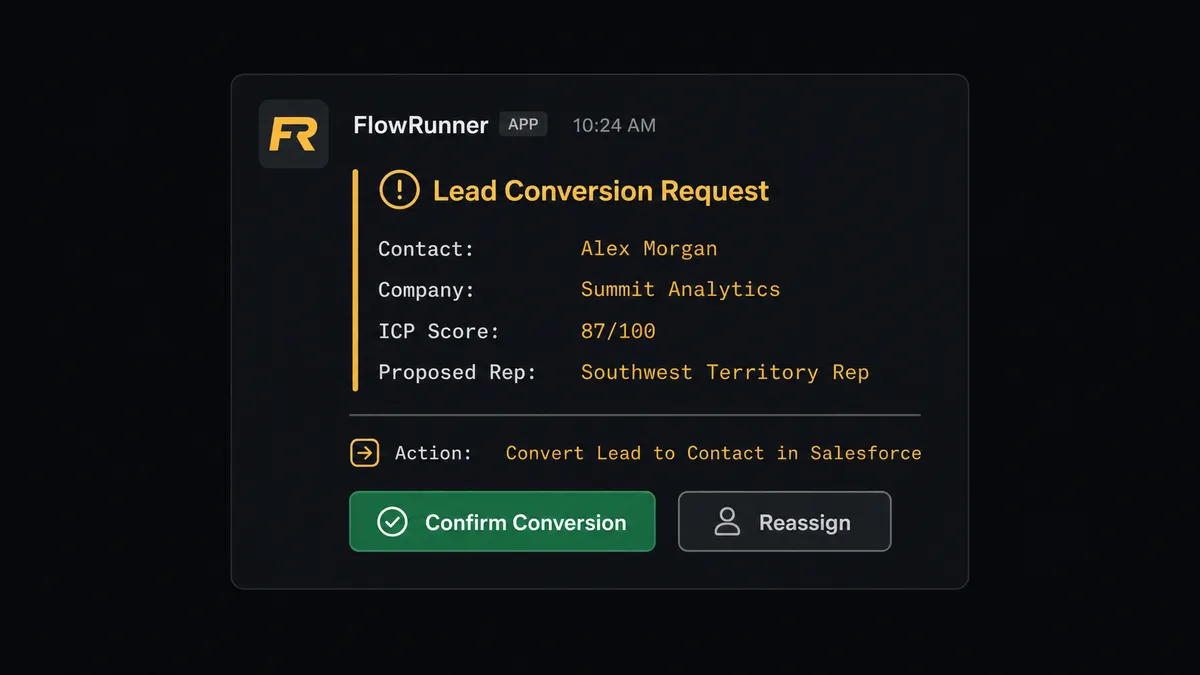
Here is what that looks like in practice. A contract comes in from a prospect who was in the lead stage. The envelope is completed. The agent downloads the document, runs Find Record to pull the lead record, and evaluates the context: lead score 87, company size matches ICP, territory maps to the Southwest region. The agent is ready to convert. But before it runs Convert Lead to Contact, it pauses and sends a Slack message to the sales manager:
“Lead [Contact Name] at [Company] scored 87 on ICP criteria. Ready to convert and assign to [Rep Name] in Southwest territory. Confirm or reassign?”
The manager sees the full context. One click to approve, one click to reassign. The agent resumes with the decision as input. It runs Convert Lead to Contact, attaches the signed document to the new opportunity, sends the customer a confirmation email, and logs the approver’s name and timestamp in an Enhanced Note on the record.
This is not a threshold rule (“if score above 80, ask human”). The agent evaluates context. If the same lead had a score of 87 but the territory assignment was ambiguous, or the account already existed under a different rep, the agent would flag those specific issues in the escalation message. The human receives exactly the information they need to make the decision, not a generic alert.
FlowRunner vs Zapier for DocuSign and Salesforce Pro
Zapier is the tool most non-technical sales teams already have. It works well for straightforward trigger-action connections, and its template library makes setup fast. If you need “signed envelope updates one Salesforce field,” Zapier gets you there with no learning curve.
The differences show up when the workflow needs to reason rather than just relay.
| Feature | Zapier | FlowRunner |
|---|---|---|
| Basic trigger-action connection | Strong template library, fast setup | Fully supported, visual builder |
| AI agent with conditional routing | Not available | Native AI Agent node, BYOK |
| Human-in-loop approval before irreversible steps | Not available | Native, with full audit log of approver and timestamp |
| Unlimited users on every tier | Per-user pricing | Unlimited users on all tiers |
| Self-hosted deployment | Not available | Community Edition (free) and Enterprise |
| SOQL query support for complex Salesforce data | Not available | Custom SOQL Query action in Salesforce Pro |
The short version: Zapier is a sync tool. FlowRunner is an orchestration layer. If your DocuSign-to-Salesforce workflow is a straight line with no decisions, either works. If the workflow involves lead conversion, deal routing, or any step where the wrong action has consequences, FlowRunner’s human-in-loop and audit trail are the difference.
Before and after
| Category | Before | After |
|---|---|---|
| Post-signature Salesforce update | Rep manually updates opportunity stage, attaches document, logs the close | Update Record and Create File run automatically within 90 seconds of the last signature |
| Lead conversion consistency | Different reps convert at different points; no approval trail | Every conversion requires manager approval via Slack; approver and timestamp logged in Enhanced Note |
| Document attachment to Salesforce | Rep downloads from DocuSign, uploads to Salesforce manually | Agent runs Download Document then Create File; signed PDF attached to the opportunity automatically |
| Stalled signing follow-up | Unsigned envelopes sit open until someone notices | On Envelope Sent triggers a 3-day window; agent resends and notifies deal owner if no signature arrives |
| Declined contract response | Decline notification arrives by email; response depends on whether rep checks DocuSign | On Envelope Declined triggers immediate Slack alert to deal owner with signer name and next-step options |
What you can build
Signed MSA to Closed Won, billed immediately. On Envelope Completed fires when the prospect signs the master services agreement. Agent runs Update Record to close the opportunity, attaches the signed document with Create File, and sends a confirmation email via Send Email. Billing setup in your payment system runs in the same flow. Zero manual steps between signature and active account.
Lead conversion with manager approval. A qualification form triggers DocuSign to send a lightweight agreement. When it comes back signed, the agent runs Find Record to check lead status, evaluates ICP score, and stages Convert Lead to Contact. Before running it, the agent invokes the human-in-loop flow. The sales manager approves or reassigns via Slack. The conversion is logged with the approver’s identity.
Declined contract recovery flow. On Envelope Declined fires. The agent runs Get Envelope Recipients to identify who declined, then uses Find Record to pull the Salesforce opportunity. It sends a Slack message to the deal owner with the signer’s name, the deal value, and three options: schedule a review call, send revised terms, or mark the deal as lost. The rep responds. The agent acts. No deal disappears quietly.
Deal desk document package on stage change. When an opportunity reaches the Proposal stage, the agent uses Find Child Records to retrieve all products and line items on the opportunity, generates the quote document, attaches it with Create File and Create Attachment, and sends the DocuSign envelope using Send Envelope from Template. The rep gets a Slack notification when the envelope is sent. The whole package is assembled and dispatched without manual assembly.
Weekly pipeline attribution report. A scheduled trigger fires every Monday. The agent runs Custom SOQL Query against closed opportunities to pull campaign attribution data for the week. It generates a summary, posts it to the revenue ops Slack channel, and updates custom attribution fields on each opportunity using Update Record. Marketing gets accurate ROI data without running queries by hand.
Common questions
Is it free to connect DocuSign and Salesforce Pro on FlowRunner? FlowRunner has a free plan with 100 executions a month, every integration included, and no credit card required, and new accounts get 14 days of Professional on top. All tiers include unlimited users and workflows.
Can I self-host this integration? Yes. FlowRunner offers a self-hosted Community Edition at no cost and an Enterprise self-hosted tier for organizations that need multi-instance clustering and full compliance features.
Does the agent need my own AI API key? Yes. FlowRunner uses a Bring Your Own Key model. You connect your own OpenAI, Anthropic, or other provider key. Your data never passes through FlowRunner’s AI layer.
What happens when the agent isn’t sure what to do? The agent invokes a human-in-loop flow as a callable tool. It pauses execution, packages full context for a human reviewer via Slack, email, or another channel, and resumes only after a decision is made. The decision, the reviewer, and the timestamp are all logged.
What triggers the DocuSign to Salesforce Pro connection? The On Envelope Completed trigger fires when all required signatures are collected. From there, the agent can run Update Record, Convert Lead to Contact, Create Record, or any other Salesforce Pro action based on the data in the signed envelope.
Can I use this without building an AI agent? Yes. A direct trigger-action connection works without AI. The On Envelope Completed trigger fires and runs Salesforce Pro actions in a fixed sequence. Adding an AI agent is the upgrade that enables conditional routing and human-in-loop escalation.
Getting started
FlowRunner’s Growth tier starts at $45/month and includes 12,000 executions, unlimited users, and full access to both the DocuSign and Salesforce Pro connectors. FlowRunner has a free plan with 100 executions a month, every integration included, and no credit card required, and new accounts get 14 days of Professional on top.
Start building at flowrunner.ai. If you want to walk through the DocuSign to Salesforce Pro connection with your team’s specific workflow, book a 30-minute session at calendly.com/flowrunner/intro.
Frequently asked questions
Is it free to connect DocuSign and Salesforce Pro on FlowRunner?
FlowRunner has a free plan with 100 executions a month, every integration included, and no credit card required, and new accounts get 14 days of Professional on top. All tiers include unlimited users and workflows.
Can I self-host this integration?
Yes. FlowRunner offers a self-hosted Community Edition at no cost and an Enterprise self-hosted tier for organizations that need multi-instance clustering and full compliance features.
Does the agent need my own AI API key?
Yes. FlowRunner uses a Bring Your Own Key model. You connect your own OpenAI, Anthropic, or other provider key. Your data never passes through FlowRunner's AI layer.
What happens when the agent isn't sure what to do?
The agent invokes a human-in-loop flow as a callable tool. It pauses execution, packages full context for a human reviewer via Slack, email, or another channel, and resumes only after a decision is made. The decision, the reviewer, and the timestamp are all logged.
What triggers the DocuSign to Salesforce Pro connection?
The On Envelope Completed trigger fires when all required signatures are collected. From there, the agent can run Update Record, Convert Lead to Contact, Create Record, or any other Salesforce Pro action based on the data in the signed envelope.
Can I use this without building an AI agent?
Yes. A direct trigger-action connection works without AI. The On Envelope Completed trigger fires and runs Salesforce Pro actions in a fixed sequence. Adding an AI agent is the upgrade that enables conditional routing and human-in-loop escalation.