How to Connect ClickUp with Google Sheets (With or Without an AI Agent)
Connect ClickUp and Google Sheets so new tasks, status changes, and triage decisions flow into your spreadsheets automatically, optionally as an AI agent that pauses for human judgment on the ambiguous calls.
How do you connect ClickUp to Google Sheets?
You connect ClickUp to Google Sheets by setting the On Task Created or On New or Updated Row trigger in FlowRunner, then calling Add Row or Update Task as the downstream action, mapping task fields to sheet columns or vice versa. FlowRunner is a visual AI-agent orchestration platform where automations run autonomously and pause for human judgment on the steps that carry real consequence. The same connection that logs a new ClickUp task to a tracking sheet can run as a full AI agent that reads the task, scores it for priority and ownership, routes it, and pauses for a team lead on the calls that are genuinely ambiguous.
The problem with keeping ClickUp and Google Sheets in sync by hand
Most operations teams run two parallel records: the project tracker in ClickUp and the status spreadsheet in Google Sheets. Someone creates the task in ClickUp after a meeting. Someone else copies the row into the sheet at end of week. A third person updates the sheet when the task closes. None of those three steps has a single owner, and none of them fire automatically. Work falls through the cracks between systems, the sheet is always at least a few days behind, and the only way to know what is actually current is to open both tools and compare them by hand.
The cost is real but diffuse. An AP clerk manually copying invoice task details into a billing tracker. An ops lead exporting a ClickUp list and pasting it into a reporting sheet every Friday before the weekly standup. A project manager noticing on Thursday that two tasks assigned to the same person were never routed correctly because the triage step requires someone to read every new task and make a judgment call. Each instance is small. Across a team running dozens of tasks a week, it adds up to hours the team does not get back and exceptions that surface late.
How the connection works
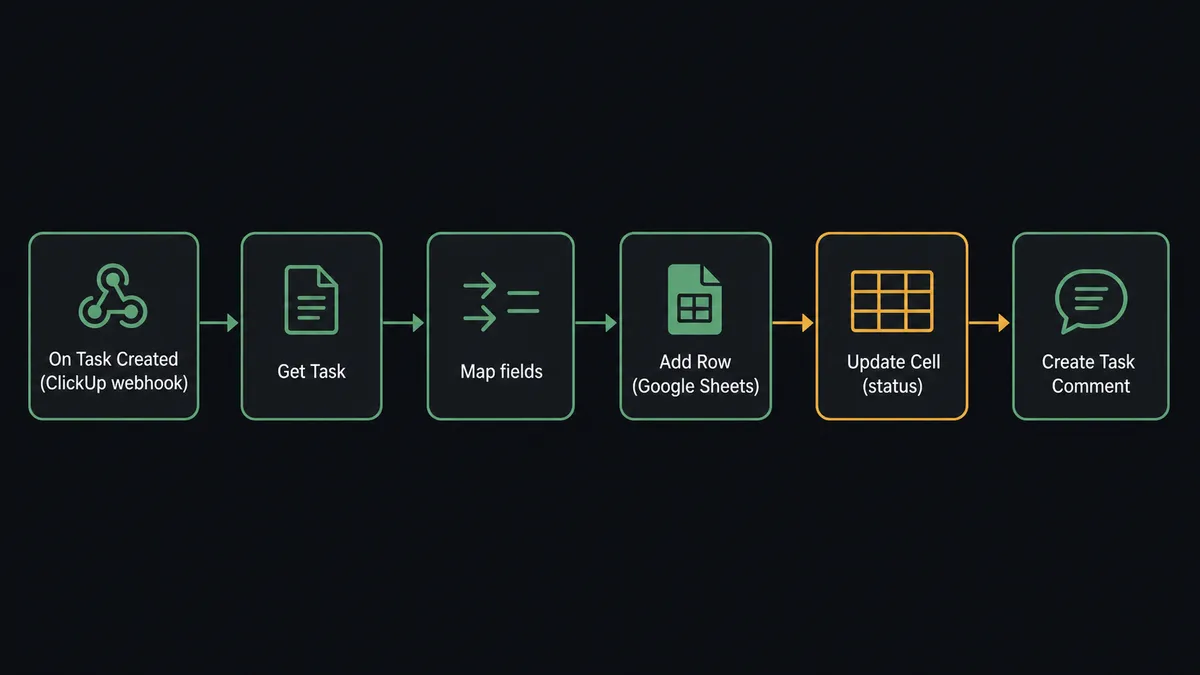
The most common setup fires On Task Created in ClickUp and writes the task data to Google Sheets using Add Row.
When a task lands in the monitored list, FlowRunner receives the webhook from ClickUp immediately, with no polling delay. The flow reads the task title, description, assignees, priority, and any custom fields. It then calls Add Row on the tracking spreadsheet, mapping each field to the correct column. The row is in the sheet by the time the task creator refreshes.
The reverse direction is equally direct. On New Row fires in Google Sheets when a new entry appears in a submission or intake sheet. The agent reads the row, validates the required fields, and calls Create Task in ClickUp to turn the row into tracked work, with the task title, description, assignees, and due date pulled from the sheet columns. The sheet becomes the intake surface; ClickUp becomes the execution layer.
For status updates, On Task Updated fires in ClickUp the instant a task changes state. The agent finds the matching row in Sheets using Find Row, then calls Update Row to write the new status, assignee, or due date back into the record. The sheet stays current without anyone opening it.
Can an AI agent run it? (and why a human stays in the loop)
A standard automation runs the same sequence every time. An AI agent reads the data and decides what to do. For ClickUp and Google Sheets, that distinction matters most at the triage step.
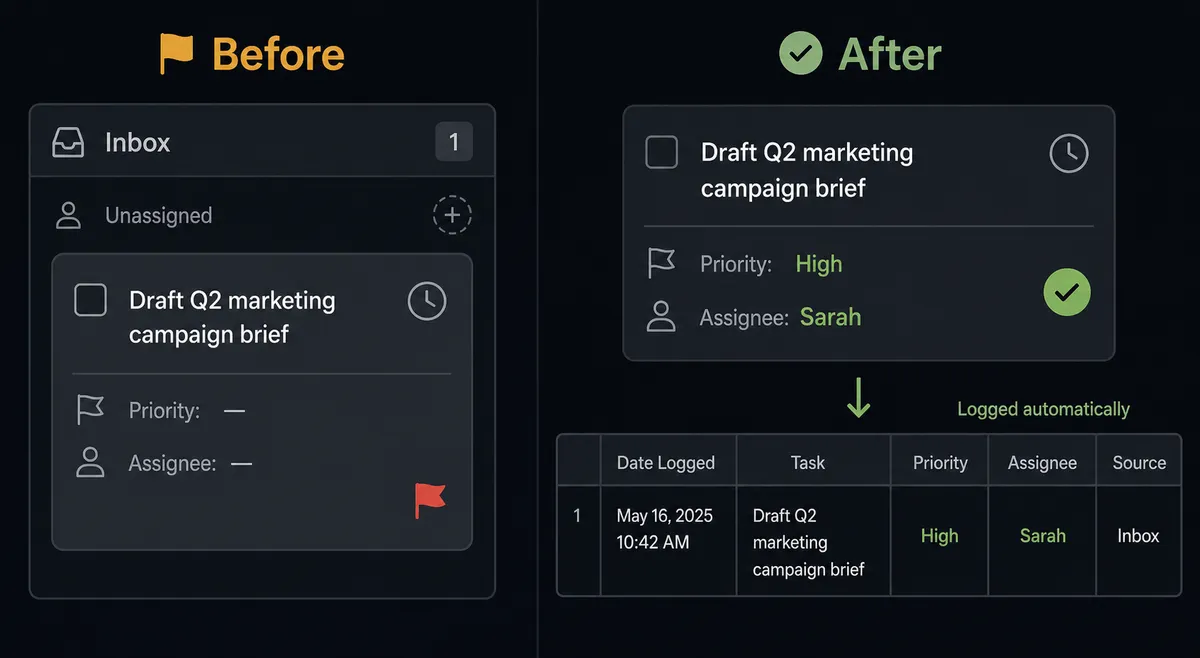
When On Task Created fires, the agent does not just copy fields into a sheet. It reads the task title, description, and any custom fields, then scores the task against the routing rules: which priority level does this deserve, who should own it, which tags route it to the right saved views. Clear cases get their Update Task call immediately. Priority set. Assignee locked. Tags applied. The agent posts a Create Task Comment recording the decision and then logs the full routing record to the Google Sheets tracker with Add Row.
The agent handles tasks that fit the rules on its own. The ones that do not are a different matter.
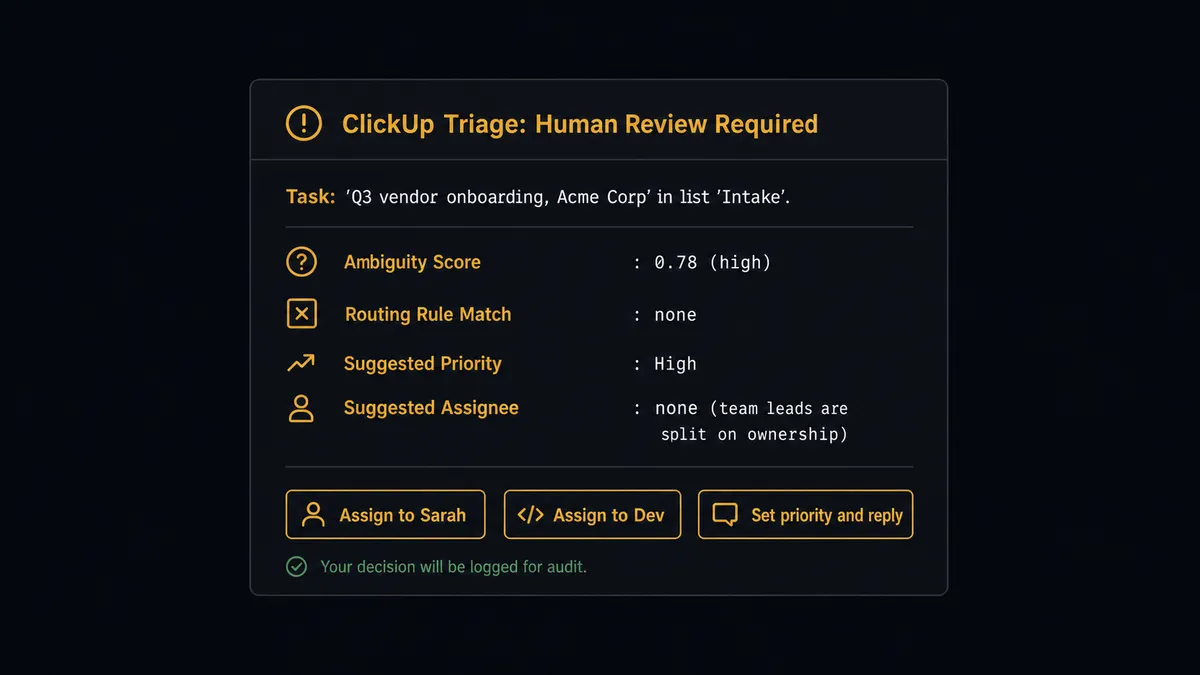
A task arrives with a vendor category the routing rules have not seen before. The task scores between the clear-yes and clear-no thresholds. The agent does not guess. It pauses and routes to the team lead through Slack: “A new task ‘Q3 vendor onboarding’ landed in Intake. It scored ambiguous on priority. Set the priority and assign an owner?” The lead sees the task name, the list, why it scored ambiguous, and their options. They decide. The agent resumes with Update Task, then writes the human-approved routing to the tracking sheet.
This is the digital andon cord in practice. The agent stops the line when it hits uncertainty. The human decision, the decider’s identity, and the timestamp are captured in the audit trail. The sheet reflects the approved routing, not the agent’s guess.
FlowRunner vs Zapier for connecting ClickUp and Google Sheets
Zapier is the most common tool operations teams reach for when they first try to connect these two systems. It earns that position: setup takes minutes, the interface is approachable for non-technical users, and the ClickUp and Google Sheets connectors are reliable.
The gap shows up at the decision layer.
| Feature | Zapier | FlowRunner |
|---|---|---|
| Connect ClickUp trigger to Google Sheets action | Yes, straightforward | Yes, native webhook triggers |
| AI agent that reads task data and decides routing | No. Zaps follow fixed sequences. | Yes. Agent scores tasks and chooses tools. |
| Human-in-loop as a callable agent tool | No. Conditional logic only. | Yes. Agent invokes a human-review flow as a tool. |
| Unlimited users on every paid plan | No. User limits vary by tier. | Yes. All tiers. |
| BYOK for your own AI provider | No | Yes |
| Audit trail of agent decisions and human approvals | No | Yes. Every action logged with actor and timestamp. |
The practical difference: Zapier copies fields from ClickUp to Sheets reliably. FlowRunner’s agent reads those fields, decides what they mean, routes the task, and asks a person when it is not sure. If the connection between these two tools is purely mechanical, Zapier is a reasonable choice. If the value is in the judgment layer around the connection, the tools are not comparable.
Before and after
| Category | Before | After |
|---|---|---|
| Task triage | Someone reads every new task by hand to set priority and pick an owner | The agent scores and routes clear cases the instant On Task Created fires |
| Sheet currency | The tracking sheet is updated manually, usually days behind | Add Row writes each routing decision to the sheet in the same flow run |
| Ambiguous routing | Ambiguous tasks sit unassigned until a lead notices them | Agent routes ambiguous tasks to a lead via Slack before anything is locked in |
| Audit trail | Task decisions are not recorded; ownership is inferred from assignment history | Every routing decision is logged in Create Task Comment and in the sheet |
| Status reporting | Someone exports ClickUp data and pastes it into a report sheet each week | On Task Updated writes status changes to the sheet as they happen |
What you can build
Task intake from a Google Sheets form A form submission appends a row to a tracking sheet via Add Row. On New Row fires. The agent reads the row, validates required fields, and calls Create Task in ClickUp with the task title, description, and due date pulled from the sheet. The form becomes a task without anyone copying it over.
Weekly project status report written to Sheets On a schedule, the agent calls Get Tasks on the active list, reads status and blockers for each task, and writes a summary row per project into a reporting sheet with Add Row. The team opens the sheet Monday morning and finds the current state without anyone having built it by hand.
Blocked-task escalation with a human gate On Task Updated fires when a task moves past its due date without closing. The agent reads the task with Get Task, finds the owner, and routes a Slack message asking whether the task needs a new due date, re-scoping, or escalation. The agent logs the decision to the tracking sheet with Update Row and updates the task in ClickUp with Update Task. The blocked task reaches a person before the next standup, not after.
Tag-based routing from sheet submissions A shared intake sheet collects requests tagged by department. On New or Updated Row fires. The agent reads the department tag, calls Create Task in the matching ClickUp list, and adds the right space tags with Add Task Tag. Requests route to the right team list without a router touching them.
Attachment delivery from ClickUp to Sheets When a task is marked complete, the agent calls Get Task, retrieves any attachments, and logs a summary row to a delivery tracking sheet with the task name, assignee, completion timestamp, and a link to the attachment. The sheet becomes the delivery record of truth.
Common questions
Is it free to connect ClickUp and Google Sheets on FlowRunner? FlowRunner has a free plan with 100 executions a month, every integration included, and no credit card required, and new accounts get 14 days of Professional on top. After that, the Growth tier is $45 per month and includes unlimited users and workflows.
Can I self-host FlowRunner? Yes. FlowRunner offers a free Community Edition for self-hosted single-instance deployments and an Enterprise tier for multi-instance clustering. Cloud and self-hosted plans both support the ClickUp and Google Sheets connectors.
Does the AI agent need my own OpenAI key? FlowRunner uses a BYOK model, so you connect your own key from whichever AI provider you prefer. You are not locked into a single model or provider.
What happens when the agent is not sure about a task? The agent pauses the flow and routes the ambiguous task to a team lead through Slack, email, or another channel you configure. The lead decides, and the agent resumes from that decision. Nothing is locked in until a person weighs in.
Does FlowRunner support ClickUp webhooks or just polling? FlowRunner uses native ClickUp webhooks for On Task Created and On Task Updated, so the flow fires the instant a task changes. Polling triggers are also available when webhooks are not an option.
Can the agent write back to Google Sheets after a task is resolved? Yes. The agent can call Update Row or Update Cell to write a status, timestamp, or resolution note back into the tracking sheet the moment the ClickUp task moves forward. The sheet stays current without anyone opening it.
Getting started
FlowRunner has a free plan with 100 executions a month, every integration included, and no credit card required, and new accounts get 14 days of Professional on top.
Start at flowrunner.ai and connect your accounts from the ClickUp integration page and the Google Sheets integration page. The agent handles the routine routing on its own. The calls that carry weight go to a person first.
If you want to walk through the flow with someone from the team before building, book a session at calendly.com/flowrunner/intro.
Frequently asked questions
Is it free to connect ClickUp and Google Sheets on FlowRunner?
FlowRunner has a free plan with 100 executions a month, every integration included, and no credit card required, and new accounts get 14 days of Professional on top. After that, the Growth tier is $45 per month and includes unlimited users and workflows.
Can I self-host FlowRunner?
Yes. FlowRunner offers a free Community Edition for self-hosted single-instance deployments and an Enterprise tier for multi-instance clustering. Cloud and self-hosted plans both support the ClickUp and Google Sheets connectors.
Does the AI agent need my own OpenAI key?
FlowRunner uses a BYOK model, so you connect your own key from whichever AI provider you prefer. You are not locked into a single model or provider.
What happens when the agent is not sure about a task?
The agent pauses the flow and routes the ambiguous task to a team lead through Slack, email, or another channel you configure. The lead decides, and the agent resumes from that decision. Nothing is locked in until a person weighs in.
Does FlowRunner support ClickUp webhooks or just polling?
FlowRunner uses native ClickUp webhooks for On Task Created and On Task Updated, so the flow fires the instant a task changes. Polling triggers are also available when webhooks are not an option.
Can the agent write back to Google Sheets after a task is resolved?
Yes. The agent can call Update Row or Update Cell to write a status, timestamp, or resolution note back into the tracking sheet the moment the ClickUp task moves forward. The sheet stays current without anyone opening it.