Send Bitbucket Pipeline Failures to Jira Issues Automatically
Connect Bitbucket and Jira Issues so failed pipeline runs become tracked, assigned Jira issues, with a human confirming the assignee on P1-level failures.
How do you connect Bitbucket to Jira Issues?
A failed Bitbucket pipeline run, detected with List Pipelines, drives a Create Issue call in Jira Issues that files a bug with the pipeline name, branch, run link, and error details attached. FlowRunner is a visual AI-agent orchestration platform where automations run autonomously and pause for human judgment on the steps that carry real consequence. The same connection can run as a plain trigger-to-action sync, or as an AI agent that reads the failure, decides who should own it, and pauses to confirm the assignment with a team lead before it commits to an owner. Either way, the pipeline failure becomes a tracked, attributed Jira issue instead of a red mark in a build log that nobody claims.
The problem it solves
A pipeline breaks on a Friday afternoon. Someone on the team notices, eventually, usually because a deploy stalls or a teammate pings the channel asking why staging is broken. By the time anyone files a ticket, the context that would have made the fix fast, the exact error, the branch, the commit, the run link, has scattered across a build log, a Slack thread, and someone’s memory. The engineer who finally opens the Jira issue has to reconstruct all of it by hand, and if they’re not sure who owns the affected service, the issue sits unassigned until someone in standup asks about it.
This is the gap between two systems that should already be talking to each other. Bitbucket knows exactly when and why a pipeline failed. Jira Issues is where the engineering org tracks and assigns the work to fix it. Without a bridge between them, an engineering manager loses visibility into how many failures are actually getting tracked versus quietly re-run and forgotten, and the team loses the time back that would come from not reconstructing the same failure report by hand every time.
How it works: the connection
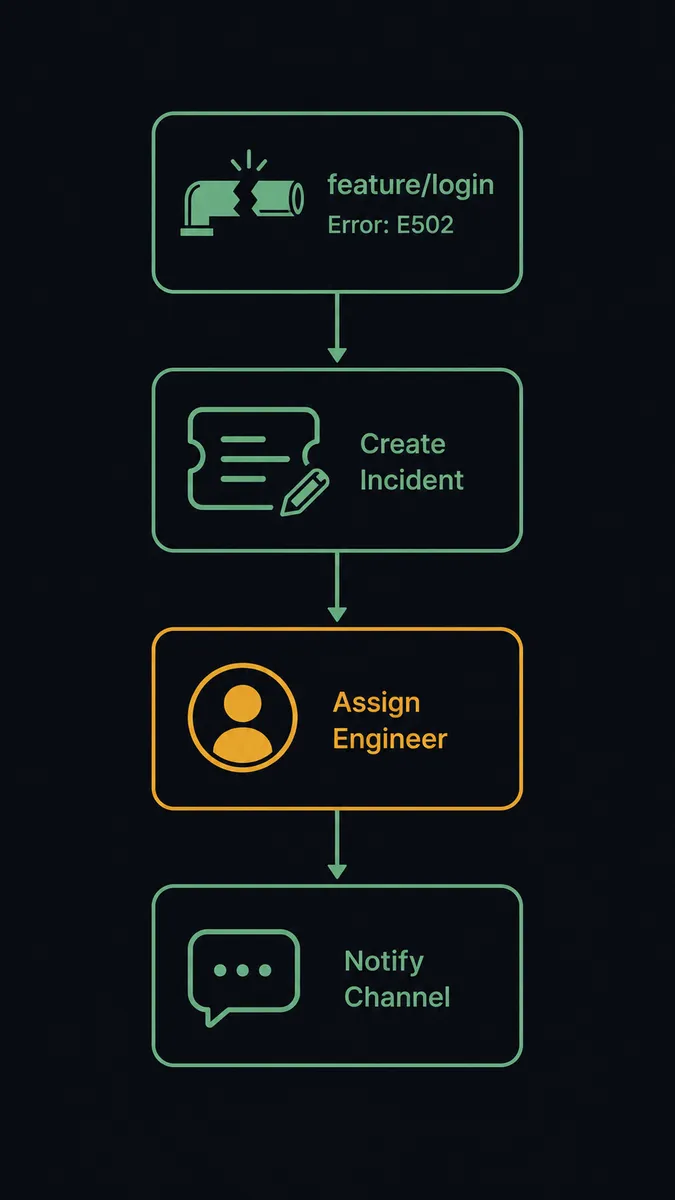
The flow starts on the Bitbucket side. The agent calls List Pipelines to check for failed runs, either on a schedule or right after a pipeline event. When it finds one, it pulls the run details: which branch failed, what the error was, and a link to the failing run.
From there it calls Create Issue in Jira Issues, filing a bug in the project your engineering team actually works from, with the pipeline name, branch, run link, and error context filled in automatically. No one retypes a stack trace into a ticket form. The issue exists, fully described, within seconds of the failure.
The agent then decides who should own it and calls Assign Issue in Jira Issues to route it, and finally posts the Jira link and pipeline status to the engineering Slack channel so the on-call engineer sees it immediately instead of stumbling on it later. That’s the baseline connection: a failed run becomes a described, assigned, visible ticket with no manual re-entry.
Can an AI agent run it? (and why a human stays in the loop)
This is not a sync tool. A plain trigger-to-action connection would file every failure and assign it the same way, every time. The FlowRunner agent reads the pipeline failure, reasons about the branch and the severity, and calls Bitbucket and Jira Issues actions as tools it chooses to use, in the order the situation calls for.
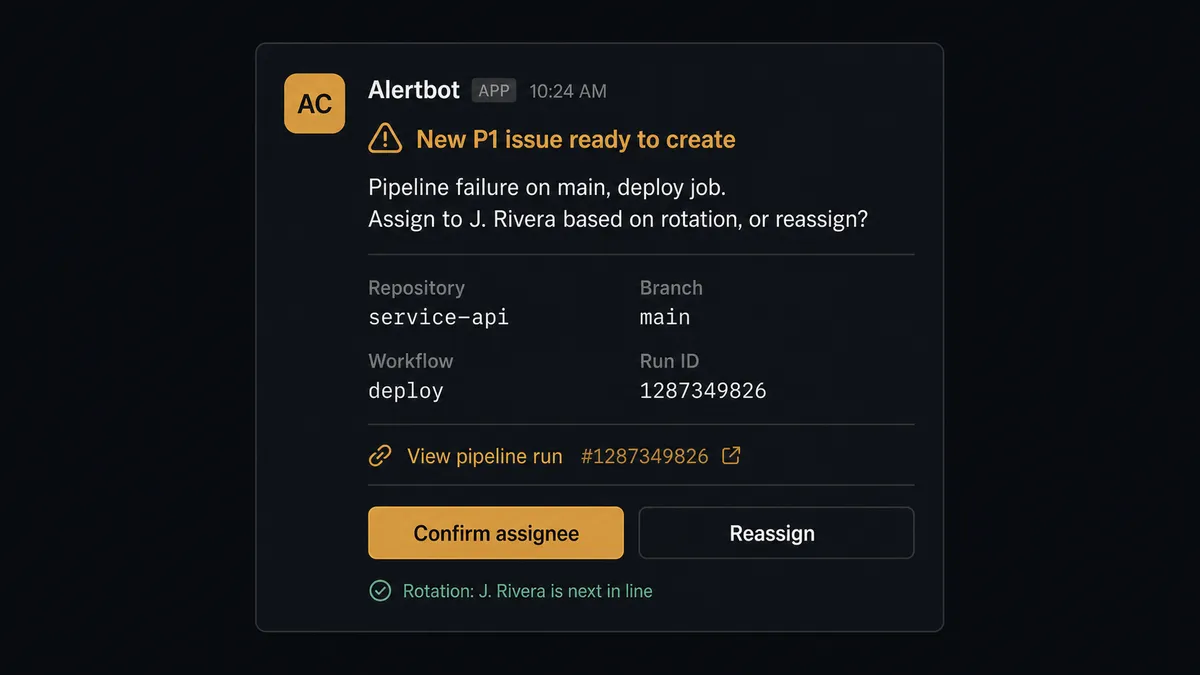
Here’s the decision moment. When the agent evaluates a failure on a production branch or one tagged with a sensitive component, it doesn’t assume its suggested assignee is correct. It packages what it found: the pipeline name, the branch, the error, and who it thinks should own it based on rotation data, then posts that to the team lead in Slack: “New P1 issue ready to create: pipeline failure on main, deploy job. Assign to [Suggested Assignee] based on rotation, or do you want to assign someone else?” The team lead confirms or redirects. Only then does the agent call Assign Issue. A routine failure on a feature branch, by contrast, gets filed and assigned without a pause, because the agent’s instructions don’t treat it as consequential.
This is the digital andon cord: the agent keeps the review-and-track loop moving on its own, and stops the line the moment a decision carries real weight. The same discipline applies on the Bitbucket side of this pairing. Opening, commenting on, and updating pull requests are reversible, so the agent runs them by rule. Merging into a protected branch is not, so a reviewer confirms it first. Critical issues get accountable ownership from the moment they’re created, and protected branches get a recorded approval before they ship.
FlowRunner vs n8n
n8n is a genuine option here. It’s open source, self-hostable, and technical teams like it because custom code nodes let you transform pipeline payloads or Jira fields in ways a purely visual mapper can’t always match. For an engineering team that already runs its own infrastructure, that flexibility is real.
The difference shows up in what happens at the assignment decision. In n8n, routing a P1 failure to a team lead for confirmation means building that logic yourself with a webhook, a wait node, and custom code to hold state until a human responds. In FlowRunner, human-in-loop is a native building block the agent calls as a tool, with the full exchange captured in an audit trail automatically.
| FlowRunner | n8n | |
|---|---|---|
| Human-in-loop on assignment | Native tool the agent invokes with context and full audit trail | Build it yourself with webhooks, wait nodes, and custom logic |
| Pricing model | Transparent workflow-based tiers, unlimited users on every tier | Per-execution pricing on cloud tiers; self-hosted needs your own infrastructure |
| AI provider access | BYOK, connect your own key from any provider | Also supports BYOK for AI nodes |
| Audit trail depth | 30 to 90-day retention native from Professional tier up | Requires custom logging or the higher-priced Business/Enterprise tier |
| Self-hosting | Available on Enterprise, cloud-hosted by default | Core strength; open source and self-hostable from the start |
Before and after
| Before | After | |
|---|---|---|
| Ticket creation | An engineer notices the failure and files the Jira issue by hand, reconstructing the branch and error from the build log | Jira issue with full pipeline context created within seconds of the failed run |
| Ticket detail | Tickets often start with just a subject line and no structured error data | Pipeline name, branch, run link, and error details attached automatically |
| Ownership | Failures sit unassigned until someone raises it in standup | On-call engineer assigned automatically; P1s confirmed by the team lead first |
| Visibility | Engineering manager checks Jira manually to find unassigned or blocked failures | Jira link and pipeline status posted to the engineering channel the moment the issue is filed |
| Sign-off on P1 ownership | No record of who decided a critical issue’s assignee | Team lead’s confirmation captured in the audit trail |
What you can build
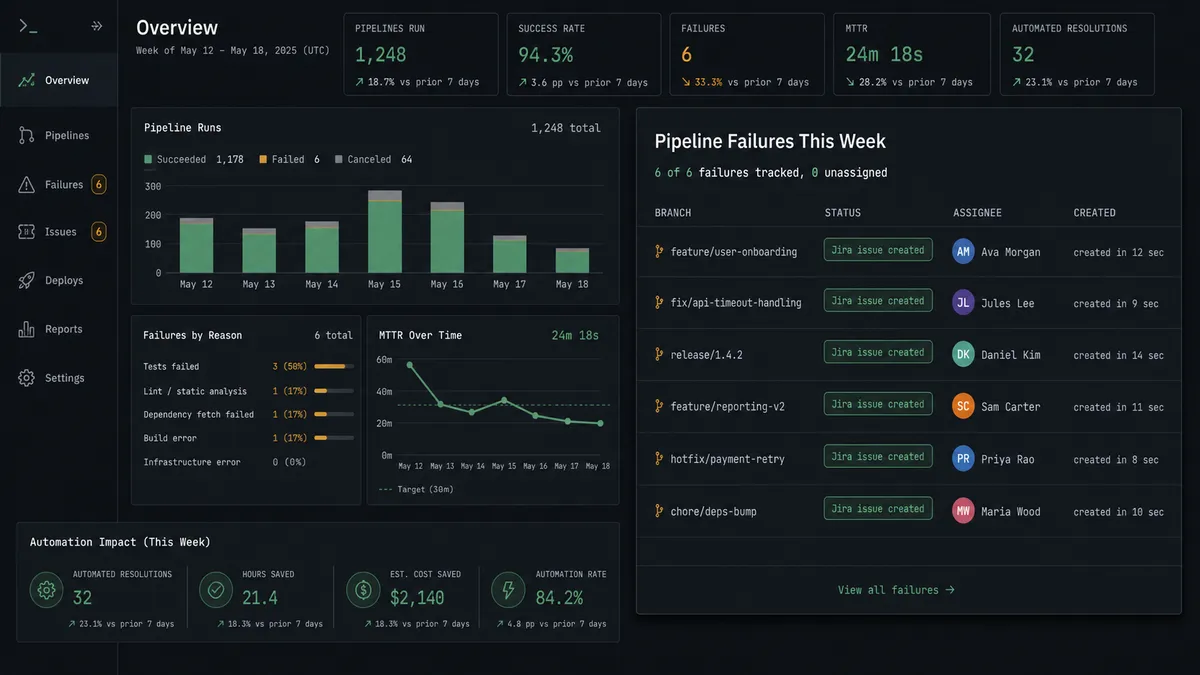
Failed pipeline to assigned bug. A failed run on any branch becomes a Jira issue with the pipeline name, branch, and error attached, assigned to the on-call engineer, with the team lead confirming ownership on production branches.
Mirrored pull request with a Jira link. When the agent opens a Bitbucket pull request with Create Pull Request, it can create a matching Jira Issues task with Create Issue linking back to the PR, so the ticket and the code change stay connected from the start.
Sprint health check against open pipeline failures. A daily flow calls Search Issues in Jira Issues for unassigned or blocked items, cross-references them against recent Bitbucket pipeline runs, and posts a combined summary to the engineering channel.
Resolution loop back to the branch. When an engineer transitions a Jira issue to Done with Transition Issue, the agent adds a comment on the related Bitbucket pull request or issue confirming the fix landed, so both systems reflect the same state.
Common questions
Is it free to connect Bitbucket and Jira Issues on FlowRunner? Yes. FlowRunner has a free plan with 100 executions a month, every integration included, and no credit card required, and new accounts get 14 days of Professional on top.
Can I self-host the Bitbucket and Jira Issues connection? Yes. FlowRunner offers a self-hosted Enterprise option for teams that need to keep pipeline and issue data inside their own infrastructure, in addition to the cloud-hosted tiers.
Does the agent need my own OpenAI key? FlowRunner uses a bring-your-own-key (BYOK) model, so you connect your own API key from your preferred AI provider rather than paying FlowRunner a markup on model usage.
What happens when the agent isn’t sure whether to assign a Jira issue? The agent packages the pipeline failure details and its suggested assignee, then posts them to the team lead in Slack and waits for confirmation before it calls Assign Issue, rather than guessing.
Does this replace Bitbucket’s own issue tracker? No. FlowRunner can still file issues directly in Bitbucket’s tracker for repository-local bugs; routing pipeline failures to Jira Issues instead is a choice you make when Jira is the tool your broader engineering org actually works from.
Can the same flow open a pull request too? Yes. The same agent can also call Bitbucket’s Create Pull Request and List Pull Requests actions elsewhere in the flow, and it still stops for a human before it calls Merge Pull Request on a protected branch.
Getting started
FlowRunner has a free plan with 100 executions a month, every integration included, and no credit card required, and new accounts get 14 days of Professional on top. Turn on the flow above as-is, or add the human-in-loop assignment step to fit how your team already triages P1 failures. Start at flowrunner.ai or book a walkthrough at calendly.com/flowrunner/intro.
Frequently asked questions
Is it free to connect Bitbucket and Jira Issues on FlowRunner?
Yes. FlowRunner has a free plan with 100 executions a month, every integration included, and no credit card required, and new accounts get 14 days of Professional on top.
Can I self-host the Bitbucket and Jira Issues connection?
Yes. FlowRunner offers a self-hosted Enterprise option for teams that need to keep pipeline and issue data inside their own infrastructure, in addition to the cloud-hosted tiers.
Does the agent need my own OpenAI key?
FlowRunner uses a bring-your-own-key (BYOK) model, so you connect your own API key from your preferred AI provider rather than paying FlowRunner a markup on model usage.
What happens when the agent isn't sure whether to assign a Jira issue?
The agent packages the pipeline failure details and its suggested assignee, then posts them to the team lead in Slack and waits for confirmation before it calls Assign Issue, rather than guessing.
Does this replace Bitbucket's own issue tracker?
No. FlowRunner can still file issues directly in Bitbucket's tracker for repository-local bugs; routing pipeline failures to Jira Issues instead is a choice you make when Jira is the tool your broader engineering org actually works from.
Can the same flow open a pull request too?
Yes. The same agent can also call Bitbucket's Create Pull Request and List Pull Requests actions elsewhere in the flow, and it still stops for a human before it calls Merge Pull Request on a protected branch.