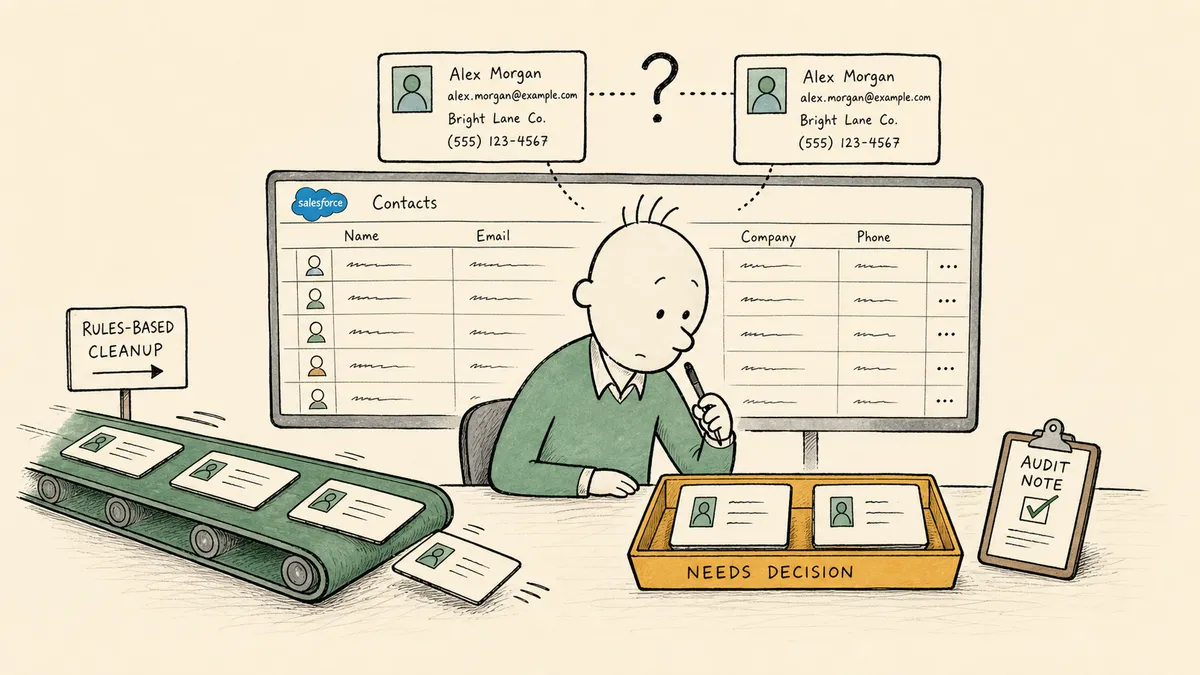
When a list import drops two records into Salesforce that look like the same company spelled three different ways, which tool should make the call, and who signs off on the merge? That single question separates Make.com and FlowRunner for Salesforce data hygiene more cleanly than any feature table. Make is built to run the cleanup that follows a rule. FlowRunner is built for the part of the cleanup that needs a judgment call and a record of who made it. The honest version of this comparison is not which platform is better at hygiene. It is whether your hygiene workload is mostly rules or mostly exceptions, because the answer points at different tools.
How the two stack up for CRM hygiene work
| Make.com | FlowRunner | |
|---|---|---|
| Self-description | ”The visual AI automation platform” | Orchestration as a service for coordinating AI agents and humans across systems |
| Built for | Scheduled, rule-based scenarios connecting many apps | Coordinating agents and human decisions on cross-system work |
| Salesforce hygiene fit | Strong for deterministic cleanup: find records, standardize fields, dedupe on clear rules, create and convert | Strong for the judgment calls: ambiguous merges, lead conversion, ownership reassignment with a reviewer in the loop |
| Connector library | 1,000+ app integrations built over years (catalog now claims 3,000+) | Smaller pre-built catalog today; new connectors built in 30 minutes or less |
| Human review | Approval and routing built as a gate inside a scenario | Callable step: an agent pauses on uncertainty and calls a named reviewer with full context, then resumes on the response |
| AI agents | Real capability layered on the scenario foundation, with MCP and connections to Claude, ChatGPT, OpenAI | Agents are first-class workflow nodes; multi-agent coordination is the base model |
| Entry pricing | Free tier (1,000 credits/mo); $12 Core | Free (100 executions/mo); $5 Starter; $45 Growth |
| Audit trails and RBAC | Teams tier ($38/mo) and above for audit logs, SSO, roles | Audit trails and RBAC at $299 Professional; SSO/SAML at $999 Business |
| Ecosystem | Mature: established community, Academy, partner network | Newer in the visual workflow space; ecosystem still building |
| Decision audit trail | Available through audit logs at the Teams tier | Per-record log of every create, update, merge, and human decision |
The table covers the shape of the choice. The part that decides it is what happens to the records a rule cannot resolve, and the rest of this article is about that.
What Make.com is genuinely good at
Make is a mature, polished visual scenario builder, and pretending otherwise would not survive contact with the product. Make calls itself “the visual AI automation platform”. It frames its job as letting users “connect any app, data source, or AI model” and “build and manage automations and AI agents, visually, in code, or with a prompt.” For Salesforce data hygiene that follows a rule, that is an accurate and capable description.
Specific strengths this article is not going to relitigate:
- A large app library, with the catalog now claiming 3,000+ integration apps and including the tools a sales ops team already runs alongside Salesforce: Google Sheets, HubSpot, Airtable, Notion, LinkedIn, Slack, and many more. That breadth is a real advantage over FlowRunner’s growing library today, and it matters when hygiene spans tools beyond the CRM.
- A visual scenario builder with a long track record and the kind of canvas a non-technical ops user can learn without an engineering background.
- A mature ecosystem: an established community, an Academy, and a partner network that FlowRunner is still building. Years of market presence count for something real here.
- AI agents shipped as a genuine capability, with Make describing “transparent AI agents that take action and orchestrate complex workflows across 3,000+ apps” and supporting MCP and connections to Claude, ChatGPT, and OpenAI. The agents are real and documented, not vaporware.
- Entry pricing that opens at a Free tier and a $12 per month Core plan, accessible for a small team or a solo operator running simple, linear scenarios. FlowRunner’s Free plan and $5 Starter sit alongside it, so the entry price is a match rather than a Make advantage; Make’s edge at this level is its scenario builder and connector directory, not the sticker.
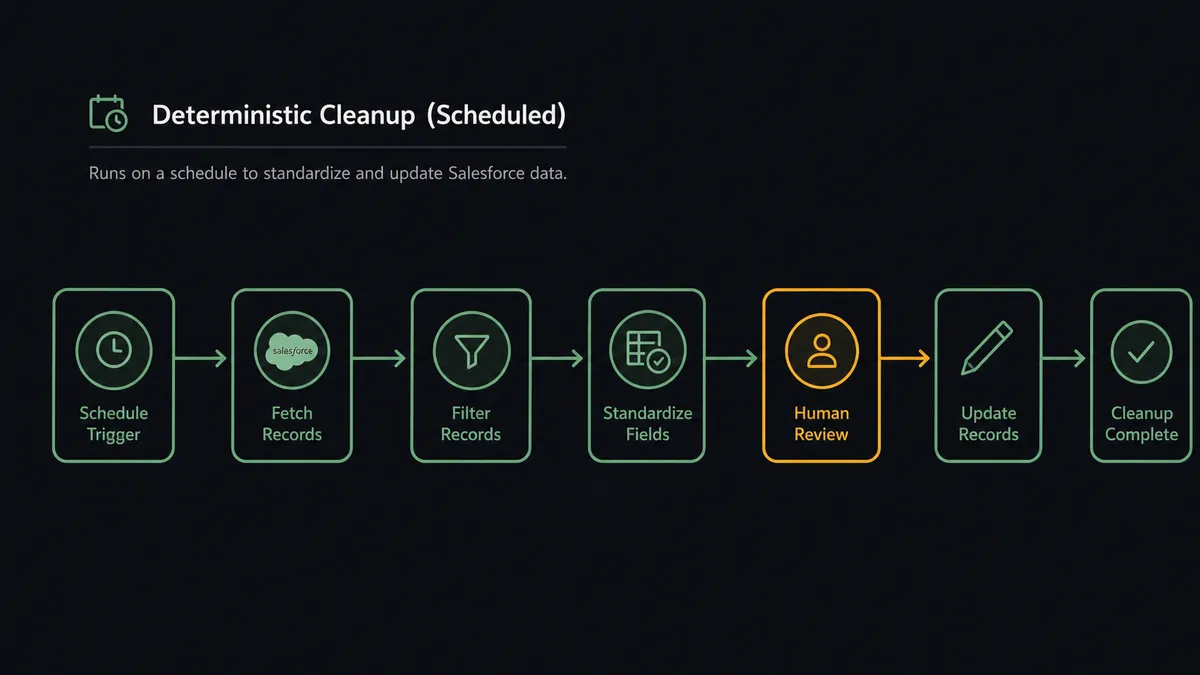
For a recurring hygiene job that runs on a schedule, that is a strong toolset. A nightly scenario that finds records matching a clear rule, standardizes country codes and industry picklists, dedupes on an exact email match, and writes the results back to Salesforce is exactly what Make’s scenario model was built to do. If that describes your hygiene problem, Make is a real answer.
What Salesforce data hygiene actually involves
Here is the read most data hygiene content avoids, because it complicates the sales pitch for a dedup engine: the dedup engine is the easy 80 percent. The judgment call is the other 20 percent, and the 20 percent is where the risk and the real work live.
Salesforce’s own guidance frames data quality around a recurring set of tasks. In practice, ongoing hygiene comes down to a handful of operations:
- Duplicate detection and merging. Finding records that represent the same entity and combining them without losing field history or related records.
- Lead-to-contact conversion. Promoting a qualified lead into a contact and account, with the right account match attached.
- Field standardization. Normalizing country codes, industry picklists, phone formats, and company name casing so reporting holds together.
- Ownership reassignment. Moving records to the right rep or team when territories shift, an owner leaves, or an account gets reclassified.
Two of those four are mostly rules. Field standardization follows a normalization table. Exact-match deduplication follows a key. A scheduled scenario handles both well, and this is squarely Make’s territory.
The other two are mostly judgment. A duplicate where the email differs and the company name is spelled three ways is not a rule, it is a decision. A lead that scored hot but may not match a target account is not a rule, it is a decision. An ownership reassignment that affects a rep’s commission is not a rule, it is a decision someone needs to own and stand behind later. These are the cases that produce hygiene debt, because a deterministic scenario has only two ways to handle them: guess, or stop. Guessing creates a bad merge that someone discovers three months later. Stopping leaves the record in limbo until a human notices.
That is the seam. Rule-based hygiene runs itself. Judgment-based hygiene needs a person, the right context in front of them, and a record of what they decided. The question is which tool is built for that second shape of work.
Where FlowRunner fits: the judgment call as a first-class step
FlowRunner treats human review as a first-class workflow primitive, where an agent can pause and call a reviewer on uncertainty rather than only running a deterministic scenario from start to finish. That sentence is the whole architectural difference, so it is worth unpacking against a real hygiene flow.
The pattern for ambiguous-merge handling looks like this:
- An intake event fires (a list import row, an enrichment webhook, a web-to-lead submission).
- A workflow gathers context: it runs a match query against Salesforce and pulls the candidate plus the closest existing records.
- An agent attempts the mechanical decision. Clean single match, it updates. No match, it creates. This is the 80 percent, and it runs without a human.
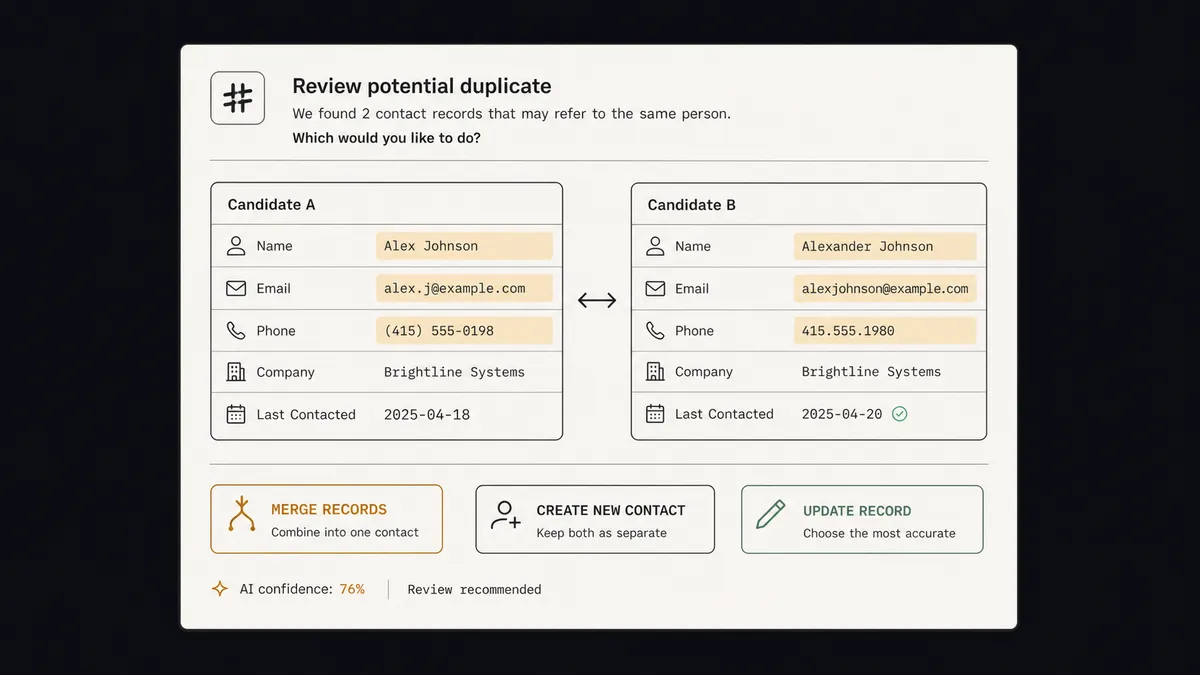
- On an ambiguous case (two plausible matches, or one match where critical fields disagree), the agent does not guess and does not silently stop. It calls a human as a callable step.
- The reviewer receives a structured message in Slack, email, or WhatsApp: the candidate record, the closest matches, the fields that overlap, the fields that disagree, and three actions (merge into existing, create new, update existing).
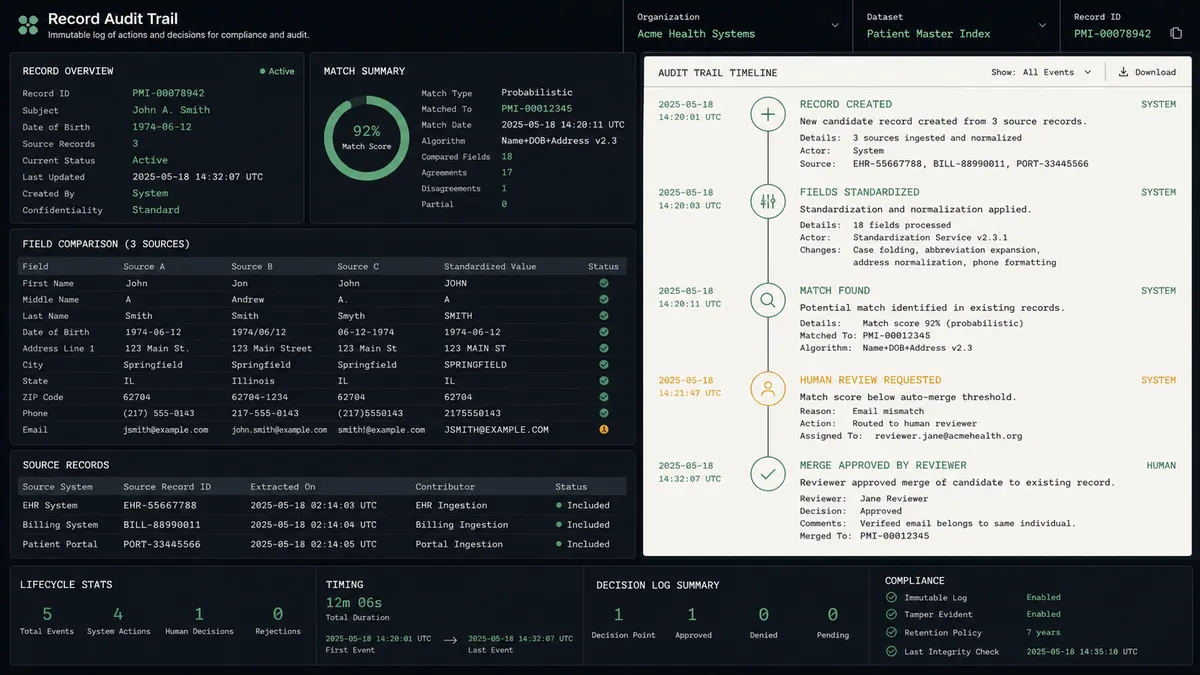
- The workflow resumes from the reviewer’s choice, writes the decision back to Salesforce, and records who decided what, when, and why in a per-record audit trail.
Step four is what a scenario tool does not do natively. In a scenario built for deterministic automation, an approval is a gate you wire in: a router, a notification, a wait state. It works, and it is the right pattern when the rule for escalation is known in advance (“anything over $X needs sign-off”). FlowRunner’s difference is that the agent escalates on its own confidence, not on a fixed threshold. The agent works the merge until it hits the part it should not decide alone, and at that point it hands the reviewer a worked problem rather than a raw alert.
The compositional shape of the platform reinforces the pattern. A Make scenario starts with a trigger module by design; the first step is always the event that woke the scenario up. A FlowRunner flow can start with any node type: an action, a trigger, a condition that evaluates the current state of an account, a group of steps invoked together. The same flow that runs on a list-import webhook can be called manually by an ops lead resolving a specific record, scheduled to sweep stale leads on a Sunday night, or invoked as a subflow from inside another agent’s logic when that agent decides it needs the merge resolution as a tool. The reviewer-callable pattern is one expression of the same idea: a flow is a function the platform can call, not only a pipeline a trigger can fire. For hygiene work where exceptions surface from many directions, that compositional flexibility is what lets the same judgment-call logic serve every entry point without rebuilding it per scenario.
This is the same shape laid out in the deep dive on treating Salesforce data hygiene as a control surface rather than a quarterly cleanup project. It is implemented end to end in Salesforce workflows with human-in-the-loop approvals. The mechanic also shows up one CRM over, where a workflow can flag duplicate contacts before they ever land in the CRM on the HubSpot side, and in sales ops orchestration across CRM and calendar. The records land in a different system; the judgment-call-at-the-seam pattern is identical.
There is a category forming around this, and the merge decision is a clean way to see it. When a reviewer resolves an ambiguous merge, the artifact that matters six months later is not the merged record. It is the answer to “why did these two become one, who decided it, and what disagreed at the time.” That answer lives between systems: the intake source, the CRM, the reviewer in Slack. No system of record was built to own it, and no scheduled scenario produces it as a byproduct. An orchestration layer is the category that owns that seam: a layer above the CRM and the intake tools that gathers the cross-system context a rule never had, pulls a human in on the decisions that need judgment, and keeps the decision trail as a first-class artifact. FlowRunner is built for that layer. That is also why the audit trail sits in the platform rather than in a tier: every create, update, merge, and human decision is logged per record, because in hygiene work the decision log is the point.
The honest part: where Make is stronger
A comparison that gives FlowRunner every axis is not worth reading, so here is where Make is the better tool today, plainly.
Connector breadth. Make’s library is materially larger. The catalog claims thousands of integration apps against FlowRunner’s growing set. If your hygiene work reaches across many tools beyond Salesforce, and you need those connectors out of the box today, Make has the immediate advantage. FlowRunner builds new connectors in 30 minutes or less, but a fast build is not the same as a connector that already exists, and honesty requires saying so.
Maturity and ecosystem. Make has years of market presence, an established community, an Academy, and a partner network. FlowRunner is newer in the visual workflow space. When something breaks at 11pm, a deep community and a library of existing tutorials is a real asset, and Make has both built up over time.
The deterministic builder itself. Make’s scenario builder is a polished, proven product for non-AI automation. For scheduled, rule-based hygiene that does not need a judgment step, that maturity is worth a lot, and FlowRunner is the younger product on that specific axis.
Entry price. Make’s Free tier and $12 Core plan sit alongside FlowRunner’s Free plan (100 executions per month) and $5 Starter, so neither side wins on sticker. The honest read on the pricing models is that they measure different things and the comparison tilts further toward FlowRunner as flows grow. Make charges per operation, so every module that fires inside a scenario consumes monthly quota: the match query, the candidate fetch, the agent step, the notification, the wait, the write-back, the audit log entry. A single ambiguous-merge flow can spend ten or twenty operations resolving one record. FlowRunner counts executions, where one flow run is one execution whether the flow contains five nodes or five hundred. Tier limits are 12,000 executions on Growth at $45, 75,000 on Professional at $299, and 250,000 on Business at $999. At low volume with simple scenarios, the two entry tiers cost about the same. As flows pick up more steps (more enrichment, more branching, more context for the reviewer), FlowRunner’s per-execution model is the one that holds its cost shape. Neither pricing model is objectively right; they reward different work.
None of that is faint praise. For a sales ops team whose hygiene problem is genuinely a scheduled, rule-shaped cleanup across many connected tools, Make is the more sensible buy, and the AI agent layer it has added is a real capability rather than a checkbox.
Where FlowRunner is the better fit
Choose FlowRunner when the hygiene work is shaped by exceptions rather than rules:
- The hard cases are merges, conversions, and reassignments, not standardization. When the records eating your team’s time are probable duplicates with conflicting fields, leads that need a human to confirm the account match, or ownership changes that affect commission, you need escalation on uncertainty, not a fixed gate.
- Every hygiene decision needs a paper trail. When “who merged these two accounts and why” has to be answerable months later, a per-record decision log built into the platform beats reconstructing it from a scenario’s run history.
- You want governance at mid-market pricing. Every FlowRunner plan, from Free through Growth at $45/mo, includes AI agents, BYOK, all integrations, and human-in-the-loop with unlimited users and unlimited workflows, so the core hygiene job (escalating ambiguous merges to a reviewer) runs before you pay anything. FlowRunner adds audit trails and RBAC starting at the $299 Professional tier, with SSO/SAML available on the $999 Business tier. Make places audit logs, SSO, and team roles at its Teams tier and above. For regulated or audit-heavy teams, where those controls sit in the plan changes the comparison.
- You want non-developers to own the hygiene agent. Operations teams build and adjust the workflow visually, including the rule for what gets escalated, without filing an engineering ticket.
- The reviewer should get a worked problem, not a raw alert. When you want the agent to hand a person the candidate, the matches, and the disagreements already laid out, rather than pinging them to go investigate, the callable-human pattern is the difference.
These are not mutually exclusive worlds. A team can reasonably run deterministic standardization in Make and route the ambiguous merges through FlowRunner. The architectural difference is real, and the right tool follows the shape of the work rather than a feature checklist.
This article focuses on hygiene; the same Make-versus-FlowRunner trade-off shows up across other use cases too, laid out in the comparison for marketing workflow automation.
How to decide
Pull your last twenty hygiene fixes and sort them into two piles.
Pile one: the fixes that followed a rule. Standardize this picklist, normalize these phone numbers, merge these exact-email duplicates, create these records that clearly do not exist yet. If your twenty fixes land mostly here, your hygiene problem is deterministic, a scheduled scenario handles it, and Make is the stronger and more cost-effective choice. This article is over and you should go build the scenario.
Pile two: the fixes that needed someone to decide. The probable duplicate where the email differed and the company name was spelled three ways. The lead that scored hot but might not match the target account. The ownership reassignment that touched a rep’s number and needed a manager to sign off. Every one of those is a record that sat in limbo, or got a guess that someone unwound later, or pulled a person away mid-task to investigate with half the context. If your twenty fixes land mostly here, your hygiene problem is an exception-handling problem, and the question is which layer lets an agent escalate the call to a human with the candidate, the matches, the disagreement, and a decision trail that survives the next audit. That is the work FlowRunner is built for, and it is the work that does not fit inside a deterministic scenario no matter how many connectors sit behind it.
Frequently asked questions
Can Make.com do Salesforce data hygiene?
Yes. Make connects to Salesforce and can run scheduled scenarios that find records, update fields, standardize values, and create or convert records. For rule-based cleanup that runs on a schedule across many connected tools, Make is a capable choice. The limit is not whether Make can touch Salesforce. It is what happens to the records that are not a clean rule: the probable duplicate where the email differs, the lead that scored hot but may not match a target account, the ownership reassignment that needs a manager's call.
What does FlowRunner do for Salesforce hygiene that Make does not?
FlowRunner treats human review as a first-class workflow step. An agent works a hygiene decision (deduplicate, convert a lead, reassign an owner) against its context, and when it cannot resolve the decision confidently it pauses and calls a named reviewer in Slack, email, or WhatsApp with the candidate, the closest matches, and the fields that disagree. The reviewer's decision writes back to Salesforce and lands in a per-record audit trail. Make can build an approval gate inside a scenario; the difference is that in FlowRunner the agent escalates on its own uncertainty rather than at a fixed rule, and the decision log is part of the platform.
Is Make.com cheaper than FlowRunner for this?
Not on the sticker. Make starts with a Free tier (1,000 credits per month) and a $12 per month Core plan. FlowRunner has a permanent Free plan at 100 executions per month and a Starter plan at $5 for 300 executions or $15 for 3,000, and every plan, including Free, gets AI agents, BYOK, all integrations, and human-in-the-loop (Slack, email, WhatsApp, phone) with unlimited users and unlimited workflows. The units differ: Make's credits count every module that fires, so a ten-module scenario is roughly ten credits per run and Core's 10,000 credits are about 1,000 runs, while FlowRunner counts a whole run as one execution. Growth at $45 per month covers 12,000 of them. There are no technical limits on the Free plan that would prevent running a hygiene workflow with agent escalation; the caps are volume, one execution at a time, and 24 hours of log history. The comparison shifts when governance becomes a requirement. FlowRunner includes audit trails and RBAC starting at the $299 Professional tier, with SSO/SAML available on the $999 Business tier. Make places audit logs, SSO, and team roles on its Teams tier and above. For hygiene work where every merge and conversion needs a logged, reviewable trail, where those controls sit in the pricing matters more than the entry price.