Zoho CRM + Slack: New Leads Convert, Sales Gets Notified
Connect Zoho CRM and Slack so qualified leads convert automatically and sales hears about it instantly, with a manager approval step for strategic accounts.
How do you connect Zoho CRM to Slack?
You connect Zoho CRM to Slack by having FlowRunner watch for leads that reach a qualified stage, run Convert Lead to create the contact, account, and deal, and post the result to a Slack channel with Send Message to Channel. FlowRunner is a visual AI-agent orchestration platform where automations run autonomously and pause for human judgment on the steps that carry real consequence. The same connection can run as an AI agent that reads each lead, decides whether it needs a second opinion, and invokes a human-in-loop step in Slack before converting a strategic account. A basic sync tool can move the notification. Only the agent decides when to hold it.
The problem it solves
A rep qualifies a lead in Zoho CRM, and then someone has to notice. In most teams that means checking the CRM manually, or a sales manager scrolling through a list looking for anything new. Meanwhile the lead sits unconverted, no contact or deal record exists yet, and the handoff from marketing to sales depends on a person remembering to look. On a busy week, qualified leads fall through the cracks simply because nobody caught the status change in time.
The manual version has a second failure mode: strategic accounts get converted with the same lack of ceremony as every other lead. There’s no consistent point where a manager reviews a named account before it enters the pipeline. Either every conversion needs a meeting, which slows the whole team down, or nothing gets reviewed, which means the accounts that matter most get the least oversight. Ops leads want time back from watching for status changes. Sales managers want a say on the accounts that matter, without sitting in a spreadsheet all day.
How it works: the connection
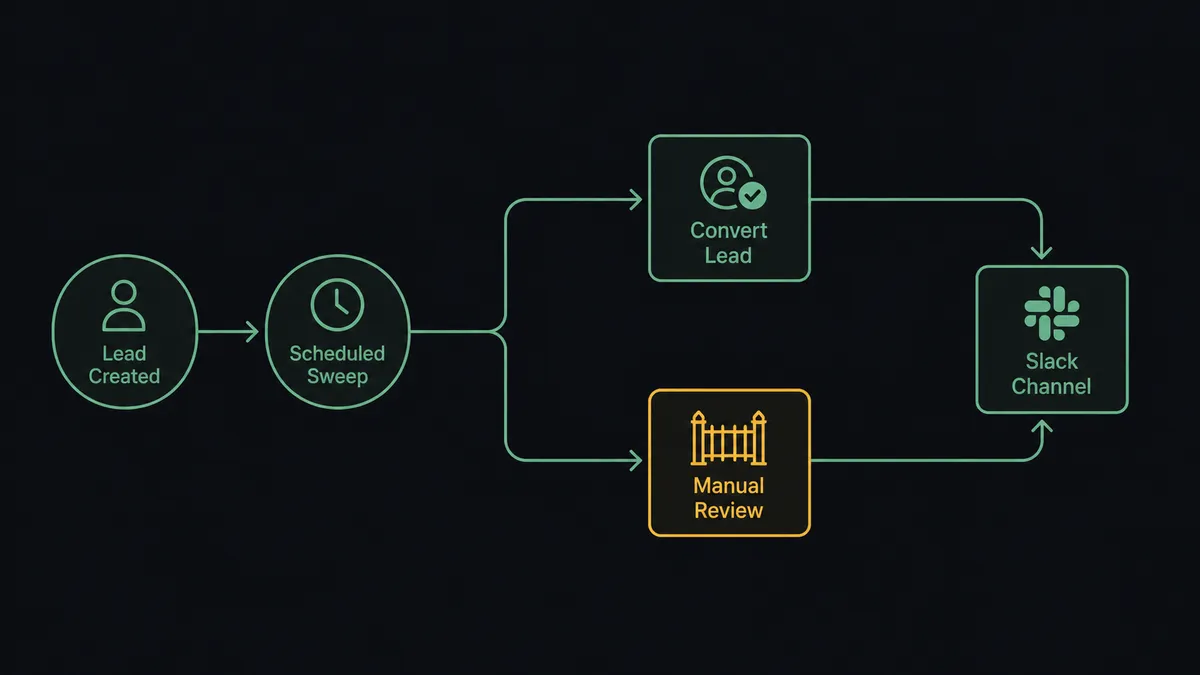
The flow starts on a scheduled sweep. The agent runs Search Records against Zoho CRM to find leads whose stage has just moved to qualified, since Zoho CRM doesn’t emit a native trigger for stage changes. For each one, the agent checks whether the associated account is flagged as strategic.
If it isn’t, the agent runs Convert Lead directly. Convert Lead creates a contact, and optionally an account and a deal, in one step, the standard Zoho CRM conversion process. The agent then calls Send Message to Channel in Slack, posting the new contact, account, and deal details to the sales channel so the team sees the handoff the moment it happens, instead of discovering it later.
If the account is flagged strategic, the agent doesn’t run Convert Lead yet. It routes to a human-in-loop step first, described in the next section. Once approved, the same Convert Lead and Send Message to Channel actions run, so the downstream result looks identical whether the conversion was automatic or reviewed. Sales always sees the announcement in Slack; they just don’t always see the wait.
Can an AI agent run it? (and why a human stays in the loop)
Yes, and this is where FlowRunner stops being a sync tool. The agent doesn’t just move data from Zoho CRM to Slack on a fixed rule. It reads each qualified lead, evaluates whether the account is flagged as strategic, and decides for itself whether Convert Lead is safe to run immediately or needs a person to weigh in first.
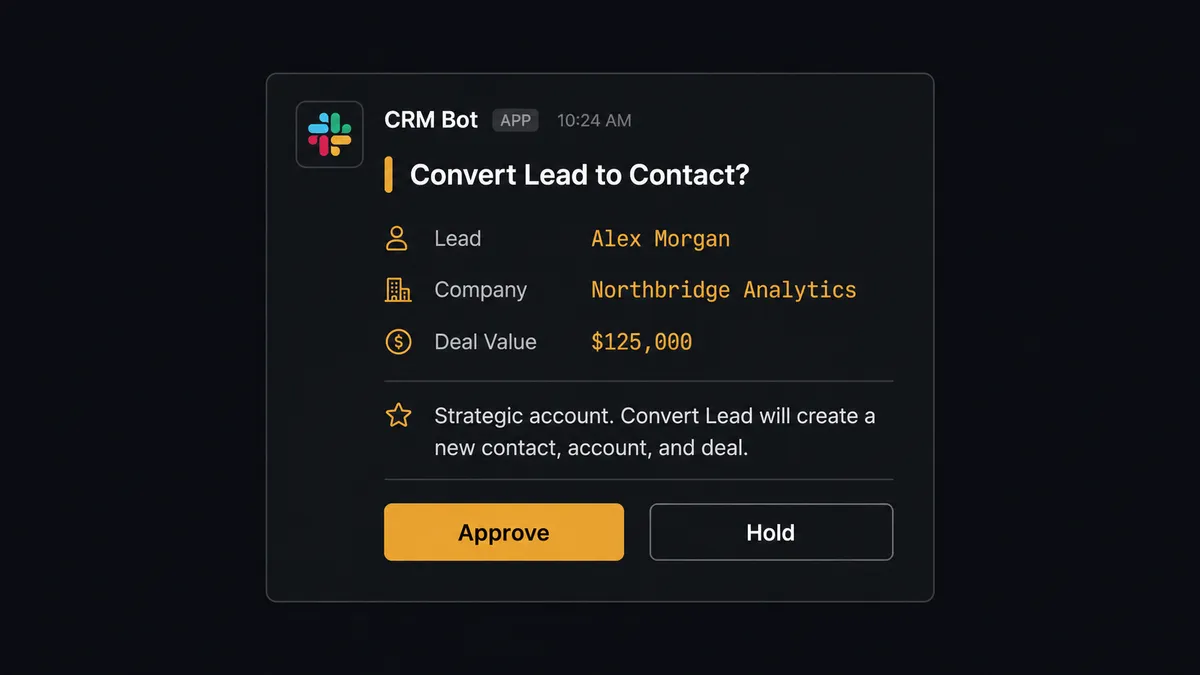
Convert Lead is a decisive action. It creates a contact, an account, and a deal, and commits the opportunity to the pipeline in one motion. On a named strategic account, that commitment shouldn’t happen unsupervised. When the agent identifies a flagged lead, it treats the conversion as a human-in-the-loop step: it pauses before calling Convert Lead, packages the lead’s details and the exact records the conversion would create, and sends that context to a sales manager in Slack with Approve and Hold options. This is not a hardcoded dollar threshold. It’s the agent recognizing which lead carries weight and routing accordingly.
The manager reviews the context from their phone and responds. If approved, the agent resumes, running Convert Lead and posting the announcement to the sales channel exactly as it would for a routine lead. If held, the lead waits, and no contact, account, or deal gets created until someone says so. Either way, the decision, the decider’s identity, and the timestamp land in the audit trail automatically. This is the digital andon cord: the agent doesn’t fail or skip when it hits something it shouldn’t decide alone. It stops the line and asks.
FlowRunner vs Zapier
Zapier is a fast, well-known way to connect Zoho CRM and Slack, and for teams that just need “new lead posts to a channel,” it does the job with a short setup. Where it runs out of road is anywhere a decision needs to happen before the automation continues, not just after.
| Capability | Zapier | FlowRunner |
|---|---|---|
| Human-in-the-loop review | No native pause-and-ask step; approvals require workarounds or extra apps | Native: the agent pauses Convert Lead and routes flagged accounts to a manager in Slack as a built-in step |
| Decision-maker on complex logic | Rule-based branching (Paths, Filters) | An AI agent reads each lead and decides whether it needs review, not just whether a field matches a value |
| Users included | Paid per-user on higher tiers | Unlimited users and unlimited workflows on every tier |
| AI provider | Zapier-managed AI credits | BYOK: bring your own OpenAI or Anthropic key |
| Self-hosting | Cloud only | Cloud-hosted or self-hosted, including on-prem for Enterprise |
| Pricing model | Per-task pricing that scales with volume | Transparent workflow-based tiers with a clear execution limit per plan |
Before and after
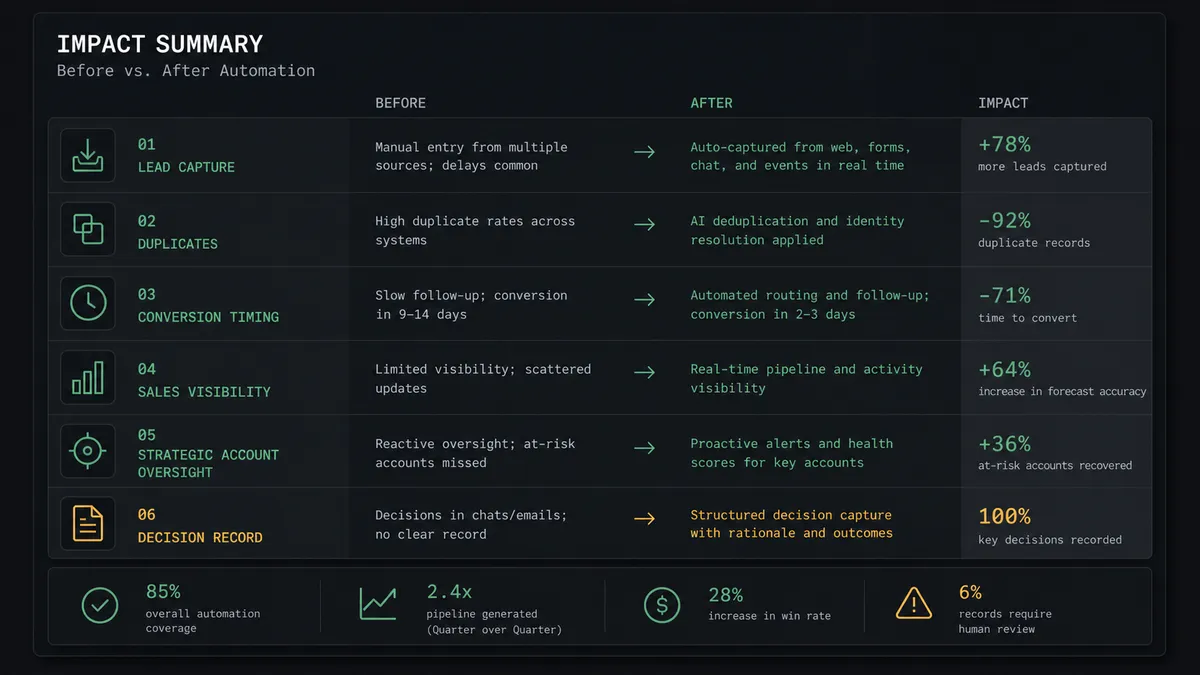
| Metric | Before | After |
|---|---|---|
| Lead capture | A rep copies inbound details into the right module by hand | The agent creates or updates the record the moment a lead appears |
| Duplicates | The same lead enters twice because no lookup runs before create | Create or Update Record matches and merges instead of duplicating |
| Conversion timing | Qualified leads sit unconverted because the step is manual | Convert Lead produces a contact, account, and deal as soon as a lead qualifies |
| Sales visibility | The team finds out about a new deal by checking the CRM | Send Message to Channel announces the contact, account, and deal in Slack immediately |
| Strategic account oversight | No consistent review point before a named account enters the pipeline | The agent pauses and routes flagged accounts to a manager in Slack before converting |
| Decision record | Approvals happen in conversation with no consistent log | Every hold or approve decision is captured with approver identity and timestamp |
What you can build
Qualified lead to sales announcement. The moment a lead’s stage moves to qualified, the agent runs Convert Lead and posts the new contact, account, and deal to your sales channel with Send Message to Channel, so the handoff is visible the same minute it happens.
Strategic account gate. Flag your named accounts in Zoho CRM. The agent holds Convert Lead on any of them and asks a sales manager for approval in Slack before the contact, account, and deal are created.
Duplicate-safe intake. Feed inbound leads from an inbox or form into Zoho CRM using Create or Update Record, so the same prospect emailing twice never becomes two separate leads, then notify sales in Slack once the record is clean.
Weekly conversion digest. Every Monday, the agent uses Search Records to pull the week’s conversions and posts a formatted Block Kit summary to your operations channel, so leadership sees pipeline movement without pulling a report by hand.
Follow-up context on hold. When a conversion is held for review, the agent adds a note to the lead in Zoho CRM documenting why it escalated, so the context isn’t lost even if the manager doesn’t respond right away.
Common questions
Is it free to connect Zoho CRM and Slack on FlowRunner? Yes. FlowRunner has a free plan with 100 executions a month, every integration included, and no credit card required, and new accounts get 14 days of Professional on top. You can build and test this exact Zoho CRM to Slack flow during the trial before paying anything.
Do I need to know how to code to set this up? No. The connection, the Convert Lead action, and the Slack approval step are all configured visually in FlowRunner’s flow builder. No API keys to wire by hand and no scripts to maintain.
Can I self-host this workflow instead of using FlowRunner’s cloud? Yes. FlowRunner offers a self-hosted Enterprise option for teams that need the Zoho CRM and Slack connection to run entirely on their own infrastructure, alongside the standard cloud-hosted tiers.
Does the AI agent need my own OpenAI key? FlowRunner uses a bring-your-own-key (BYOK) model, so the agent runs on the AI provider and key you choose rather than a FlowRunner-managed model you have no visibility into.
What happens when the agent isn’t sure whether to convert a lead? It doesn’t guess. On accounts flagged as strategic, the agent pauses Convert Lead, sends the lead and the records it would create to a sales manager in Slack, and waits for an approve or hold decision before it acts.
What if two people reply to the Slack approval at once? The agent captures the first decision it receives, along with the approver’s identity and a timestamp, in the workflow’s audit trail, so there’s a clear record of who made the call.
Getting started
Start on the free plan: 100 executions a month, every integration included, no credit card required, plus 14 days of Professional for new accounts. Connect Zoho CRM and Slack, pick the qualified-lead trigger, add the strategic-account approval step, and turn it on.
Build it yourself at flowrunner.ai, or book a walkthrough at calendly.com/flowrunner/intro and we’ll set up the Zoho CRM to Slack flow with you.
Frequently asked questions
Is it free to connect Zoho CRM and Slack on FlowRunner?
Yes. FlowRunner has a free plan with 100 executions a month, every integration included, and no credit card required, and new accounts get 14 days of Professional on top. You can build and test this exact Zoho CRM to Slack flow during the trial before paying anything.
Do I need to know how to code to set this up?
No. The connection, the Convert Lead action, and the Slack approval step are all configured visually in FlowRunner's flow builder. No API keys to wire by hand and no scripts to maintain.
Can I self-host this workflow instead of using FlowRunner's cloud?
Yes. FlowRunner offers a self-hosted Enterprise option for teams that need the Zoho CRM and Slack connection to run entirely on their own infrastructure, alongside the standard cloud-hosted tiers.
Does the AI agent need my own OpenAI key?
FlowRunner uses a bring-your-own-key (BYOK) model, so the agent runs on the AI provider and key you choose rather than a FlowRunner-managed model you have no visibility into.
What happens when the agent isn't sure whether to convert a lead?
It doesn't guess. On accounts flagged as strategic, the agent pauses Convert Lead, sends the lead and the records it would create to a sales manager in Slack, and waits for an approve or hold decision before it acts.
What if two people reply to the Slack approval at once?
The agent captures the first decision it receives, along with the approver's identity and a timestamp, in the workflow's audit trail, so there's a clear record of who made the call.