How to Connect Squarespace with QuickBooks Online (With or Without an AI Agent)
Connect Squarespace to QuickBooks Online so every new order creates a QuickBooks invoice automatically, with a FlowRunner AI agent pausing for human review on disputed charges, refunds, or amounts that don't match expectations.
How do you connect Squarespace to QuickBooks Online?
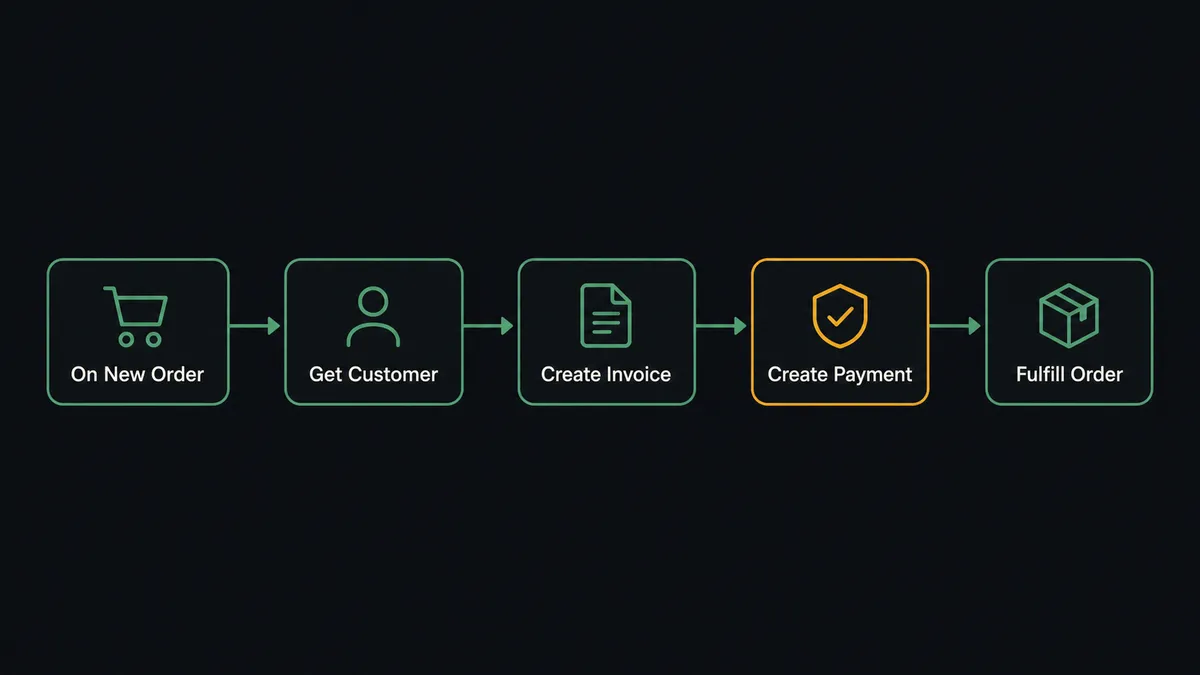
When a customer places an order in your Squarespace store, FlowRunner’s On New Order trigger fires, and the agent uses Get Customer or Create Customer in QuickBooks Online to find or create the buyer’s record, then calls Create Invoice and Create Payment to record the transaction automatically. FlowRunner is a visual AI-agent orchestration platform where automations run autonomously and pause for human judgment on the steps that carry real consequence. That same connection can run as an AI agent that reads each order, reasons about whether it matches expectations, and calls in a person before posting anything it finds uncertain.
The problem with doing this manually
Right now, someone on your team is looking at Squarespace orders and copying line items into QuickBooks. Maybe it is your bookkeeper. Maybe it is you. Either way, it happens in batches, it happens late, and it skips the orders that come in over weekends or during busy periods. By the time your books reflect what happened in your store, the data is hours or days old.
The pain is not just the entry time. It is the exceptions. A refund that the bookkeeper has to cross-reference with an original invoice. An order with an unusually large total that probably deserves a second look before it posts. A new customer who needs a QuickBooks record before the invoice can be created. Each of these turns into a tab open somewhere, a sticky note on a monitor, or a transaction that falls through the cracks until the next reconciliation. Your team is spending time on work that follows the same pattern every time, and getting interrupted by the exceptions that do not.
How it works: the connection
The Squarespace connector gives the agent two triggers and a set of order and inventory actions. On New Order fires the moment a customer completes checkout. The agent reads the full order with Get Order, which returns line items, shipping address, and fulfillment status.
From there, the agent moves into QuickBooks Online. It calls Get Customer to check whether the buyer already has a record. If they do not, it calls Create Customer to set one up. Then it calls Create Invoice to record the purchase as a receivable, maps the Squarespace line items to QuickBooks items, and calls Create Payment to mark it paid immediately if payment was collected at checkout.
When the order is processed on the QuickBooks side, the agent returns to Squarespace and calls Fulfill Order to mark the order complete and optionally email the customer their tracking details. The entire loop from order to recorded invoice to fulfilled status runs in seconds without anyone opening either platform.
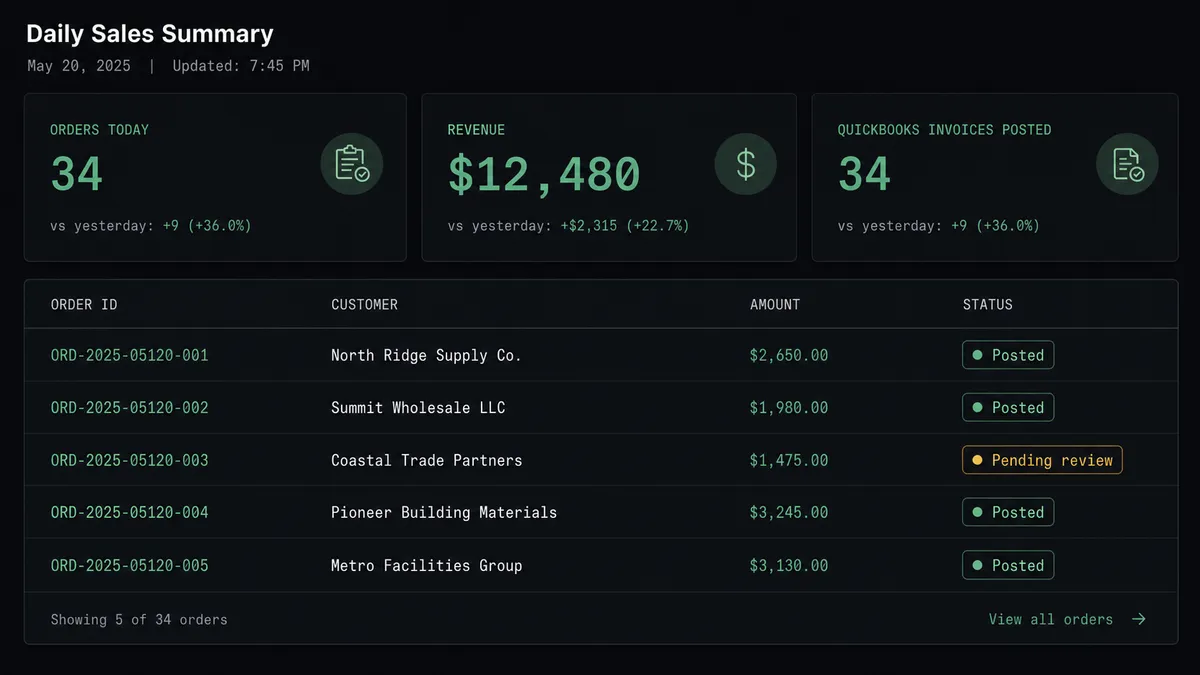
For teams that also track daily sales, the agent can call List Orders at the end of each day to pull a summary and log it wherever your operations team tracks revenue.
Can an AI agent run it? And why a human stays in the loop
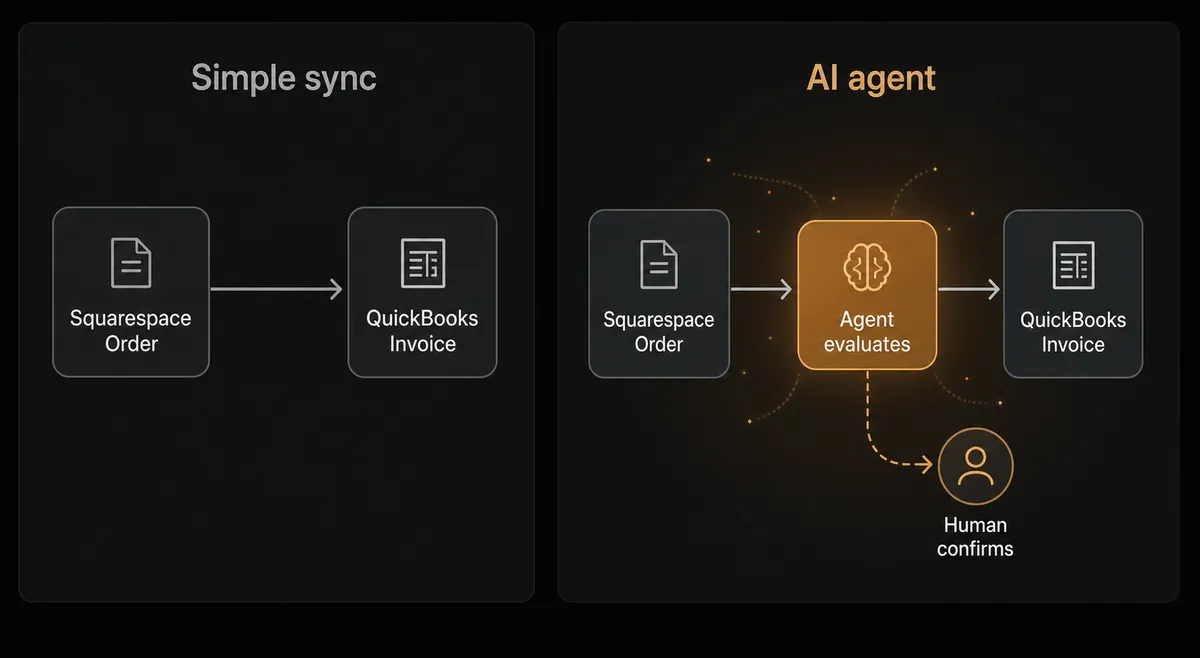
The plain connection syncs data. The agent version understands it.
When the agent reads a Squarespace order, it is not just extracting fields and passing them to QuickBooks. It is evaluating the order against what it knows: the customer’s history, the order size, whether the items match what is in your QuickBooks item catalog, and whether anything about the transaction looks unusual compared to normal patterns for that buyer.
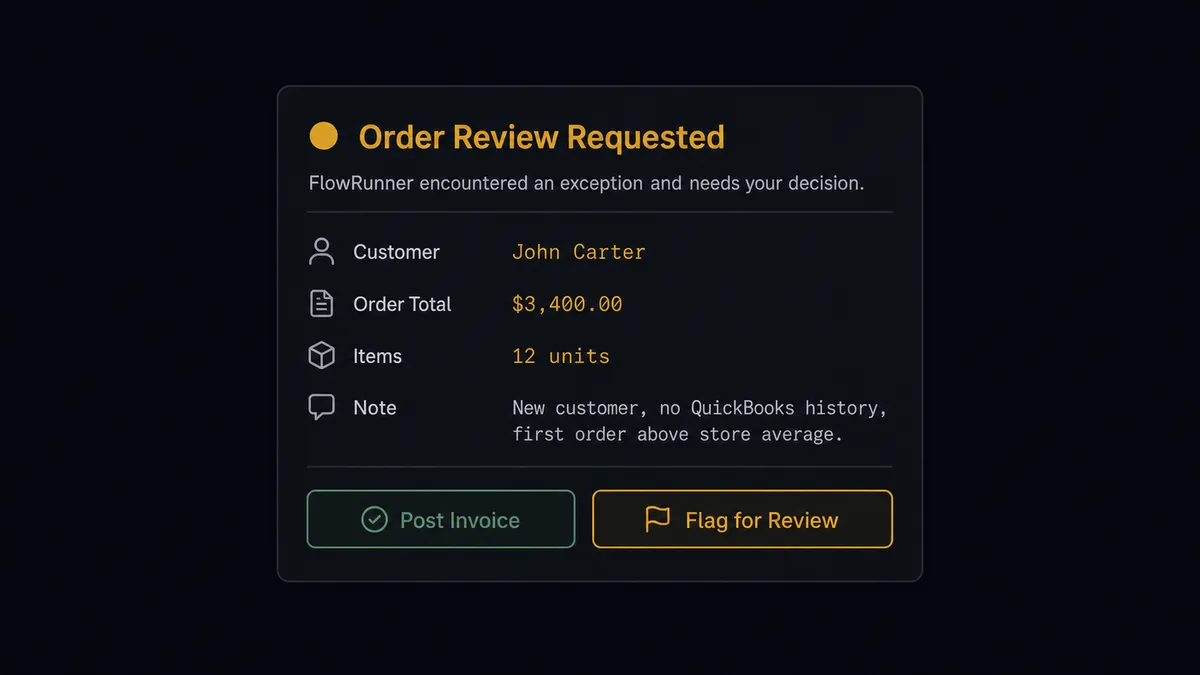
Consider a new customer placing a first order for $3,400 worth of inventory. A simple sync tool posts that invoice without hesitation. An agent notices that this buyer has no QuickBooks history, the amount is well above the store’s average order value, and the shipping address is new. It does not refuse to process the order. But it does know that posting a large invoice to a brand-new customer record, then immediately marking it paid, is a step worth a person confirming.
The agent invokes the human-in-loop tool: a separate FlowRunner subflow that sends a Slack message to your operations or accounting lead. The message includes the order summary, the new customer record it created, the invoice total, and two options: post it as normal or flag for review. The workflow pauses there. When the person responds, the agent records their decision and the timestamp in the audit trail, then either posts the invoice or routes it for further review. This is not a rule that says “orders over $X require approval.” The agent made a judgment call based on context, just as a careful bookkeeper would.
The Squarespace human-in-loop highlight is the same principle applied to inventory. The agent checks stock before it fulfills or adjusts. An order that would oversell a variant pauses for a person before anything is marked fulfilled. The agent routes it through the same channel with the variant name, the ordered quantity, and the current stock level attached, then waits for a decision before calling Fulfill Order.
This is what the Squarespace and QuickBooks Online integration looks like when it has a brain behind it: autonomous on the routine, collaborative on the consequential.
FlowRunner vs Zapier for this connection
Zapier is the tool most Squarespace store owners reach for first, and for good reason. It is fast to set up, it has a large template library, and both Squarespace and QuickBooks are well-supported connectors. For a simple trigger-action pair, Zapier works.
The gap shows up when the workflow needs to make decisions rather than just move data.
| Feature | Zapier | FlowRunner |
|---|---|---|
| Basic trigger-action sync | Yes, with pre-built templates | Yes, with verified connector actions |
| AI agent that reasons about order data | No | Yes, agent evaluates context and picks tools |
| Human-in-loop as a callable tool | No native equivalent | Yes, agent invokes a person as a workflow step |
| Unlimited users on every tier | No, seat-based pricing on most plans | Yes, every tier includes unlimited users |
| Bring-your-own AI provider keys | No | Yes, BYOK model across all supported models |
| Self-hosted option | No | Yes, Community Edition and Enterprise |
| Audit trail with decision timestamps | No | Yes, every human decision is logged with identity and timestamp |
Zapier moves data. FlowRunner runs a workflow that knows when the data needs a person to look at it first.
Before and after
| Category | Before | After |
|---|---|---|
| Invoice creation | Bookkeeper copies Squarespace orders into QuickBooks manually, in batches | Agent creates the QuickBooks invoice within seconds of each order, automatically |
| Customer records | New customers added to QuickBooks by hand when someone remembers | Agent calls Create Customer for new buyers as part of the order flow |
| Exception handling | Unusual orders sit in a queue until someone notices them | Agent flags and routes exceptions to a person via Slack before posting |
| Order fulfillment | Fulfillment status updated in Squarespace separately from QuickBooks entry | Agent calls Fulfill Order after QuickBooks is updated, in the same workflow |
| Audit trail | No record of who posted what or when | Every automated action and every human decision logged with identity and timestamp |
What you can build
Order-to-invoice with new customer onboarding. On New Order fires in Squarespace. The agent checks whether the customer exists in QuickBooks using Get Customer. If not, it calls Create Customer and then Create Invoice, so new buyers are fully set up in your accounting system the moment they first purchase.
Inventory-aware fulfillment. The agent reads List Inventory before it calls Fulfill Order. If the ordered quantity would push a variant below zero, it pauses for a person rather than overselling. If stock is clear, it marks the order fulfilled and emails the customer tracking details.
Refund reconciliation. When a Squarespace order triggers a refund flow, the agent finds the original invoice with Get Invoice, calls Void Payment or Delete Invoice depending on the refund stage, and routes the action to your accounting lead for confirmation before anything is permanently reversed.
Daily sales-to-P&L check. At the end of the day, the agent calls List Orders to count the day’s revenue, then pulls the current-month P&L with Get Profit and Loss. It compares the day’s intake against the month-to-date trend and posts a summary to your finance channel. No exports, no manual compilation.
Vendor and product catalog sync. When a new product is created in Squarespace with Create Product, the agent creates a matching item in QuickBooks using Create Item, keeping your billing item catalog synchronized with your storefront without duplicate entry.
Common questions
Is it free to connect Squarespace and QuickBooks Online on FlowRunner? FlowRunner has a free plan with 100 executions a month, every integration included, and no credit card required, and new accounts get 14 days of Professional on top. No credit card is required to sign up. Beyond the free plan, Growth is $45 per month with 12,000 executions included.
Can I self-host FlowRunner? Yes. FlowRunner offers a self-hosted Community Edition at no cost for teams that need to keep automation inside their own infrastructure. Enterprise self-hosted plans add multi-instance clustering and the full compliance suite.
Does the AI agent need my own API key for the AI model? Yes. FlowRunner uses a bring-your-own-keys model. You connect your own OpenAI, Anthropic, or other supported AI provider credentials. FlowRunner orchestrates the agent; you control which model and which API account it runs on.
What happens when the agent isn’t sure whether to post a transaction? The agent pauses and routes the order or transaction to a person through Slack, email, or WhatsApp with the full context attached: the order details, the discrepancy it found, and the options available. The workflow resumes only after the person responds. This is the human-in-loop step, not a hardcoded rule.
Does FlowRunner verify its connector actions against the actual Squarespace and QuickBooks APIs? Yes. Every action in both connectors is built and verified against the official Squarespace Commerce API and QuickBooks Online API. You are not relying on undocumented endpoints or workarounds.
How many users can run Squarespace-to-QuickBooks workflows on a single plan? Every FlowRunner tier includes unlimited users and unlimited workflows. A team of twenty can build and monitor these automations without paying per seat.
Getting started
Start on the free plan: 100 executions a month, every integration included, no credit card required, plus 14 days of Professional for new accounts. No credit card.
Connect both platforms in FlowRunner’s Integrations panel: Squarespace authenticates with your Developer API key and QuickBooks Online connects via OAuth2. The agent is ready to build once both connections are verified.
If you want to see the workflow running against your actual store before committing, book a 30-minute intro call. We will walk through the Squarespace-to-QuickBooks flow with your data and show you where the human-in-loop step fits for your team’s specific exceptions.
Start free at flowrunner.ai.
Frequently asked questions
Is it free to connect Squarespace and QuickBooks Online on FlowRunner?
FlowRunner has a free plan with 100 executions a month, every integration included, and no credit card required, and new accounts get 14 days of Professional on top. No credit card is required to sign up. Beyond the free plan, Growth is $45 per month with 12,000 executions included.
Can I self-host FlowRunner?
Yes. FlowRunner offers a self-hosted Community Edition at no cost for teams that need to keep automation inside their own infrastructure. Enterprise self-hosted plans add multi-instance clustering and the full compliance suite.
Does the AI agent need my own API key for the AI model?
Yes. FlowRunner uses a bring-your-own-keys model. You connect your own OpenAI, Anthropic, or other supported AI provider credentials. FlowRunner orchestrates the agent; you control which model and which API account it runs on.
What happens when the agent isn't sure whether to post a transaction?
The agent pauses and routes the order or transaction to a person through Slack, email, or WhatsApp with the full context attached: the order details, the discrepancy it found, and the options available. The workflow resumes only after the person responds. This is the human-in-loop step, not a hardcoded rule.
Does FlowRunner verify its connector actions against the actual Squarespace and QuickBooks APIs?
Yes. Every action in both connectors is built and verified against the official Squarespace Commerce API and QuickBooks Online API. You are not relying on undocumented endpoints or workarounds.
How many users can run Squarespace-to-QuickBooks workflows on a single plan?
Every FlowRunner tier includes unlimited users and unlimited workflows. A team of twenty can build and monitor these automations without paying per seat.