How to Connect Slack with Azure Service Bus (With or Without an AI Agent)
Operate Azure Service Bus queues from Slack, with an AI agent that receives and triages messages with peek-lock and pauses for an engineer before it completes a suspect message or deletes a queue.
How do you connect Slack to Azure Service Bus?
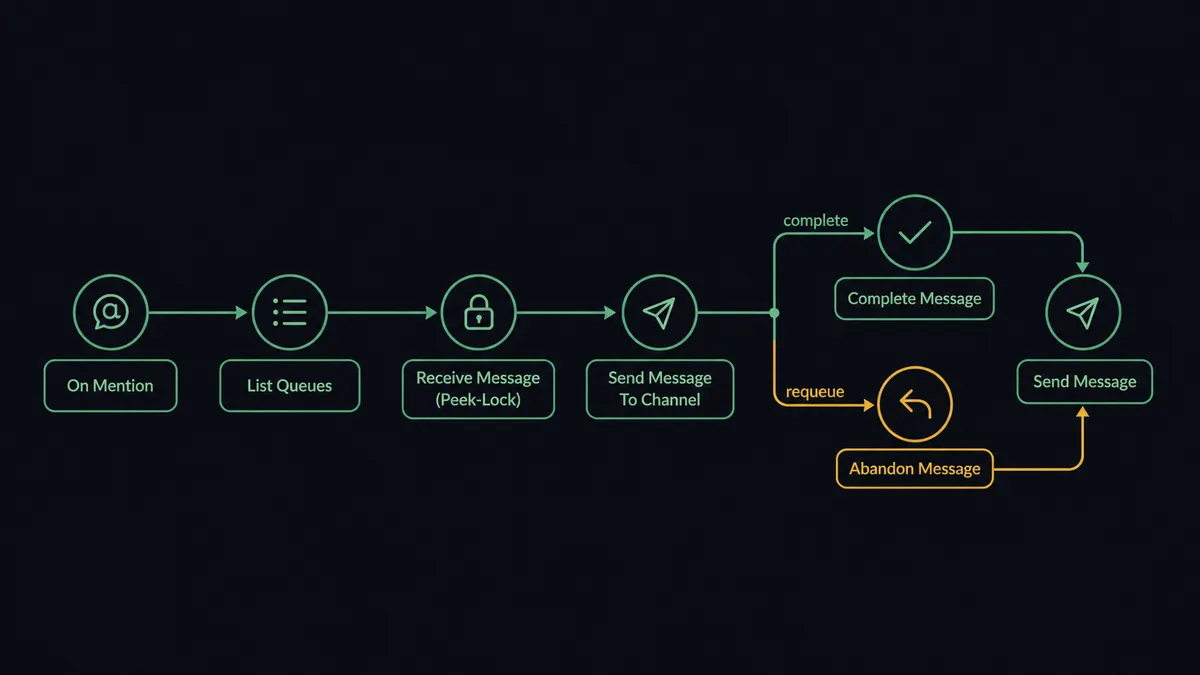
You connect Slack to Azure Service Bus by having Slack’s On Mention trigger drive Service Bus actions: an engineer mentions the agent with a queue name, the workflow resolves it with List Queues, pulls the next message safely with Receive Message (Peek-Lock), and posts the payload and BrokerProperties into the channel, where one click runs Complete Message or Abandon Message. FlowRunner is a visual AI-agent orchestration platform where automations run autonomously and pause for human judgment on the steps that carry real consequence. The same connection can run as an AI agent that triages stuck messages on its own, completing what it recognizes and holding the destructive calls, Complete Message on suspect payloads and Delete Queue always, for a named engineer.
The problem it solves
When a queue backs up, the person who fixes it works alone. An alert says a retry queue is growing. An engineer opens the Azure portal, peeks at messages one by one, squints at JSON payloads, and makes the same call over and over: is this a poison message that needs to come off the line, or a transient failure that deserves redelivery? The context that would answer the question, which deploy went out, which downstream service was flaky, lives in Slack, while the messages live in the portal, and the engineer swivels between the two.
The failure modes are asymmetric. Abandon a poison message and it loops through delivery forever, burning retries and log volume. Complete a message that was actually fine and the work it carried silently never happens; there is no undo on Complete Message. Worse is the cleanup that goes too far: Delete Queue takes the queue and every message still in it, permanently, and nothing in the portal asks whether a teammate was mid-investigation. Queue operations are a stream of small irreversible decisions made with partial context, which is exactly the shape of work that should not be one person’s browser tab.
How it works: the connection
The connection listens to Slack and operates the Service Bus namespace. Here is the plain version, grounded in the real connector actions.
- Trigger: Slack fires On Mention when an engineer asks the agent to look at a queue: “check orders-retry.”
- Resolve: The workflow calls List Queues (or List Topics for topic traffic) to confirm the target exists in the namespace.
- Receive safely: It calls Receive Message (Peek-Lock), which locks the next message without deleting it, returning the body, BrokerProperties, and the lock location URI. For topic traffic it calls Receive from Subscription instead.
- Surface: It calls Send Message To Channel in Slack with a triage card: payload preview, Label, CorrelationId, delivery context.
- Decide: The engineer clicks Complete or Requeue on the card.
- Act: The workflow calls Complete Message to remove the message for good, or Abandon Message to release the lock so the message redelivers.
- Requeue corrected work: When the payload just needs a fix, the workflow calls Send Message to publish the corrected message back to the queue or topic, carrying the original CorrelationId.
That is the “just connect them” answer. Queue triage moves from a solo portal session into the channel where the deploy context already lives, and every message is handled with peek-lock so a wrong click never destroys work silently.
Can an AI agent run it? (and why a human stays in the loop)
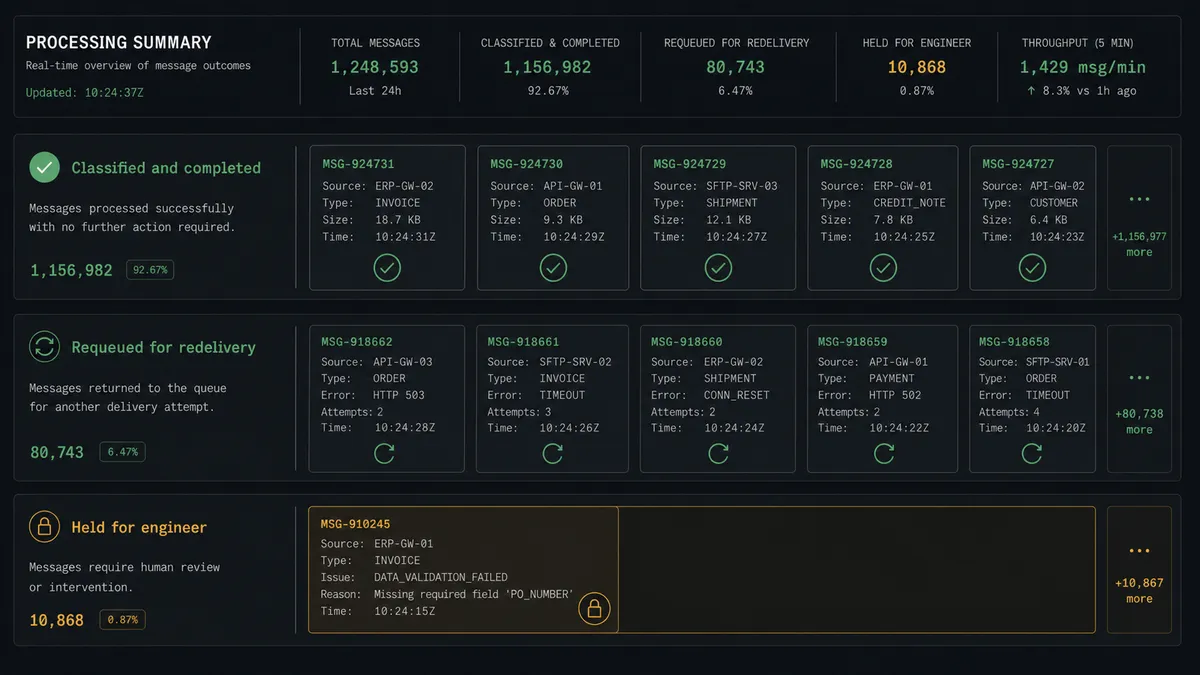
Yes, and this is where triage stops being message-by-message manual labor. An AI agent holds the Service Bus operations as tools: List Queues, Receive Message (Peek-Lock), Receive from Subscription, Complete Message, Abandon Message, Send Message. Asked to drain a backlog, it works through the queue message by message, reading each payload and classifying it: a known duplicate-event pattern it completes, a timeout from a service that has since recovered it abandons for redelivery, a malformed payload it sets aside. The agent does in minutes what an engineer does in an evening, and it applies the same rules to message four hundred as it did to message four.
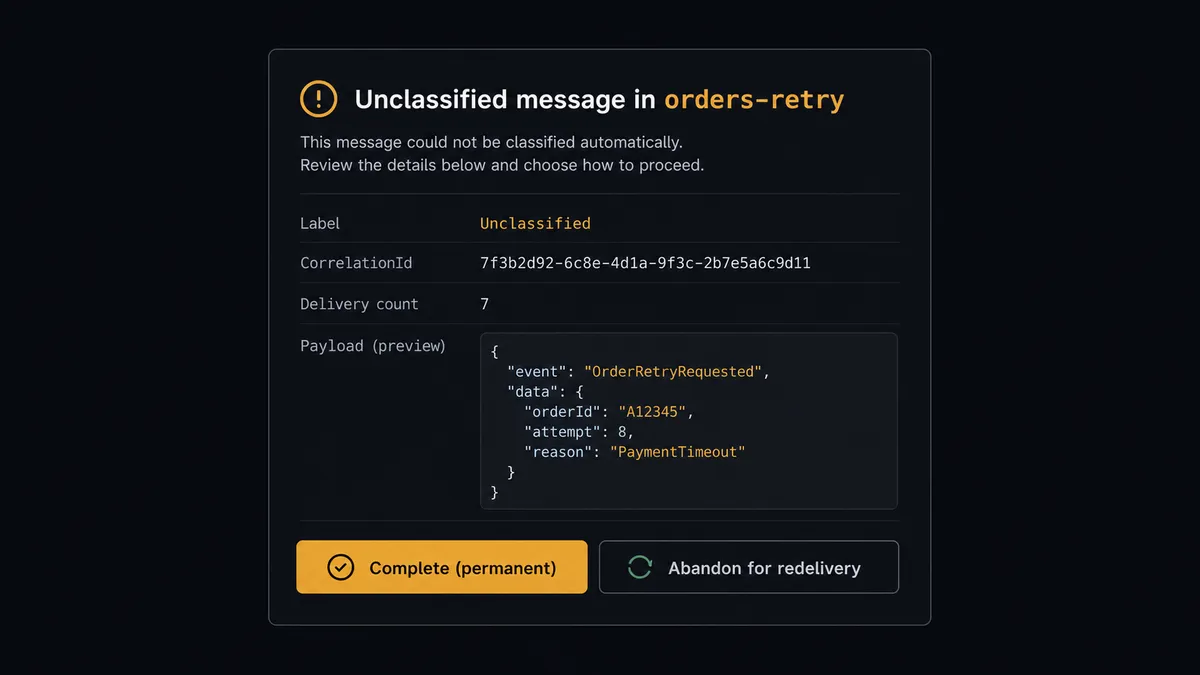
The consequential step is deletion, in both sizes. Complete Message is a permanent removal: once completed, the work a message carried will never run. So when the agent meets a payload it cannot confidently classify, it stops and invokes the human-review flow it holds as a callable tool: “Queue orders-retry, message with CorrelationId [id], Label [label], delivered [n] times. Payload attached. I cannot match this to a known failure pattern. Complete it, or abandon for redelivery?” The large size is Delete Queue, which removes the queue and every message in it and cannot be undone. The agent never calls it without a named engineer approving, no matter how routine the cleanup looks.
This is the digital andon cord applied to infrastructure: the line runs autonomously through everything the agent can classify, and stops the moment it cannot. The engineer is no longer the conveyor. They are the judgment at the checkpoint, and every complete, abandon, and delete is attributed in the audit trail.
FlowRunner vs Fivetran
If your goal is getting Service Bus event data into a warehouse for analytics, Fivetran is genuinely strong: managed connectors, automated schema handling, and reliable incremental replication with essentially no pipeline code to maintain. As a data-movement product, it has earned its reputation with data teams.
But replication is not operation. Fivetran copies data from A to B on a schedule; it does not receive a locked message, reason about its payload, ask an engineer a question, and then complete or requeue it. This pair is about operating a live queue with judgment in the loop, and that is orchestration.
| What matters for this pair | FlowRunner | Fivetran |
|---|---|---|
| Human-in-the-loop on Complete Message and Delete Queue | Native. The agent pauses and routes the decision to a named engineer | Not applicable; replication has no approval concept |
| Who runs the flow | An AI agent receives, reasons about payloads, picks actions as tools | Scheduled sync pipelines, no per-message logic |
| Users included | Unlimited users on every tier | Priced per connector and consumption, not per collaborator |
| Bring your own AI keys | Yes, BYOK | No agent layer to bring keys to |
| Self-hosted option | Yes, cloud-hosted or self-hosted | Cloud service |
| Pricing model | Transparent workflow-based tiers | Consumption-based (MAR), which grows with data volume |
If you need Service Bus data replicated into Snowflake or Redshift for analysis, use Fivetran for that pipeline; the two are not substitutes. If you need the queue itself operated, triaged, drained, and cleaned up with an engineer approving the irreversible steps, this pairing is the fit.
Before and after
| Category | Before | After |
|---|---|---|
| Backlog triage | An engineer peeks messages one by one in the portal, alone | The agent works the queue with Receive Message (Peek-Lock) and classifies each payload |
| Poison messages | Loop through redelivery until someone notices the retry burn | Pulled aside and posted to Slack with payload and delivery count for a decision |
| Wrong completions | A misjudged Complete silently destroys work with no record | Unclassified messages pause at the gate; every Complete is attributed |
| Queue cleanup | Delete Queue is one portal click away from destroying in-flight work | Held behind a named approval, every time |
| Context | Deploy history in Slack, messages in the portal, engineer in between | Payloads, CorrelationIds, and decisions all live in the same channel thread |
What you can build
Mention-to-triage. On Mention starts it: “check invoices-dlq.” The agent resolves with List Queues, pulls with Receive Message (Peek-Lock), and posts a triage card. One click completes or abandons.
Backlog drain with a gate. Asked to drain a backlog, the agent loops receive, classify, act: Complete Message on known-safe patterns, Abandon Message on transients, and the approval tool on everything else.
Alert-driven inspection. On Channel Message watches your monitoring alerts channel. When a depth alert lands, the agent inspects the named queue and posts what is actually stuck before anyone opens the portal.
Requeue desk. For messages that failed on a fixed bug, the agent posts the corrected payload for review, then calls Send Message to publish it back with the original CorrelationId and completes the stuck original.
Namespace janitor with named approvals. On a schedule, the agent lists queues and topics, flags empty or orphaned ones, and proposes cleanup. Create Queue provisions replacements; Delete Queue runs only after a named engineer approves each one.
Getting started
Start on the free plan: 100 executions a month, every integration included, no credit card required, plus 14 days of Professional for new accounts. Both connectors are available on every tier, and every tier includes unlimited users and unlimited workflows.
Explore the integration details:
- Slack integration (8 triggers and 16 actions covering messages, reactions, files, and channel management)
- Azure Service Bus integration (10 actions covering send, peek-lock receive, and queue management)
Start building free at flowrunner.ai or book a demo to see a live Slack to Azure Service Bus workflow, complete-or-abandon gate and all.
Frequently asked questions
Is it free to connect Slack and Azure Service Bus on FlowRunner?
You can build and run the connection on FlowRunner's free plan, which includes 100 executions a month and every integration with no credit card required, and new accounts also get 14 days of Professional. Both connectors are available on every FlowRunner tier, and every tier includes unlimited users and unlimited workflows.
Can I self-host the Slack to Azure Service Bus workflow?
Yes. FlowRunner offers a cloud-hosted option and a self-hosted option, so the connection can run inside your own environment.
Does the AI agent need my own OpenAI or Claude key?
FlowRunner uses a bring-your-own-keys model, so you connect the AI provider key you already have. You are not locked to one model.
What happens when the agent cannot classify a message it received?
Nothing is lost. Because the agent uses Receive Message (Peek-Lock), the message stays locked but not deleted. The agent posts the payload, Label, CorrelationId, and delivery context to Slack and waits. An engineer picks Complete Message to remove it or Abandon Message to release it for redelivery.
Which Slack triggers and Service Bus actions does this pair use?
Slack's On Mention and On Channel Message start the flow, since Azure Service Bus has no trigger in the catalog. The agent then works the namespace with List Queues, Receive Message (Peek-Lock), Receive from Subscription, Complete Message, Abandon Message, and Send Message.
Can the agent delete a queue?
Only through the hard gate. Delete Queue permanently removes the queue and every message in it and cannot be undone, so the agent always posts the queue name and its purpose to Slack and waits for a named engineer to approve before it runs.