How to Connect PagerDuty with Slack (With or Without an AI Agent)
Connect PagerDuty's On New Triggered Incident trigger to Slack's Send Message to Channel action so your on-call channel gets full incident context the moment a service pages, optionally as an AI agent that pauses for human acknowledgement before any recovery step runs.
How do you connect PagerDuty to Slack?
You connect them by setting the PagerDuty On New Triggered Incident trigger to fire a Slack Send Message to Channel action, mapping the incident title, urgency, and on-call responder name into the message body so the on-call channel has full context before the responder reads the page. FlowRunner is a visual AI-agent orchestration platform where automations run autonomously and pause for human judgment on the steps that carry real consequence. That same connection can run as an AI agent that correlates the incident against recent deploys, names the right responder, and holds every production recovery step until an engineer acknowledges in Slack.
The problem with today’s incident workflow
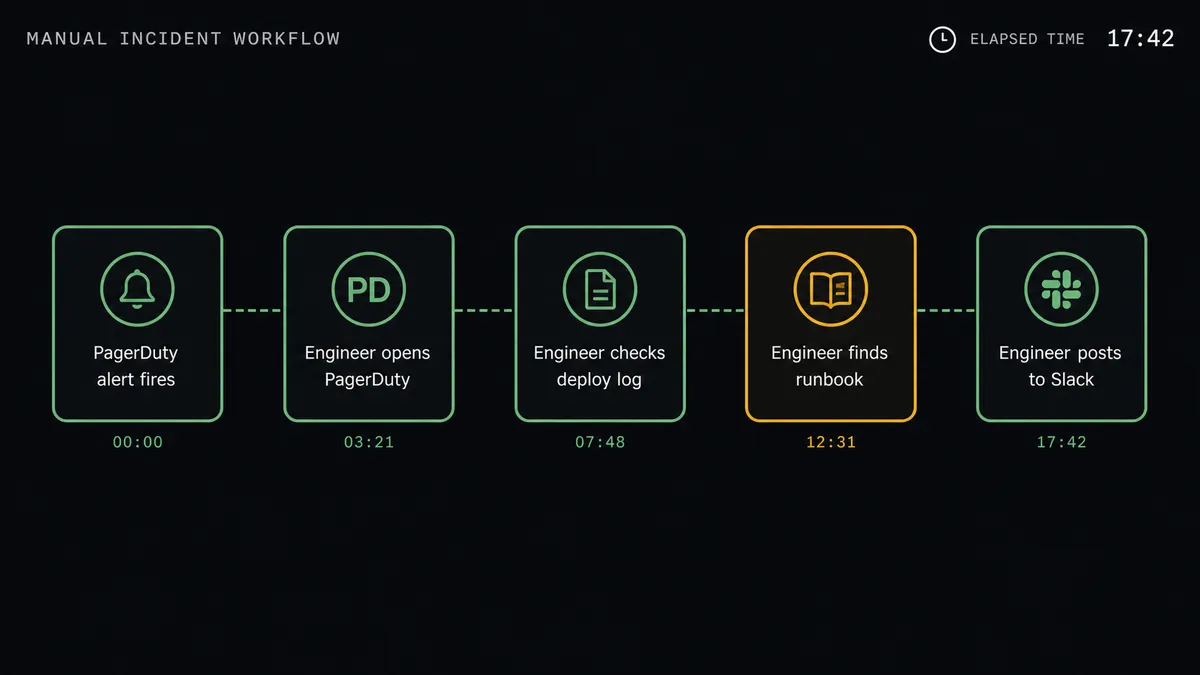
When a service pages, the on-call engineer opens PagerDuty, reads a bare alert title, and then starts manually pulling context together. Who is on call? Was there a recent deploy? Is there a runbook? That work happens in the first critical minutes of an incident, and it happens by hand while the clock is running. Three tools, no single view, and context that falls through the cracks when the responder is on mobile at 2am.
The Slack side is just as fragmented. Teams create incident channels manually, paste in links from different sources, and try to keep a thread coherent while the actual response is happening in PagerDuty. Nothing is connected. Decisions made in Slack are not captured in PagerDuty. The incident timeline is missing half the story.
How it works: the connection
The PagerDuty On New Triggered Incident trigger fires the moment a service pages, before any human has acknowledged. That is the right moment to start gathering context, because the responder is still reading the page.
The agent’s first tool call is List On-Calls. It pulls who is on call right now, across schedules and escalation policies, and names that person in the Slack message. The responder knows immediately that they are named and that the page is theirs.
The agent then calls Get Incident to pull the full incident detail: title, urgency, the alert payload, and the service it belongs to. It follows that with List Log Entries to check whether recent changes are already attached to the incident timeline.
The Slack Send Message to Channel action posts the result: incident title, urgency level, on-call responder name, a direct link to the incident in PagerDuty, and a runbook link if one is configured on the service. The on-call channel gets all of this before the responder has opened PagerDuty.
For deploys, the agent calls Send Change Event on PagerDuty’s Events API v2 to record the change so the incident correlates with what caused it. Expected alert noise gets suppressed with Create Maintenance Window, which the agent opens before the deploy and closes automatically when the deploy is confirmed healthy.
Can an AI agent run it? (and why a human stays in the loop)
The plain connection posts context. The AI agent decides what to do with it.
When an incident triggers, the agent does not just forward the page. It reads the incident payload, correlates it against recent change events, checks whether the service has an automated recovery step, and evaluates whether running that step without human sign-off would carry production risk. This is not a rule. It is the agent reasoning about the specific incident in front of it.
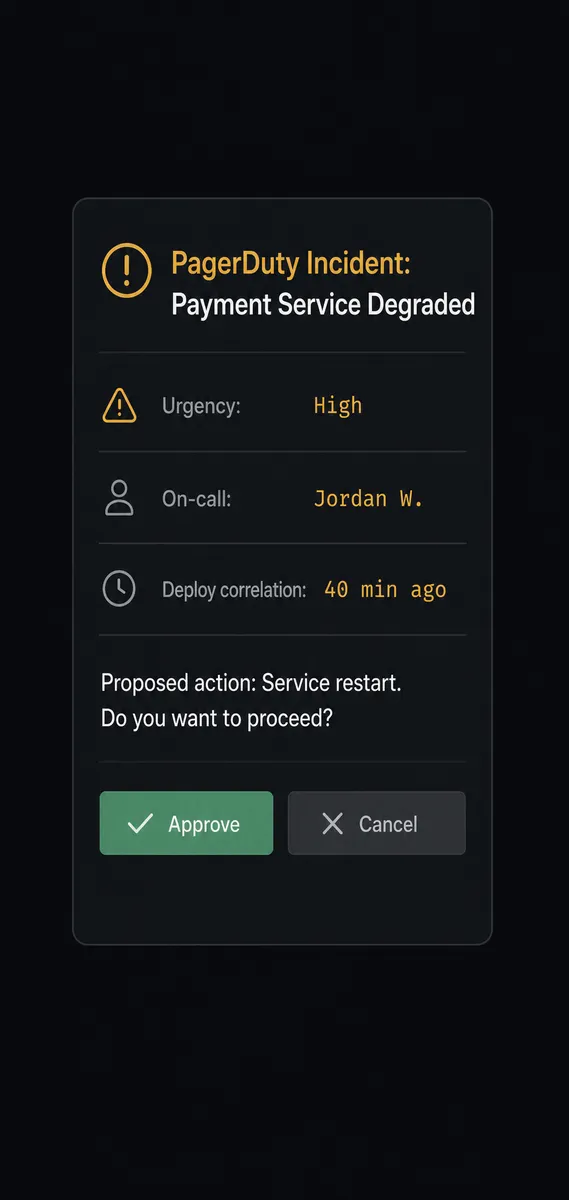
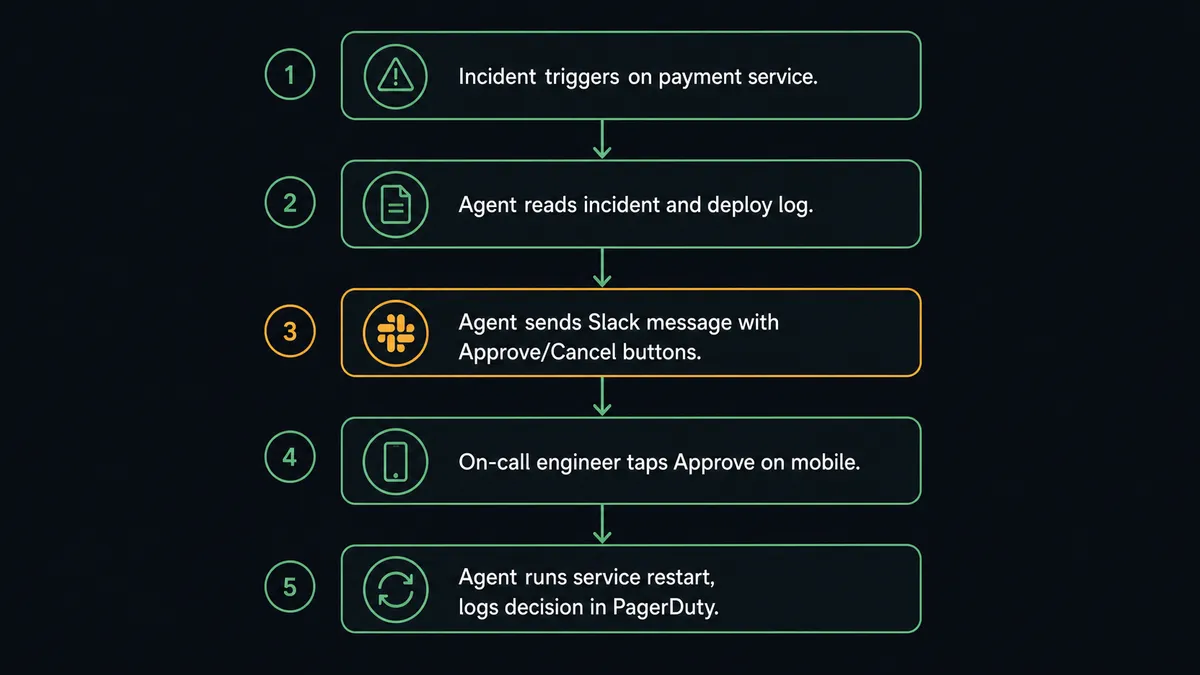
Here is what that reasoning looks like in practice. An incident pages on a payment processing service at 11pm. The agent reads the urgency, pulls the on-call name, and checks List Log Entries. It sees that a deploy shipped 40 minutes ago. It identifies a recovery step, a service restart, that could resolve the issue. The same recovery step ran successfully on a staging incident last week. But this is production, and the deploy timestamp lines up too closely with the page for the agent to act unilaterally.
The agent invokes the human-in-loop subflow. It sends a Slack Direct Message to the on-call engineer with the full incident summary, the proposed recovery action, and the deploy correlation, plus two buttons: Approve and Cancel. The On Block Action trigger in Slack collects the decision and routes it back to the flow. The workflow has been paused since the agent made the call to escalate. Nothing touched production.
The engineer approves from their phone. The agent runs the recovery step, then calls Create Note on the incident to record what happened: the proposed action, who approved it, and the exact timestamp. The incident timeline shows the full story.
This is what prospects call the “digital andon cord.” The agent stops the line when it hits a step that should not be automated. It does not fail, skip, or make a guess. It asks the right person, packages everything they need to decide, and waits.
FlowRunner vs Zapier (the tool you’re probably comparing)
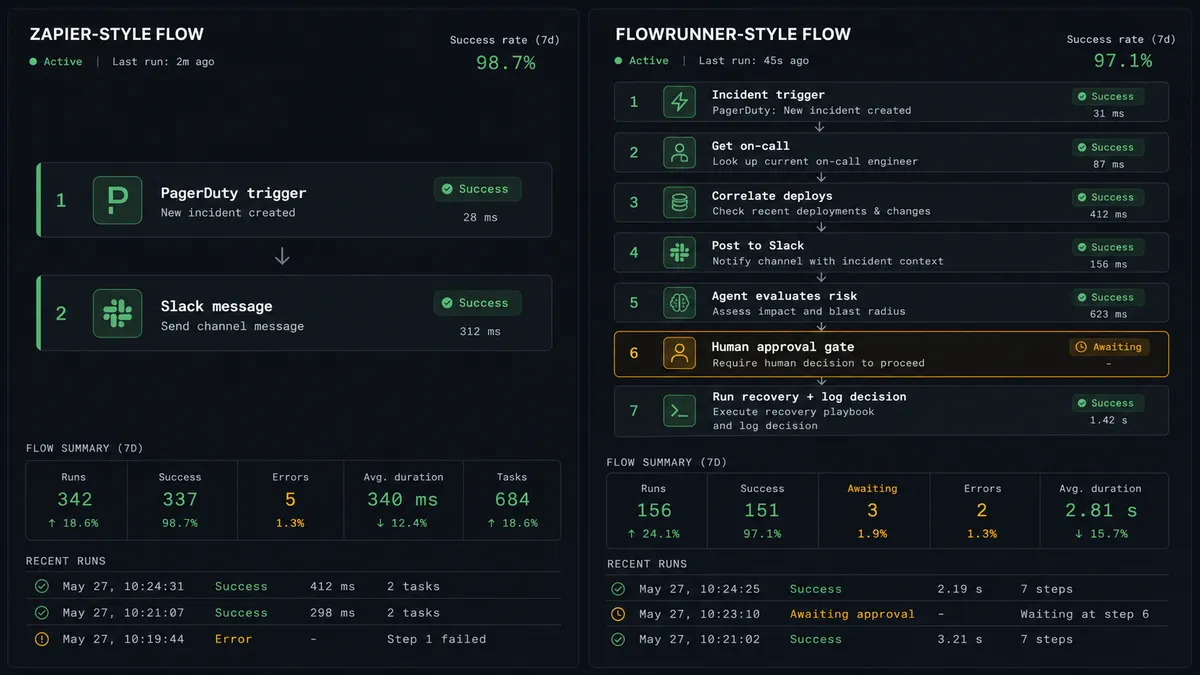
If your team already uses Zapier for simple Slack notifications when PagerDuty pages, Zapier is genuinely good at that job. It has a large template library, a fast setup experience, and a pricing model most teams understand. For a basic trigger-and-post connection, it works.
The differences that matter for incident operations:
| Capability | Zapier | FlowRunner |
|---|---|---|
| Human-in-loop with interactive approval | Not available | Native. Agent pauses and sends Slack buttons. Resumes on decision. |
| AI agent reasoning about incident context | Not available | Agent correlates deploys, evaluates risk, and decides when to escalate |
| Slack interactive buttons (Block Kit) | Not available | On Block Action trigger collects decisions natively |
| Unlimited users on every tier | Per-seat pricing | Unlimited users on every tier including Growth ($45/mo) |
| Audit trail with decision identity | Not available | Every human decision captured with approver identity and timestamp |
| BYOK (bring your own AI keys) | Not available | Yes. You connect your own AI provider keys |
Zapier does not offer a way to pause a workflow mid-run and collect a structured human decision before resuming. That is not a missing feature. It is a different model. Zapier is a trigger-and-action tool. FlowRunner is an orchestration layer.
Before and after
| Metric | Before | After |
|---|---|---|
| Context on arrival | Responder opens 3-4 tools manually to assemble incident context | Agent posts urgency, on-call name, deploy correlation, and runbook link before the page is acknowledged |
| Deploy correlation | Nobody links the incident to the deploy that caused it | Agent attaches recent change events to the incident timeline automatically |
| Production recovery gate | Recovery steps run manually, or not at all, depending on who is on call | Agent holds every automated recovery step until the on-call engineer approves in Slack |
| Audit trail | Decisions made in Slack are not recorded in PagerDuty | Every human decision captured with approver identity and timestamp in the incident timeline |
| On-call visibility | Responder manually checks who is on call and routes accordingly | Agent calls List On-Calls and names the responder in the first Slack message |
What you can build
Incident triage with deploy correlation. When On New Triggered Incident fires, the agent calls Get Incident, List Log Entries, and List On-Calls, then posts a structured triage summary to the on-call Slack channel. The summary includes urgency, affected service, the on-call name, and any change events from the last two hours. The responder opens a complete picture, not a bare alert.
Maintenance window automation for deploys. Before a deploy, a FlowRunner flow calls Create Maintenance Window on the affected services and records the deploy with Send Change Event. When the deploy is confirmed healthy, the flow calls Delete Maintenance Window automatically. Suppresses expected noise. Real outages still page.
Escalation routing to the right person. When an incident comes in outside business hours or on a service with a critical SLA, the agent calls List On-Calls to identify the secondary escalation contact, then uses Slack Send Direct Message to notify them directly with full context. No manual routing. No one missed.
Interactive recovery approval. The agent identifies an automated recovery step (service restart, cache flush, queue drain) and sends a Slack message with Approve and Cancel buttons before running anything. On Block Action collects the decision. The agent runs the step and calls Create Note to record the approval. The incident timeline shows the recovery was human-authorized.
Incident merge on alert storms. When monitoring fires a cluster of related alerts in a short window, the agent uses List Incidents to identify active incidents on related services, then Merge Incidents to collapse them into a single coordinated response. Slack gets one clean summary instead of a flood of duplicate pages.
Common questions
Is it free to connect PagerDuty and Slack on FlowRunner? FlowRunner has a free plan with 100 executions a month, every integration included, and no credit card required, and new accounts get 14 days of Professional on top. Corporate email required for signup.
Can I self-host this integration? Yes. FlowRunner’s Enterprise tier supports self-hosted deployment, which keeps your incident data and Slack messages entirely within your own infrastructure.
Does the AI agent need my own OpenAI key? FlowRunner uses a Bring Your Own Keys model. You connect your own API keys for whichever AI provider you choose. FlowRunner orchestrates the agent; you own the model credentials.
What happens when the agent is not sure what to do? The agent pauses and sends a Slack message with full incident context, the proposed action, and interactive buttons for the on-call engineer to decide. Nothing runs against production until a human confirms. The decision and the decider’s identity are captured in the audit trail.
Does this work with PagerDuty’s maintenance windows? Yes. The FlowRunner PagerDuty connector includes Create Maintenance Window, Update Maintenance Window, and Delete Maintenance Window actions. An agent can open a window before a deploy and close it automatically when the deploy is confirmed healthy.
Can the agent tell me who is on call right now? Yes. The List On-Calls action returns the current on-call responders across schedules and escalation policies. The agent calls this at incident time and names the responder in the Slack summary.
Getting started
FlowRunner’s Growth tier ($45/mo) covers 12,000 executions per month and includes AI agents, BYOK, human-in-loop orchestration, and unlimited users. Start on the free plan: 100 executions a month, every integration included, no credit card required, plus 14 days of Professional for new accounts. Corporate email required.
Both integrations are ready to connect today: PagerDuty on FlowRunner and Slack on FlowRunner.
Start your free trial at flowrunner.ai or book a 30-minute walkthrough at calendly.com/flowrunner/intro.
Frequently asked questions
Is it free to connect PagerDuty and Slack on FlowRunner?
FlowRunner has a free plan with 100 executions a month, every integration included, and no credit card required, and new accounts get 14 days of Professional on top. Corporate email required for signup.
Can I self-host this integration?
Yes. FlowRunner's Enterprise tier supports self-hosted deployment, which keeps your incident data and Slack messages entirely within your own infrastructure.
Does the AI agent need my own OpenAI key?
FlowRunner uses a Bring Your Own Keys model. You connect your own API keys for whichever AI provider you choose. FlowRunner orchestrates the agent; you own the model credentials.
What happens when the agent is not sure what to do?
The agent pauses and sends a Slack message with full incident context, the proposed action, and interactive buttons for the on-call engineer to decide. Nothing runs against production until a human confirms. The decision and the decider's identity are captured in the audit trail.
Does this work with PagerDuty's maintenance windows?
Yes. The FlowRunner PagerDuty connector includes Create Maintenance Window, Update Maintenance Window, and Delete Maintenance Window actions. An agent can open a window before a deploy and close it automatically when the deploy is confirmed healthy.
Can the agent tell me who is on call right now?
Yes. The List On-Calls action returns the current on-call responders across schedules and escalation policies. The agent calls this at incident time and names the responder in the Slack summary.