Update MySQL from Google Sheets, With Approval on Bulk Writes
Connect MySQL and Google Sheets so ops teams submit bulk update requests from a spreadsheet, with an AI agent that runs the write and pauses for approval before touching a production table.
How do you connect MySQL to Google Sheets?
You connect them by setting a trigger in one system that drives a named action in the other. A new or edited row in a tracking sheet fires Google Sheets’ On New or Updated Row trigger, and FlowRunner’s agent reads that row and calls Select Rows and Update Rows in MySQL to apply the requested change, without anyone touching the database directly. FlowRunner is a visual AI-agent orchestration platform where automations run autonomously and pause for human judgment on the steps that carry real consequence. That same connection can run as an AI agent: it checks the current state of the affected records, decides whether the write is safe to run on its own, and invokes a human-in-loop approval flow as a callable tool before any write that touches a production table or a large batch of rows.
The problem with spreadsheet-driven database updates
Most operations teams do not have direct MySQL access, and that is usually by design. A billing manager who needs to mark 40 orders as refunded, or an ops lead correcting a batch of mis-tagged records, cannot run their own UPDATE statement. They open a ticket, email an engineer, or drop a request in a Slack thread, then wait. The engineer eventually gets to it, writes the query by hand, and runs it. A same-day fix can take two or three days once it clears the queue behind everything else engineering is doing that week.
The deeper problem shows up once someone does get database access, in a hurry, without a second reviewer. An UPDATE with a forgotten WHERE clause rewrites every row in the table. A DELETE meant for one region removes records company-wide. After the batch runs, there is often no clean record of what changed, who asked for it, or who approved it. The request that started as a plain spreadsheet row or a Slack message leaves no trail once it becomes a raw SQL statement, and exceptions, a row referencing a table that does not exist, a filter that matches far more rows than expected, fall through the cracks because nobody is watching for them.
How it works: the connection
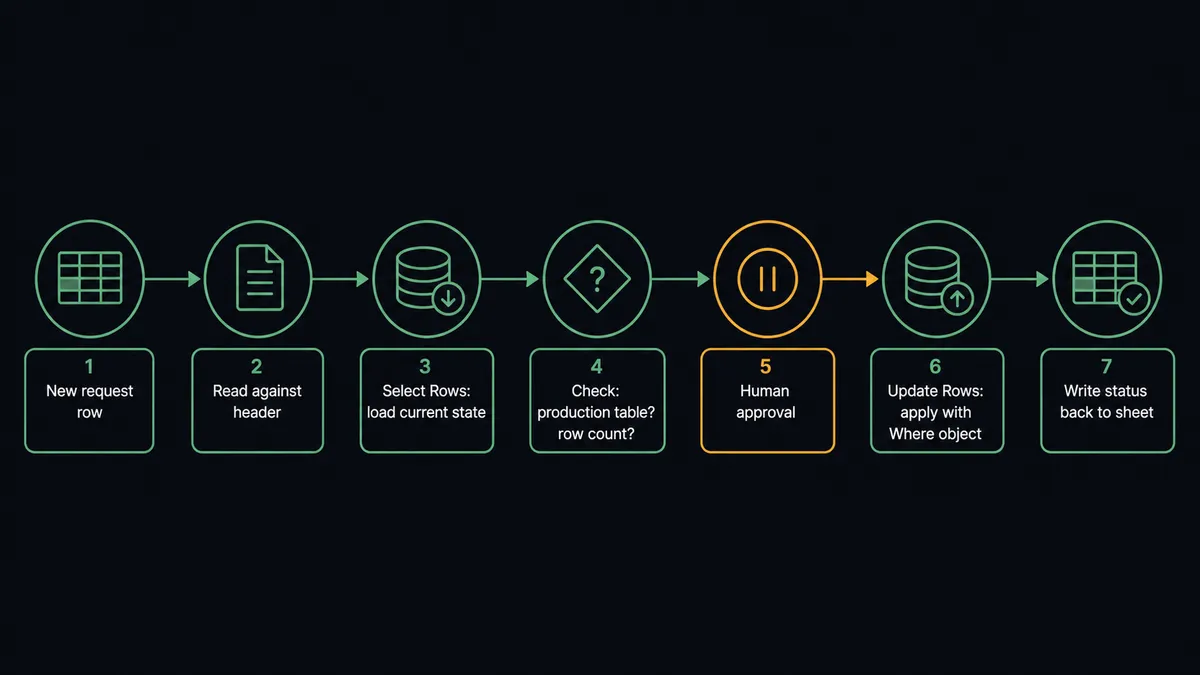
FlowRunner bridges the two systems at the trigger level. Set up a tracking sheet in Google Sheets, something like an “MySQL Update Requests” tab, with columns for the target table, the Where column and value, the Set column and value, and a status column. Load Header Row maps those columns once, so the agent can reference them by name instead of by cell coordinates.
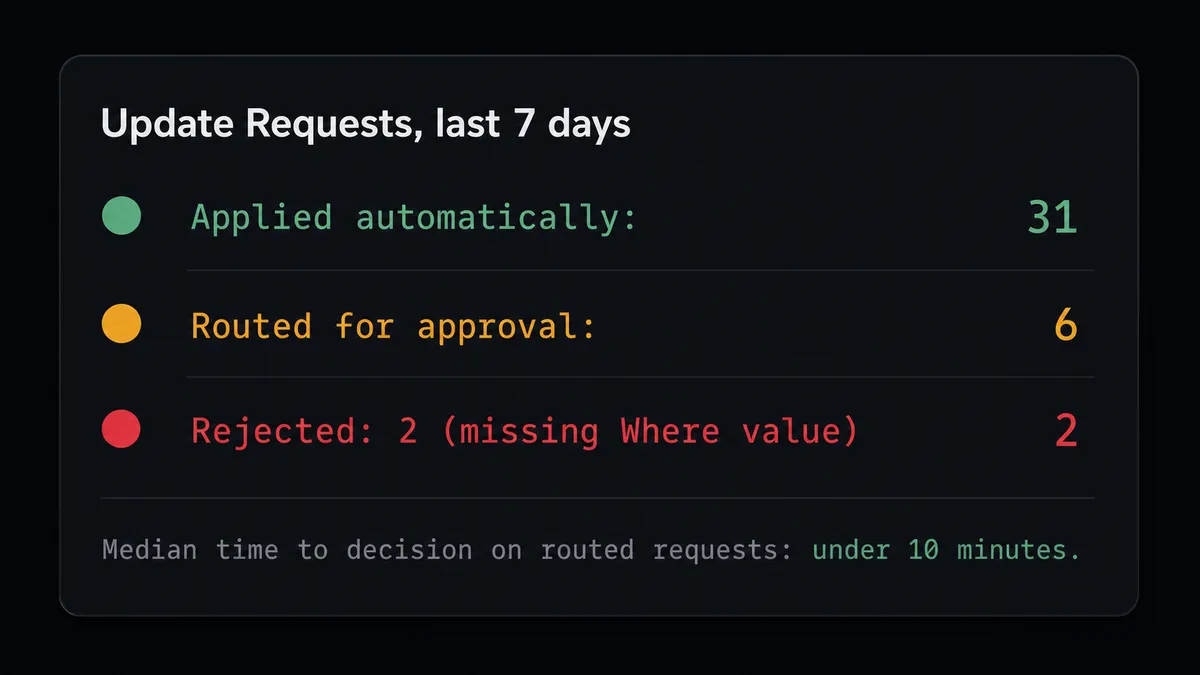
When someone adds a new request row, or edits an existing one, Sheets’ On New or Updated Row trigger fires. The agent reads the row’s values against the mapped header columns and checks that the required fields are present: a target table, a Where value, and the value to set. A row missing a required field is not sent to MySQL; the agent marks it incomplete in the status column instead.
For a complete request, the agent calls Select Rows in MySQL, filtered by the request row’s Where column and value, to load the current state of the affected records and see exactly how many rows match before anything is written. This is the step that turns a blind spreadsheet instruction into a checked one.
Once the agent has the candidate set, it calls Update Rows with an explicit Where object built from the request row. MySQL’s Update Rows action refuses to run without a Where clause, so a malformed request that would otherwise touch the entire table is rejected rather than executed. The action returns affectedRows, how many rows matched, and changedRows, how many actually changed. The agent writes both counts, and a status of Applied, back to the request row in the tracking sheet using Update Row.
Can an AI agent run it? (and why a human stays in the loop)
A plain sync tool would apply every row exactly as written, or fail outright on anything it does not recognize. An AI agent running this workflow reads the request, checks it against the live table, and decides what the situation calls for.
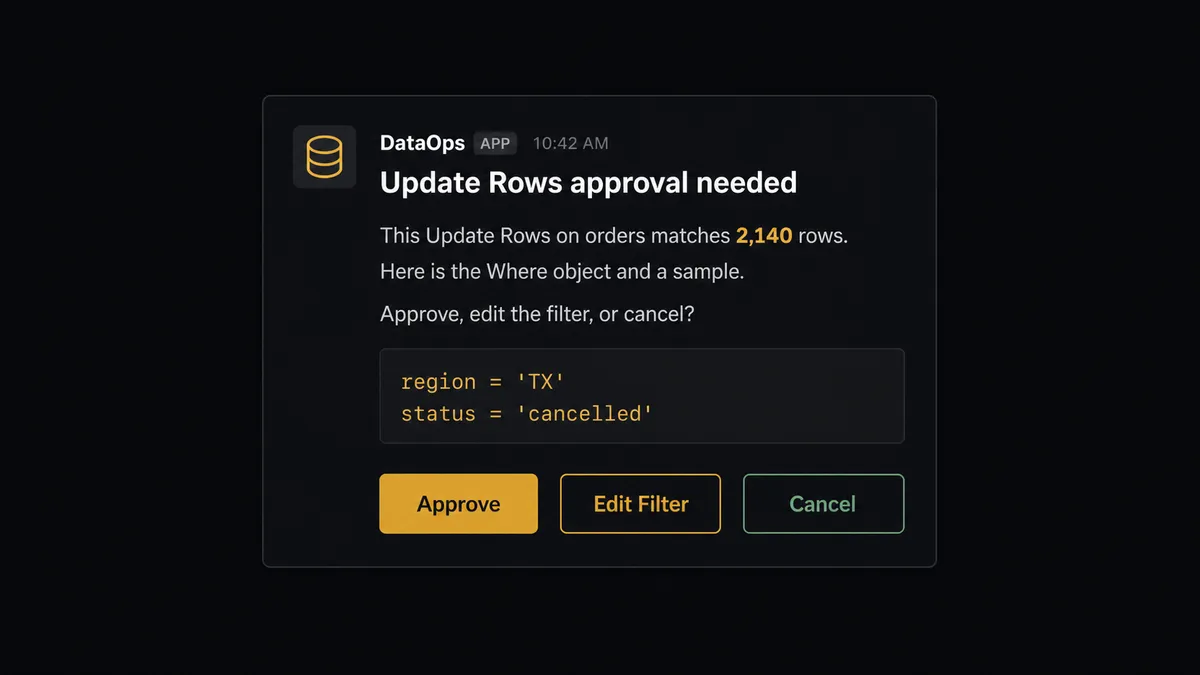
Here is a real decision moment. A request row comes in: table orders, Where region = TX, Set status = cancelled. The Where object is well formed, and nothing about the row itself looks wrong. But when the agent calls Select Rows to preview the match, it comes back with 2,140 rows, far more than the handful of rows a typical request in this sheet touches, and orders is flagged as a production table. The agent does not silently apply the write, and it does not silently reject it. It reasons: this is a valid request, but a write of this size against a production table is exactly the kind of action that is trivial to run and painful to reverse. It should not proceed without a person confirming.
The agent invokes the human-in-loop flow as a tool. That flow sends a Slack message to the table’s owner: “This Update Rows on orders matches 2,140 rows. Here is the Where object and a sample. Approve, edit the filter, or cancel?” The message carries the actual filter, a handful of sample rows, and the count, so the reviewer is deciding with the same information the agent has.
The owner responds from Slack. The agent resumes: if approved, it runs Update Rows and reports affectedRows and changedRows back to the sheet. If the filter needs adjusting, it updates the Where object and re-checks the count before asking again. If cancelled, it marks the row Rejected and moves on. Either way, the approver’s identity, the decision, and the timestamp are captured in the audit trail.
Prospects call this a digital andon cord. This is not a sync tool. The agent knows when to stop and ask.
FlowRunner vs n8n (the tool you’re probably comparing)
If your team has an engineer who already reaches for n8n, it is a reasonable first instinct for connecting a database to a spreadsheet. n8n ships a native MySQL node, a native Google Sheets node, and self-hosting that is genuinely mature, teams run n8n’s Community edition on their own infrastructure with unlimited executions today. That is a real strength, not a marketing claim.
The gap shows up in how the pause-and-ask step is decided and governed.
| Dimension | n8n | FlowRunner |
|---|---|---|
| Deciding when to pause | IF or Switch conditions set at build time, such as a fixed row-count threshold | The agent reasons about the request in context, table flagged production, row count against what is typical for this sheet, before deciding to pause |
| Human-in-loop | Native “Send and Wait for Response” node, placed in the workflow as a step | The agent invokes human oversight as a callable tool, at the moment it decides the write needs a second set of eyes |
| Governance at this price point | SSO, RBAC, and audit trails are Enterprise-only, custom pricing | 30-day audit trails and RBAC are included at Professional, $299 per month |
| Self-hosting | Self-hosted Community edition is free and mature today | Self-hosted deployment is available at the Enterprise tier |
n8n is a fair choice if your database logic is simple and your thresholds do not need to adapt to context. FlowRunner is the better fit when the agent needs to weigh what it found, not just check a number against a fixed rule, and when your compliance team needs an audit trail without paying Enterprise pricing to get one.
Before and after
| Category | Before | After |
|---|---|---|
| Bulk update requests | Ops team files a ticket or a Slack message and waits for an engineer to write and run the SQL | Ops team fills in a row on a tracking sheet; the agent runs the update through Update Rows |
| Unbounded writes | An UPDATE with a forgotten WHERE clause rewrites every row in the table | Update Rows and Delete Rows refuse to run without an explicit Where object |
| Write visibility | After a batch write there is no clean record of what changed | Every write returns matched and changed row counts, written back to the request row |
| Row intake | A new or edited request sits until someone happens to notice it | A new or updated row triggers the flow immediately |
| Approval trail | No single record of who approved a bulk change or when | The approver’s identity, decision, and timestamp are captured in the audit trail |
| Database access | Only engineers with direct MySQL credentials can make the change | Ops teams request changes from a spreadsheet; no one else needs database access |
What you can build
Bulk update requests without an engineering ticket. An ops team member fills in a row: table, Where clause, new value. The agent calls Select Rows to preview the match and Update Rows to apply it once the request clears validation, no ticket queue required.
Idempotent catalog sync from a spreadsheet. A weekly product sheet feeds MySQL through Upsert Row keyed on SKU, so re-running the import updates existing rows instead of creating duplicates when the same sheet is re-submitted.
Live reporting from MySQL back into Sheets. On a schedule, the agent calls Select Rows against a reporting table and Add Rows to append the latest data into a sheet, so stakeholders see current numbers without anyone exporting from the database by hand.
Schema-checked onboarding for a new tracking sheet. When a new sheet tab is added, On New Sheet fires and the agent calls Get Table Schema in MySQL to confirm the target table’s columns before it starts writing to it, so a mismatched header does not silently corrupt data.
Common questions
Is it free to connect MySQL and Google Sheets on FlowRunner? FlowRunner has a free plan with 100 executions a month, every integration included, and no credit card required, and new accounts get 14 days of Professional on top. Beyond the free plan, Growth starts at $45 per month.
Does the agent need my own OpenAI key? FlowRunner uses a bring-your-own-key model. You connect the AI provider of your choice, such as Anthropic Claude or OpenAI, and FlowRunner orchestrates your agents using that key. You are never locked into a specific model.
What happens when the agent isn’t sure a write is safe? The agent pauses before running Update Rows or Delete Rows and sends a Slack message with the Where object, a sample of the affected rows, and the row count. A person approves, edits the filter, or cancels, and the decision is recorded in the audit trail.
Can I self-host FlowRunner? Yes. FlowRunner offers a free Community Edition for single-instance self-hosting, and an Enterprise self-hosted option with multi-instance clustering, full compliance features, and dedicated support.
Can ops teams update MySQL without writing SQL? Yes. The agent reads the table, Where column, and new value from a spreadsheet row and calls MySQL’s Update Rows action directly. No one on the ops team has to write or run a SQL statement.
Do unlimited users come with every plan? Yes. Every FlowRunner tier, from Growth at $45 per month to Enterprise, includes unlimited users and unlimited workflows. You pay for execution volume, not seat count.
Getting started
FlowRunner has a free plan with 100 executions a month, every integration included, and no credit card required, and new accounts get 14 days of Professional on top. Any real email address works; disposable domains are not accepted.
Connect both integrations from the FlowRunner integrations library: MySQL and Google Sheets. The request-and-approve workflow described here can be live in an afternoon.
Start your free trial at flowrunner.ai or book a 30-minute walkthrough at calendly.com/flowrunner/intro. Bring your update process and your spreadsheet. We will build the first workflow together.
Frequently asked questions
Is it free to connect MySQL and Google Sheets on FlowRunner?
FlowRunner has a free plan with 100 executions a month, every integration included, and no credit card required, and new accounts get 14 days of Professional on top. Beyond the free plan, Growth starts at $45 per month.
Does the agent need my own OpenAI key?
FlowRunner uses a bring-your-own-key model. You connect the AI provider of your choice, such as Anthropic Claude or OpenAI, and FlowRunner orchestrates your agents using that key. You are never locked into a specific model.
What happens when the agent isn't sure a write is safe?
The agent pauses before running Update Rows or Delete Rows and sends a Slack message with the Where object, a sample of the affected rows, and the row count. A person approves, edits the filter, or cancels, and the decision is recorded in the audit trail.
Can I self-host FlowRunner?
Yes. FlowRunner offers a free Community Edition for single-instance self-hosting, and an Enterprise self-hosted option with multi-instance clustering, full compliance features, and dedicated support.
Can ops teams update MySQL without writing SQL?
Yes. The agent reads the table, Where column, and new value from a spreadsheet row and calls MySQL's Update Rows action directly. No one on the ops team has to write or run a SQL statement.
Do unlimited users come with every plan?
Yes. Every FlowRunner tier, from Growth at $45 per month to Enterprise, includes unlimited users and unlimited workflows. You pay for execution volume, not seat count.