How to Connect MongoDB with Google BigQuery (With or Without an AI Agent)
Connect MongoDB and Google BigQuery so aggregated document data flows into your warehouse automatically, with an AI agent that pauses for human approval before any irreversible delete.
How do you connect MongoDB to Google BigQuery?
You connect MongoDB to Google BigQuery by building a FlowRunner workflow that uses the Aggregate or Find Documents action from the MongoDB connector as its source, then passes those results to the Insert Rows or Run Query action in the BigQuery connector. FlowRunner is a visual AI-agent orchestration platform where automations run autonomously and pause for human judgment on the steps that carry real consequence. The same connection that moves data also supports an AI agent that evaluates each batch, decides whether a destructive step is safe to execute, and routes the decision to a person when it is not.
The problem with moving data between MongoDB and BigQuery today
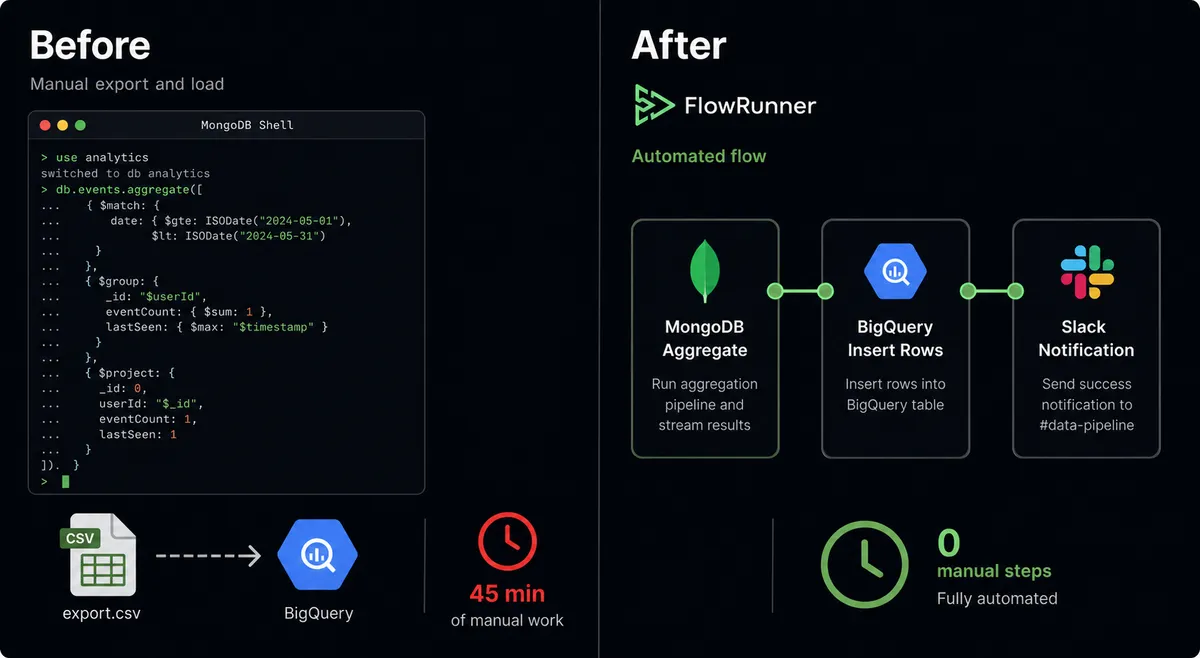
Most teams that run MongoDB for application data and BigQuery for analytics end up with a manual bridge in the middle. A developer runs an aggregation pipeline in a shell, exports the result to a CSV, and loads it into BigQuery by hand. The schedule is someone’s calendar reminder. When that person is out, the pipeline skips. When the collection schema changes, the export breaks quietly, and the team discovers the gap a week later when the dashboard numbers look wrong.
The deeper problem is that the two systems operate in different modes. MongoDB is where the live application data lives, document by document, often with ObjectId and Date types that do not map cleanly to columnar formats. BigQuery is where analytical results live, often hours or days behind the source. Without an automated layer that handles type conversion, schema mapping, and error recovery, the gap between the two systems fills up with exceptions that fall through the cracks. Someone has to check the pipeline, trace the failure, and restart the job. That is the manual work that never makes it onto a project plan but always makes it onto someone’s plate.
How it works: connecting MongoDB to BigQuery with FlowRunner
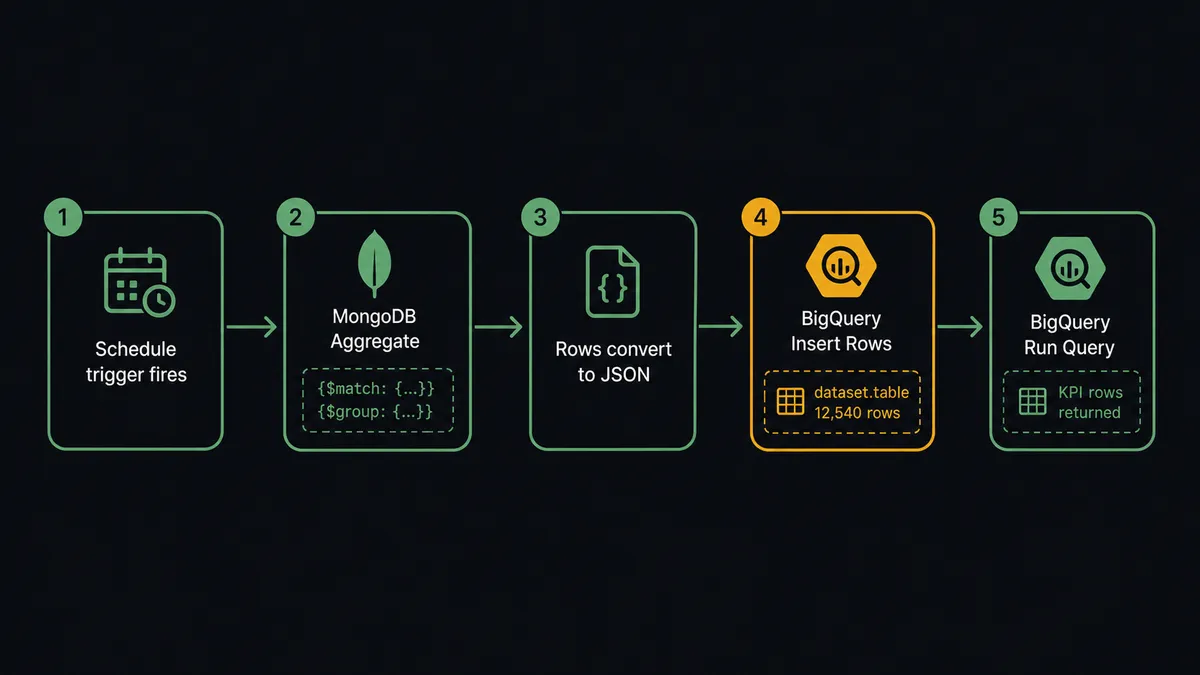
The connection runs in three steps. A FlowRunner workflow fires on a schedule or a webhook. The MongoDB Aggregate action runs a pipeline against your collection, for example a $match and $group that computes daily order totals. The result comes back as plain JSON. FlowRunner converts BSON ObjectId, Date, and Decimal128 values transparently so the agent works with clean data.
The BigQuery Insert Rows action receives that JSON and streams the records into your analytics table. Rows are queryable within seconds. If you want to run analysis on the newly loaded data, the flow continues to a Run Query action with named @name parameters, which returns rows as plain JSON keyed by column name. Those rows can feed the next step in the flow: post to a Slack channel, update a config document back in MongoDB with Update Document, or branch on a threshold.
Find Documents and Find One Document are available when you need a targeted pull by filter rather than an aggregated rollup. List Rows lets you read BigQuery table data without incurring query cost, useful for syncs that need the full table rather than a query result. The connector verifies the filter requirement on Update Documents and Delete Documents: both refuse to run without a non-empty filter, which eliminates the most common cause of accidental bulk writes.
Can an AI agent run it? (And why a human stays in the loop)
A plain automation moves data on a schedule and stops if something goes wrong. An AI agent reads the data, reasons about it, picks the right tools from its toolbox, and decides what to do next. The difference matters when the decision involves a write that cannot be undone.
Place an AI agent node in the flow and give it the MongoDB and BigQuery actions as tools. The agent runs Aggregate to get the day’s rollup, reads the result, compares it against the prior period using Count Documents on the MongoDB collection, and decides whether the numbers are within normal range. If they are, it streams the data to BigQuery with Insert Rows and posts the KPI summary to the metrics channel. No human involved. The work happens and the team gets the result.
When the flow involves a destructive step, the agent does not act on its own. This is not a hardcoded threshold rule. The agent evaluates context: the collection name, the filter, the number of documents affected, and whether this batch looks like a routine cleanup or something outside the usual pattern.
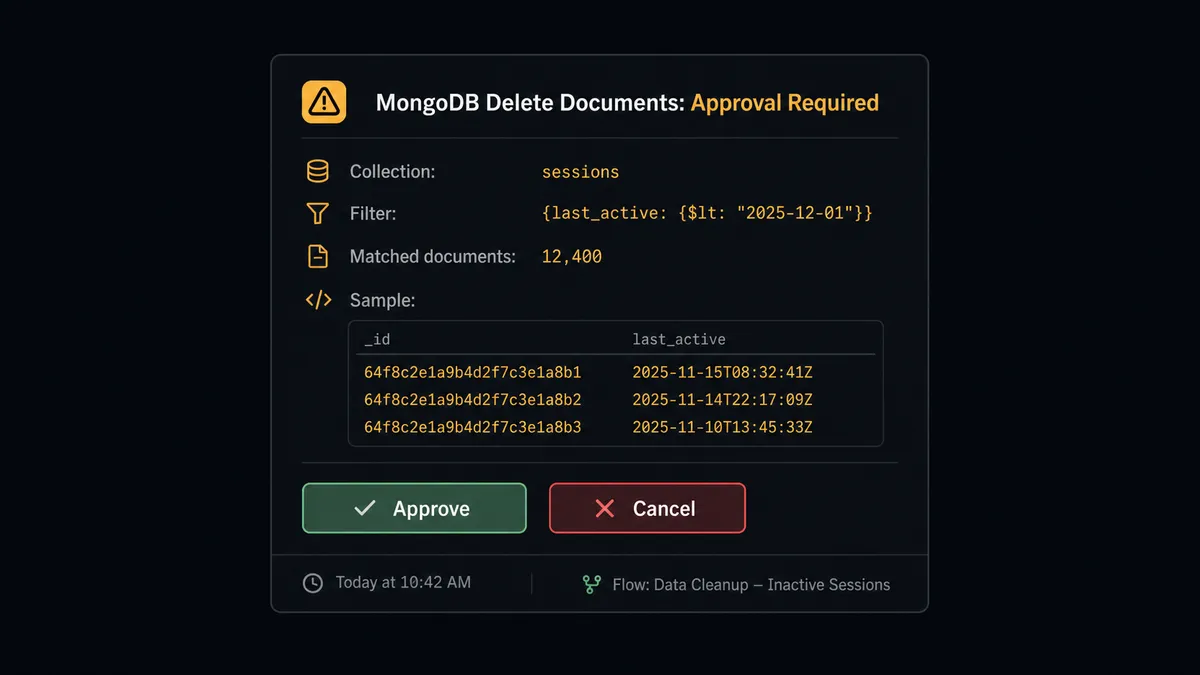
Say the agent identifies 12,400 stale session documents to remove from MongoDB. A rule-based system would either delete them automatically or require a threshold configuration. The agent instead packages the context: collection name (sessions), the filter it built, a sample of the matching documents, and the total count. It invokes the human-in-loop tool, which sends an approval card through Slack:
“This Delete Documents on sessions matches 12,400 documents. Here is the filter and a 5-document sample. Approve, narrow the filter, or cancel?”
The same pattern applies on the BigQuery side. Before the agent runs Delete Table or Delete Dataset, it pauses and sends the table name, row count, and last-modified time to a person for confirmation. The delete runs only after they respond. The approver’s identity and the timestamp go into the run log.
Prospects who have used Toyota’s production model call this a digital andon cord: AI that stops the line when it hits uncertainty. This is not a sync tool with an approval button bolted on. The agent decides when to stop and ask, based on what it found, not a number someone typed into a config field.
FlowRunner vs n8n for connecting MongoDB and BigQuery
n8n is a strong tool for technical teams. It has a large node library, an active community, and a fair-code self-hosting model that many developers prefer. If your team includes engineers comfortable building and maintaining workflow code, n8n can handle the MongoDB-to-BigQuery data movement effectively.
The gaps show when the use case moves beyond basic data movement.
| Capability | n8n | FlowRunner |
|---|---|---|
| MongoDB and BigQuery connectors | Yes, via community nodes | Yes, verified against driver and REST API |
| Human-in-loop on destructive operations | Manual conditional branch with a webhook or third-party step | Native: agent invokes a human-in-loop subflow as a tool and resumes on response |
| AI agent decision-making | LangChain agent node (bolt-on) | Native agent node with full tool access and 15-message context history |
| Unlimited users on every tier | n8n limits users on lower tiers | FlowRunner includes unlimited users on Growth, Professional, and Business |
| Bring-your-own AI keys | Yes | Yes |
| Audit trail with approver identity | Not included; requires custom logging | Built in: approver, timestamp, and decision captured per run |
| Self-hosted option | Yes (fair-code) | Yes (Community Edition free; Enterprise for clustering) |
The meaningful difference for this integration pair is what happens on the destructive steps. Moving MongoDB aggregations into BigQuery is table stakes. Making the system stop and ask a human before deleting 12,400 documents or dropping a table, then capturing who approved it and when, is what compliance-conscious operations teams need and what a plain automation layer does not provide.
Before and after
| Category | Before | After |
|---|---|---|
| Aggregation pipeline | Developer runs a pipeline in a shell and pastes the result into a report manually | MongoDB Aggregate runs inside the flow on schedule; the agent routes the result directly to BigQuery |
| Type conversion | ObjectId and Date values require manual handling before they load into BigQuery | FlowRunner converts BSON types to plain JSON transparently; no custom mapping code |
| Streaming to the warehouse | Loading events into BigQuery requires a custom ingestion pipeline | Insert Rows streams records directly from the flow; rows are queryable within seconds |
| Destructive operations | A Delete Documents with a broad filter or a Drop Collection runs without a checkpoint | The agent pauses, sends an approval card with context, and executes only after a person confirms |
| Audit trail | No record of who approved a bulk delete or when | Approver identity, timestamp, and decision are captured in the run log per execution |
| KPI delivery | Numbers sit in a BI dashboard that team members have to remember to check | Run Query results post to the metrics channel automatically; the team sees the numbers where they work |
What you can build
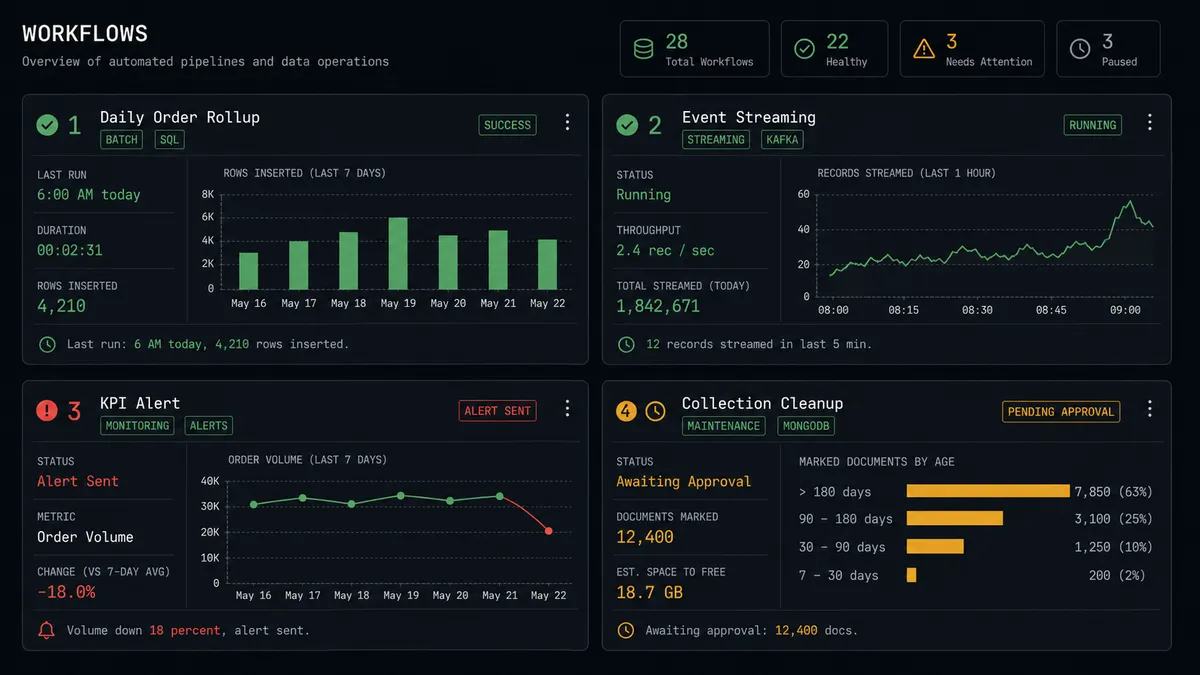
Daily order rollup from MongoDB to BigQuery. The agent runs Aggregate with a $match and $group pipeline to compute daily order totals per tenant, streams the result into BigQuery with Insert Rows, and posts the totals to a metrics channel. The rollup that used to be a manual shell command now runs unattended.
Event streaming without a custom pipeline. Another connector produces records on a schedule. The agent calls Insert Rows to stream each event into a BigQuery analytics table. Rows are queryable within seconds. No bespoke ingestion pipeline to maintain.
KPI-driven branching. The agent runs Run Query in BigQuery to compute a KPI, reads the rows, and branches the flow based on the result: post an alert if volume is down more than 15 percent, update a MongoDB config document with the summary, or trigger a downstream notification flow.
Governed collection cleanup. The agent uses Find Documents to identify stale MongoDB records, counts them with Count Documents, then pauses for human approval before running Delete Documents. The filter, the count, and the approver are all in the run log.
Common questions
Is it free to connect MongoDB and Google BigQuery on FlowRunner? FlowRunner has a free plan with 100 executions a month, every integration included, and no credit card required, and new accounts get 14 days of Professional on top. No credit card is required to start. Beyond the free plan, Growth is $45 per month.
Can I self-host FlowRunner? Yes. FlowRunner offers a free Community Edition for single-instance self-hosting and an Enterprise tier for multi-instance clustering. Both include the MongoDB and BigQuery connectors.
Does the AI agent need my own OpenAI or Anthropic key? FlowRunner uses a bring-your-own-keys model for AI providers. You connect your own API key from whichever model provider you use. FlowRunner orchestrates the agent; you own the AI relationship.
What happens when the agent is not sure whether to run a delete? FlowRunner records the MongoDB collection details or the BigQuery table metadata, packages them as context, and pauses the flow. It routes an approval card to a person on Slack, email, or WhatsApp. The delete runs only after a person confirms. The approver’s identity and timestamp go into the audit trail.
Does FlowRunner charge per execution on every tier? FlowRunner prices by workflow executions per month with a hard cap, not by individual action calls within a run. Growth includes 12,000 executions, Professional includes 75,000, and Business includes 250,000. All tiers include unlimited users and unlimited workflows.
Can I use FlowRunner without writing any code? Yes. The visual builder connects MongoDB and BigQuery through a drag-and-drop interface. You map fields, set filters, and configure the human-in-loop step without writing a line of code.
Getting started
FlowRunner has a free plan with 100 executions a month, every integration included, and no credit card required, and new accounts get 14 days of Professional on top. Corporate email required (no @gmail, @yahoo, or similar).
Both connectors are ready to use today:
- MongoDB integration covers the full document lifecycle: Find Documents, Insert Document, Aggregate, Update Documents, Delete Documents, Vector Search, and more.
- Google BigQuery integration covers Run Query, Insert Rows, List Rows, Create Table, Delete Table, and Delete Dataset.
Start building at flowrunner.ai or book a 30-minute walkthrough at calendly.com/flowrunner/intro. If you have a specific MongoDB-to-BigQuery workflow in mind, bring it to the call and we will map it out together.
Frequently asked questions
Is it free to connect MongoDB and Google BigQuery on FlowRunner?
FlowRunner has a free plan with 100 executions a month, every integration included, and no credit card required, and new accounts get 14 days of Professional on top. No credit card is required to start. Beyond the free plan, Growth is $45 per month.
Can I self-host FlowRunner?
Yes. FlowRunner offers a free Community Edition for single-instance self-hosting and an Enterprise tier for multi-instance clustering. Both include the MongoDB and BigQuery connectors.
Does the AI agent need my own OpenAI or Anthropic key?
FlowRunner uses a bring-your-own-keys model for AI providers. You connect your own API key from whichever model provider you use. FlowRunner orchestrates the agent; you own the AI relationship.
What happens when the agent is not sure whether to run a delete?
FlowRunner records the MongoDB collection details or the BigQuery table metadata, packages them as context, and pauses the flow. It routes an approval card to a person on Slack, email, or WhatsApp. The delete runs only after a person confirms. The approver's identity and timestamp go into the audit trail.
Does FlowRunner charge per execution on every tier?
FlowRunner prices by workflow executions per month with a hard cap, not by individual action calls within a run. Growth includes 12,000 executions, Professional includes 75,000, and Business includes 250,000. All tiers include unlimited users and unlimited workflows.
Can I use FlowRunner without writing any code?
Yes. The visual builder connects MongoDB and BigQuery through a drag-and-drop interface. You map fields, set filters, and configure the human-in-loop step without writing a line of code.