Connect Jasper to WordPress: On-Brand Drafts, Staged for Approval
Connect Jasper and WordPress so grounded, on-brand drafts stage automatically as WordPress posts, with an AI agent that pauses for an editor before anything publishes.
How do you connect Jasper to WordPress?
You connect Jasper to WordPress by having an agent generate a grounded draft in Jasper with Run Command, file it with Create Document, then stage it in WordPress with Create Post at status draft and attach the cover image with Upload Media From URL. FlowRunner is a visual AI-agent orchestration platform where automations run autonomously and pause for human judgment on the steps that carry real consequence. The same connection can run as an AI agent that reasons about the brief, pulls the right facts, and calls a human-in-loop step before the post ever goes from draft to publish. That upgrade path, not just the sync, is what separates this from a simple copy-and-paste integration.
The problem it solves
A content marketer writes a brief, opens Jasper, starts from a blank page, and hopes the copy lands on-brand without re-reading the style guide line by line. Once the draft is done, someone else, often the same person, copies it into WordPress by hand, downloads and re-uploads the cover image, sets the categories and tags, and clicks publish, or forgets to, or publishes before an editor has actually looked at it. Multiply that across a content calendar and the process falls through the cracks in predictable ways: drafts scattered across chat exports and downloads folders, brand voice drifting because nobody owns the source of truth, and launches nobody announced because the person who published it was heads-down on the next brief.
None of this is a writing problem. It’s a handoff problem. The content team’s time back doesn’t come from writing faster, it comes from not manually re-keying a finished draft into a second system and not chasing down whether it actually shipped.
How it works: the connection
The flow starts when a content brief is marked ready, typically in a campaign tracker. The agent runs Search Knowledge in Jasper to pull the verified facts the piece depends on, then runs Run Command with the brief as the instruction, applying the campaign’s saved voice, audience, and style guide. The agent checks the result against the style guide’s banned terms and required claims before treating it as done.
Once the draft passes that check, the agent runs Create Document to file it into the campaign’s Jasper project, so it lives where the editorial team already works instead of in a chat export. From there the agent moves to WordPress: Upload Media From URL pulls the cover image into the media library without anyone downloading and re-uploading a file, and Create Post stages the article at status draft with the title, HTML body, categories, and tags already set. The editor opens WordPress to a fully staged draft, not a blank editor and a folder of loose images.
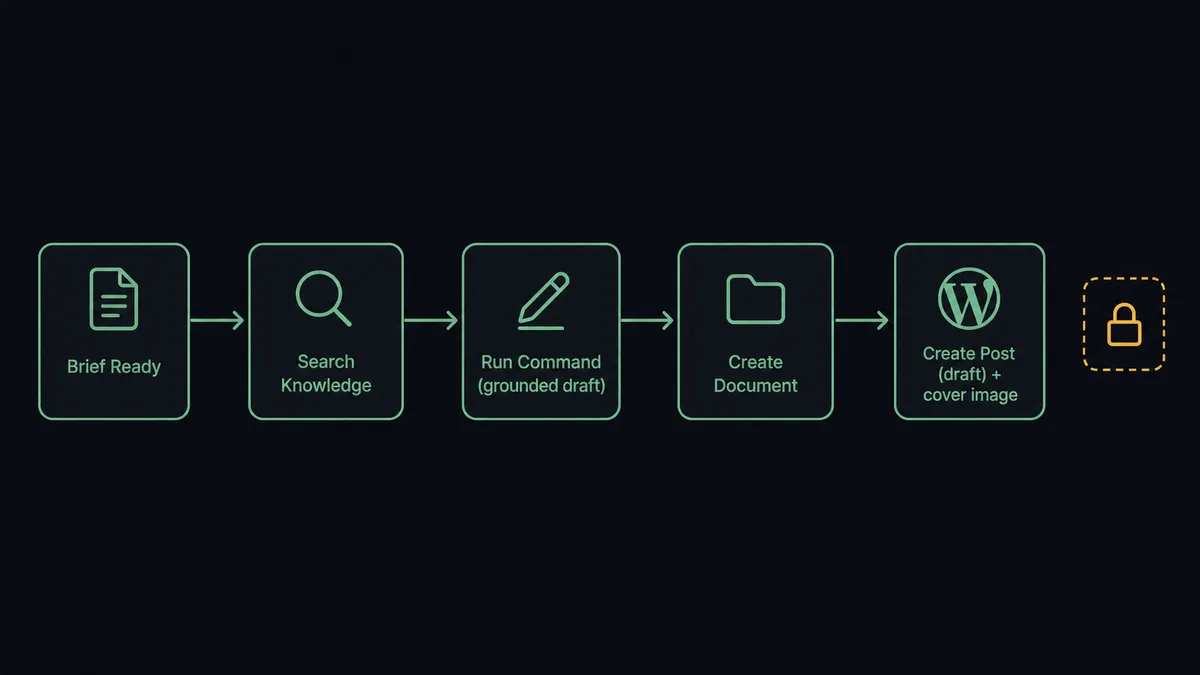
Publishing is a separate, later action. The agent does not flip the post live as part of staging it. That distinction is deliberate, and it’s where the next section picks up.
Can an AI agent run it? (and why a human stays in the loop)
This is where a plain sync tool stops and FlowRunner keeps going. A basic connector can move a finished draft from Jasper into a WordPress post field. It has no way to decide whether the draft is actually ready, whether it drifted from the brand voice, or whether this particular post is safe to publish automatically. An AI agent can, because it reads the brief, evaluates what Search Knowledge returned, and reasons about the draft against the style guide before deciding what to do next, not just executing a fixed sequence of calls.
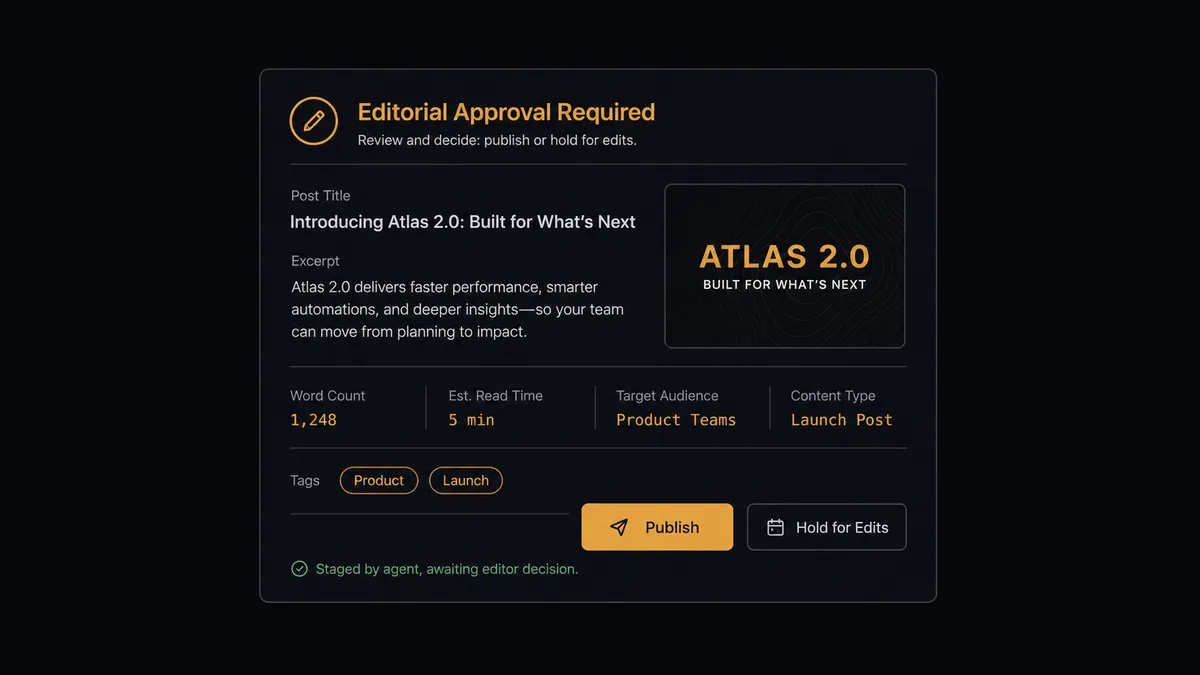
The consequential moment is publishing. Drafting, staging, tagging, and mirroring media are safe to automate, because none of them are visible to a site visitor. Moving a post’s status from draft to publish is different: it makes the article live for every visitor and fires WordPress’s own publish hooks. So when the flow reaches that step, the agent stops and invokes a human-in-loop flow as a callable tool, the same way it would call any other action. It’s not a hardcoded “always ask before publishing” rule bolted on top; the agent is built to treat status-changing writes as the one step it cannot resolve on its own judgment.
The editor gets full context in the channel FlowRunner is configured to use, whether that’s Slack, email, or WhatsApp: the post title, the rendered excerpt, the assigned categories and tags, and a preview link. The question is direct: “Publish this post to the live blog, or hold for edits?” On approval, the agent calls Update Post to set the status to publish. On hold, the post stays a draft and nothing goes public. The decision, the decider’s identity, and the timestamp are captured in the audit trail. This is not a sync tool. The agent knows when to stop and ask, and Jasper’s own voice and knowledge infrastructure gets the same treatment: Delete Voice and Delete Knowledge are permanent, so an agent cleaning up an abandoned voice inventories what references it and asks the brand owner before removing anything a future draft could still depend on.
FlowRunner vs Zapier
Zapier is a reasonable choice for a team that just wants Jasper’s finished text to land in a WordPress field without touching code, and its breadth of app coverage is genuinely useful for a marketing team stitching together a dozen small tools. Where it runs out of road is the moment this flow needs judgment: Zapier moves data on a trigger, it doesn’t reason about whether a draft is ready or pause a multi-step flow mid-run for a named person’s decision with full context attached.
| FlowRunner | Zapier | |
|---|---|---|
| Human-in-the-loop | Native: the agent invokes a human-approval flow as a callable tool, mid-run, with full context | Not native: approvals require manual workarounds bolted onto a Zap |
| AI reasoning over the draft | Agent evaluates the brief and draft, decides what to generate and when to escalate | Triggers and formats data; no judgment over content or process |
| Users included | Unlimited users and workflows on every tier | Per-user and per-task pricing scales cost with team size |
| AI provider keys | BYOK: bring your own Jasper and AI credentials | Depends on each app’s own connected account, no unified BYOK model |
| Pricing model | Transparent workflow-based execution tiers | Task-based pricing that gets harder to predict as volume grows |
Before and after
| Before | After | |
|---|---|---|
| Content origin | Copy starts from a blank page, written without the brand’s saved voice or verified facts at hand | Every draft generates against the saved voice, audience, style guide, and knowledge base before it reaches WordPress |
| Publishing step | Someone copies each finished draft into WordPress by hand and clicks publish | The agent stages the draft as a WordPress post with the cover image already attached |
| Media handling | Cover images are downloaded and re-uploaded one at a time | Upload Media From URL pulls the cover image into the media library automatically |
| Brand consistency | Voices, audiences, and knowledge entries drift with no clear owner | Voice and knowledge edits route through a named owner before any draft depends on them |
| Publish control | Drafts sit scattered in chat exports and downloads until someone remembers to post them | Every draft lands as a staged post, and publishing only happens after an editor approves |
| Launch follow-up | A new post gets shared to Slack and social whenever someone happens to notice it went live | On New Published Post fires the announcement and cross-post flow the instant the article goes live |
What you can build
Grounded blog production line. A brief goes ready, the agent runs Search Knowledge and Run Command to draft against the campaign’s voice and style guide, files it with Create Document, then stages it in WordPress with Create Post and Upload Media From URL. The editor’s queue fills with ready-to-review drafts instead of blank pages.
Localized launch pages. For each target market, the agent runs Search Knowledge and Run Command to produce localized copy, then uses Render Image Template for market-appropriate imagery, and stages a separate Create Post draft per locale so a single approved concept becomes a full market matrix.
Comment-triggered reply drafts. When On New Comment fires on WordPress, the agent runs Run Command grounded in the knowledge base to draft a response, and stages it as a moderator-reviewed reply rather than posting anything automatically.
Launch-day announcement chain. When On New Published Post fires, the agent generates alt text for the post’s imagery and hands off to the team’s downstream announcement flow the moment the article is actually live, not whenever someone remembers to share it.
Common questions
Is it free to connect Jasper and WordPress on FlowRunner? FlowRunner has a free plan with 100 executions a month, every integration included, and no credit card required, and new accounts get 14 days of Professional on top. That’s enough to build and test a full Jasper-to-WordPress publishing flow before you pay anything.
Can I self-host WordPress and still use this? Yes. The WordPress integration connects over the standard WordPress REST API, which is how self-hosted sites are already reached, so no separate plugin or hosted-only requirement applies. FlowRunner itself also offers a self-hosted deployment option on Enterprise if your whole stack needs to stay on-prem.
Does the agent need my own OpenAI key? FlowRunner runs on a bring-your-own-key model for AI providers, so you connect the AI credentials you already pay for rather than routing spend through FlowRunner’s own account. Jasper’s own generation runs on your Jasper workspace regardless.
What happens when the agent isn’t sure whether to publish? It doesn’t guess. The agent routes the staged post to an editor as a human-in-the-loop step, showing the title, rendered excerpt, categories, tags, and a preview link, and waits for a publish-or-hold decision before calling Update Post.
Can the agent edit or delete my WordPress posts on its own? Drafting, tagging, and media uploads are safe to automate and run without a human touching them. Anything that makes a post public, or any permanent delete on a post, voice, or knowledge item, is routed through a named person first.
Does this replace my content team? No. It removes the blank-page start and the manual copy-paste into WordPress. Writers and editors still own the voice, the facts, and the decision to publish; the agent just gets a grounded draft in front of them faster.
Getting started
FlowRunner has a free plan with 100 executions a month, every integration included, and no credit card required, and new accounts get 14 days of Professional on top. Start at flowrunner.ai, or book a walkthrough at calendly.com/flowrunner/intro if you want to see the human-in-loop publish step running against your own site first.
Frequently asked questions
Is it free to connect Jasper and WordPress on FlowRunner?
FlowRunner has a free plan with 100 executions a month, every integration included, and no credit card required, and new accounts get 14 days of Professional on top. That's enough to build and test a full Jasper-to-WordPress publishing flow before you pay anything.
Can I self-host WordPress and still use this?
Yes. The WordPress integration connects over the standard WordPress REST API, which is how self-hosted sites are already reached, so no separate plugin or hosted-only requirement applies. FlowRunner itself also offers a self-hosted deployment option on Enterprise if your whole stack needs to stay on-prem.
Does the agent need my own OpenAI key?
FlowRunner runs on a bring-your-own-key model for AI providers, so you connect the AI credentials you already pay for rather than routing spend through FlowRunner's own account. Jasper's own generation runs on your Jasper workspace regardless.
What happens when the agent isn't sure whether to publish?
It doesn't guess. The agent routes the staged post to an editor as a human-in-the-loop step, showing the title, rendered excerpt, categories, tags, and a preview link, and waits for a publish-or-hold decision before calling Update Post.
Can the agent edit or delete my WordPress posts on its own?
Drafting, tagging, and media uploads are safe to automate and run without a human touching them. Anything that makes a post public, or any permanent delete on a post, voice, or knowledge item, is routed through a named person first.
Does this replace my content team?
No. It removes the blank-page start and the manual copy-paste into WordPress. Writers and editors still own the voice, the facts, and the decision to publish; the agent just gets a grounded draft in front of them faster.