Intercom Google Sheets Integration: Log Chats, Flag the Hard Ones
Connect Intercom and Google Sheets so every conversation is logged automatically, with an AI agent that drafts routine replies and pauses for a person on the angry or ambiguous ones.
How do you connect Intercom to Google Sheets?
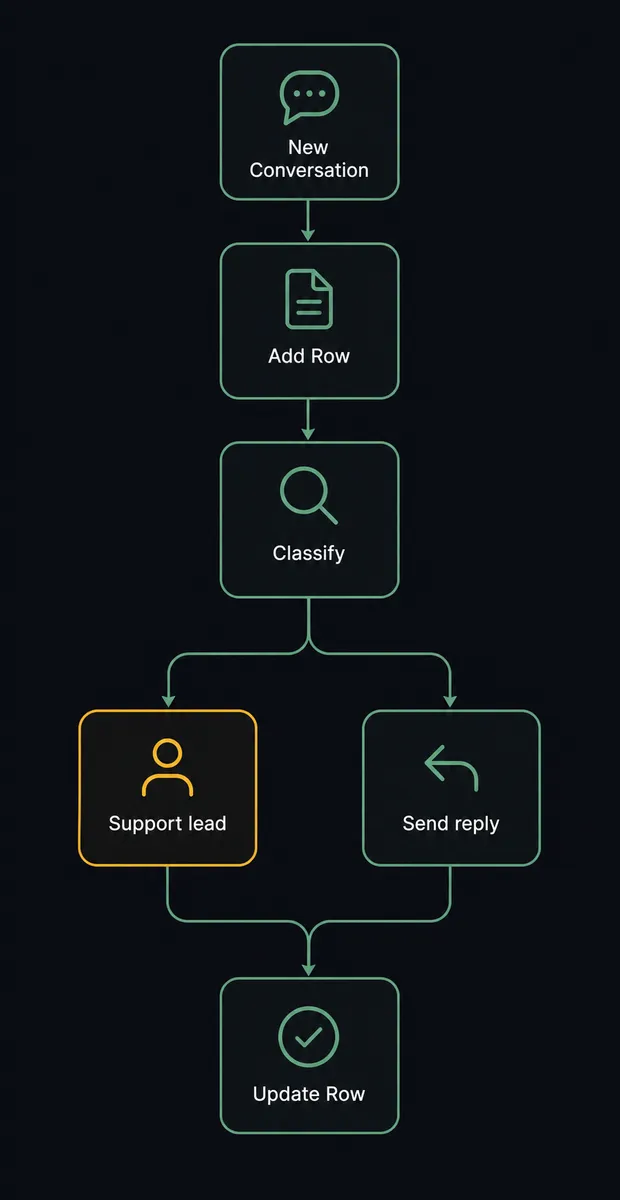
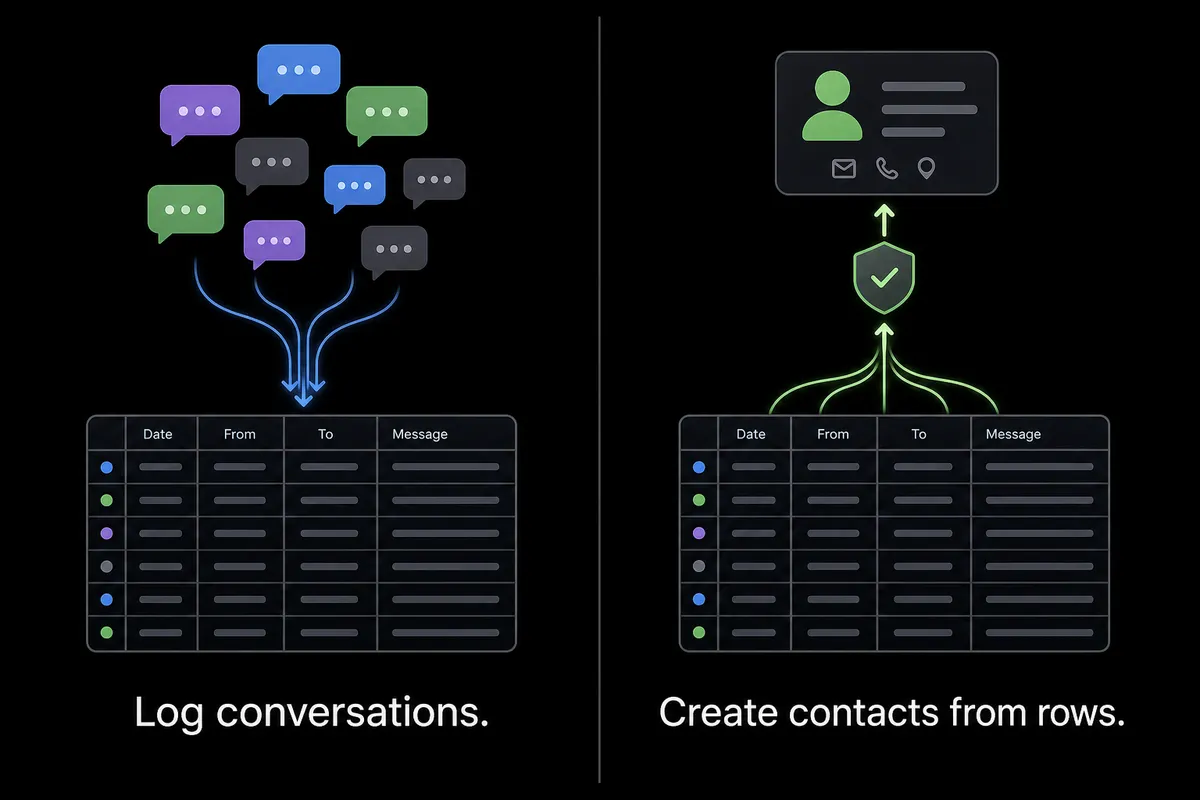
Connecting Intercom to Google Sheets means Intercom’s New Conversation trigger starts the flow, and FlowRunner calls Add Row to log the conversation into a tracking sheet, then Update Row when Conversation Closed fires to record how it was resolved. FlowRunner is a visual AI-agent orchestration platform where automations run autonomously and pause for human judgment on the steps that carry real consequence. The same connection can run as an AI agent that reads each conversation, drafts routine replies itself, and pauses for a support lead before an angry or ambiguous message goes out, logging the human’s decision back to the same row.
The problem it solves
A support lead needs a picture of ticket volume, resolution time, and customer sentiment that Intercom’s own dashboards do not slice the way ops wants. So someone, usually a support lead or an ops manager, exports conversations from Intercom on a schedule and pastes the data into a tracking sheet by hand. New conversations wait in a queue until a rep has time to read them, and by the time anyone opens the spreadsheet to update it, half the rows are stale.
The other half of the problem is worse than a slow spreadsheet. Teams that do automate support replies often do it with blanket rules: any message matching a keyword gets a canned response. That answers a frustrated customer with the same generic line whether they are asking about a password reset or threatening to cancel, and a rep only finds out after the fact. The rows fall through the cracks either way: too slow when done by hand, too risky when automated without judgment.
How it works: the connection
Intercom’s New Conversation trigger fires the moment a customer opens a chat. From there, the agent reads the message text and pulls the contact’s recent history, then calls Add Row to log the conversation, the contact, and its own classification into the tracking sheet immediately, not at the end of the week. The row exists before anyone has replied.
Next the agent classifies the conversation’s intent and sentiment. For a routine question with a clear answer, it drafts a reply and sends it through Reply to Conversation, then the row already reflects that the agent handled it. When Conversation Closed fires later, the agent calls Update Row to add the resolution time and outcome, so the sheet stays a live record of what happened, not a weekly reconstruction of it.
Google Sheets’ own actions cover the rest of the surface if you want it: Get Rows and Find Row let a flow pull the log back out for a status check, and Export Sheet can hand a scheduled Excel or PDF report to a manager without anyone opening the spreadsheet.
Can an AI agent run it? (and why a human stays in the loop)
This is not a sync tool that copies a row every time a conversation happens. The agent reads the message, reasons about what it means, and picks which of its tools to use next. For a routine billing question with a clear answer in the contact’s history, it drafts and sends the reply itself, then logs the outcome. It does not need a rule that says “if keyword X, do Y.”
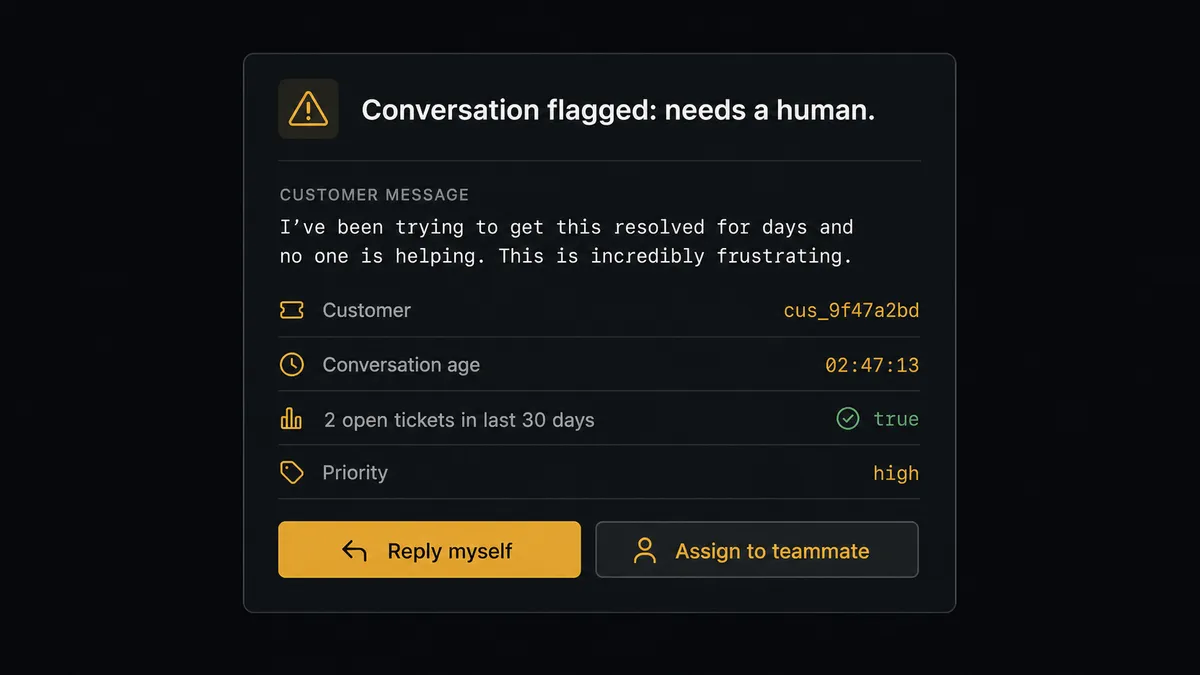
The decision to escalate is also the agent’s judgment call, not a threshold someone hardcoded. Say a customer writes in with sharp language and a history of two unresolved tickets in the last month. The agent classifies the message as angry, and instead of sending a canned apology, it stops. It packages the message text, the contact’s full history, and its own read of the situation (“customer has two open tickets and is expressing frustration about a billing delay”) and sends it to a support lead in Slack with the conversation link. No reply goes out until the lead responds. Once the lead sends the actual answer, the agent resumes, marks the row as human-handled, and records who made the call and when. That record lands directly in the audit trail.
This is the digital andon cord: the agent keeps the queue moving on its own, and it stops the line the moment a reply carries real consequence for the relationship.
FlowRunner vs Zapier
Zapier is the tool most non-technical teams already reach for to connect Intercom and Google Sheets, and it earns that position. Its Zap builder is fast to learn, its Intercom and Google Sheets integrations are mature, and chaining a trigger to an action takes minutes for anyone who has never automated anything before.
Where the two diverge is what happens after the trigger fires. Zapier moves data. FlowRunner’s agent reads the data, decides what it means, and knows when to stop.
| Zapier | FlowRunner | |
|---|---|---|
| Human-in-the-loop | Bolt-on: a manual “review” step you configure to always fire | Native: the agent decides case by case whether a step needs a person |
| Reply/decision logic | Rule-based (if/then filters) | Agent reasons over the message and contact history before acting |
| Users on a plan | Priced per user on most tiers | Unlimited users and workflows on every tier |
| AI provider | Built-in AI credits, usage-metered | BYOK: you connect and control your own AI provider key |
| Pricing model | Per-task pricing that scales with every step in a Zap | Transparent workflow-based execution tiers |
Before and after
| Category | Before | After |
|---|---|---|
| Conversation logging | Someone exports from Intercom and pastes the data into a sheet each week | Records are read and written as the conversation happens, not reconstructed later |
| Triage | New conversations wait in a queue until an agent has time to read them | The agent classifies and enriches each conversation as it arrives |
| Risky auto-replies | Blanket automation answers frustrated customers with a canned line | Angry or ambiguous messages are handed to a person before any reply goes out |
| Reporting | Each report is produced by opening the sheet and downloading a file | Sheets export on schedule and are delivered without anyone opening them |
| New activity | A new row sits until a person notices it and acts on it | A new or updated row triggers the right downstream automation immediately |
What you can build
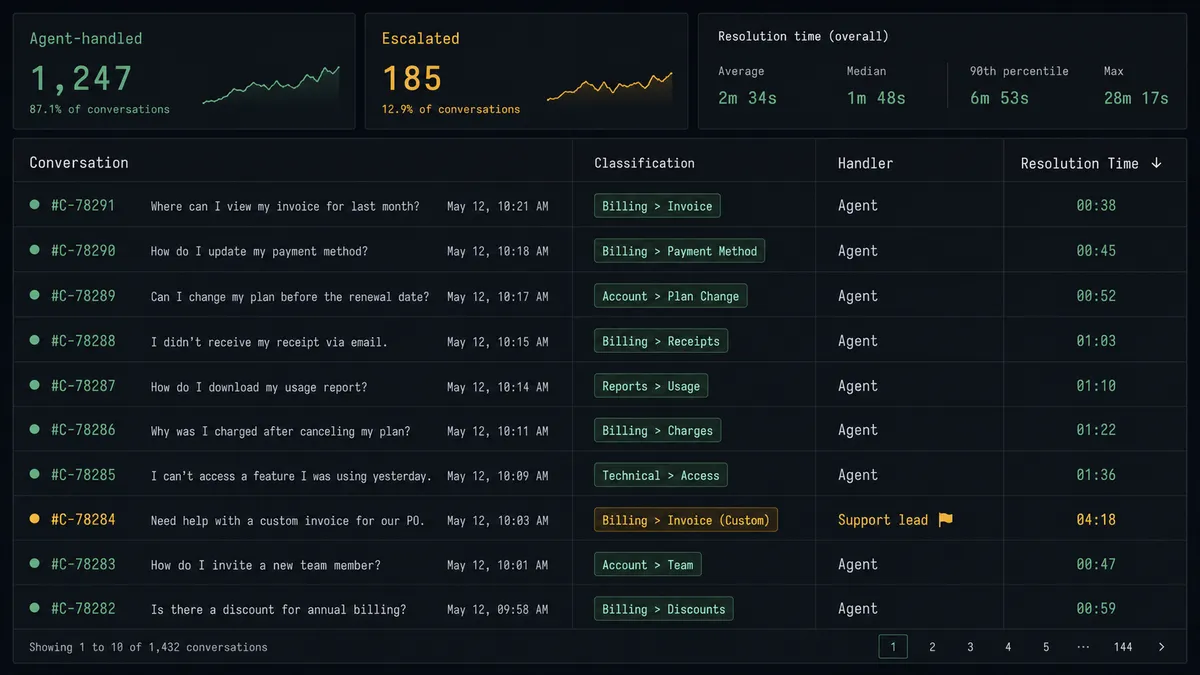
Support ticket log with sentiment attached. New Conversation triggers Add Row, so every chat lands in the tracking sheet with the agent’s intent and sentiment classification the moment it starts, not after someone remembers to update the sheet.
Weekly resolution report for leadership. Conversation Closed triggers Update Row with the outcome and handler, and a scheduled Export Sheet call turns the log into an Excel report delivered to the support lead’s inbox without anyone opening the spreadsheet.
Sheet-driven contact creation with a validation gate. An On New Row trigger in Google Sheets feeds Create Contact in Intercom for a list of new signups. The agent validates each row against required fields first; a row missing a value gets flagged and routed to the sheet owner instead of creating a broken contact.
Purchase context on the customer profile. When an order event arrives from your commerce system, the agent calls Create or Update Company and Submit Event to record the purchase on the Intercom profile, and logs the same event to the tracking sheet so finance has visibility without opening Intercom.
Common questions
Is it free to connect Intercom and Google Sheets on FlowRunner? FlowRunner has a free plan with 100 executions a month, every integration included, and no credit card required, and new accounts get 14 days of Professional on top.
Does the agent need my own OpenAI key? Yes. FlowRunner runs on a bring-your-own-key model, so the agent uses your own API key for whichever AI provider you connect, and you control that cost and provider choice directly.
What happens when the agent isn’t sure? When a conversation is classified as angry or its intent is ambiguous, the agent stops, packages the message and the contact’s history, and routes it to a support lead instead of guessing at a reply.
Can I self-host this flow? FlowRunner offers a self-hosted Enterprise option with full compliance features, alongside the free Community Edition for a single instance without audit trails, RBAC, or SSO.
Do I need to know how to code to set this up? No. The trigger, the logging action, and the human-in-loop escalation are all configured visually, with no scripting required.
Can this flow also create Intercom contacts from a spreadsheet, not just log to one? Yes. The same connection runs in reverse: an On New Row trigger in Google Sheets can drive Create Contact in Intercom, with the agent validating each row and routing anything malformed to the sheet owner before it reaches Intercom.
Getting started
Start on the free plan: 100 executions a month, every integration included, no credit card required, plus 14 days of Professional for new accounts. Connect your Intercom and Google Sheets accounts, pick New Conversation as your trigger, and add the human-in-loop step before you turn the flow on.
Build it at flowrunner.ai, or book a 15-minute intro call if you want a hand mapping the escalation path first.
Frequently asked questions
Is it free to connect Intercom and Google Sheets on FlowRunner?
FlowRunner has a free plan with 100 executions a month, every integration included, and no credit card required, and new accounts get 14 days of Professional on top.
Does the agent need my own OpenAI key?
Yes. FlowRunner runs on a bring-your-own-key model, so the agent uses your own API key for whichever AI provider you connect, and you control that cost and provider choice directly.
What happens when the agent isn't sure?
When a conversation is classified as angry or its intent is ambiguous, the agent stops, packages the message and the contact's history, and routes it to a support lead instead of guessing at a reply.
Can I self-host this flow?
FlowRunner offers a self-hosted Enterprise option with full compliance features, alongside the free Community Edition for a single instance without audit trails, RBAC, or SSO.
Do I need to know how to code to set this up?
No. The trigger, the logging action, and the human-in-loop escalation are all configured visually, with no scripting required.
Can this flow also create Intercom contacts from a spreadsheet, not just log to one?
Yes. The same connection runs in reverse: an On New Row trigger in Google Sheets can drive Create Contact in Intercom, with the agent validating each row and routing anything malformed to the sheet owner before it reaches Intercom.