Sync Insightly Deals to Mailchimp Marketing Automatically
Connect Insightly and Mailchimp Marketing so a won deal syncs the contact and tag automatically, with an AI agent that holds large campaign sends for a human's approval.
How do you connect Insightly to Mailchimp Marketing?
You connect Insightly to Mailchimp Marketing by triggering on Update Opportunity when a deal moves to Won, then calling Add Or Update List Member to sync the contact into the right Mailchimp audience and Add Tag to segment them. FlowRunner is a visual AI-agent orchestration platform where automations run autonomously and pause for human judgment on the steps that carry real consequence. The same connection can run as an AI agent that reasons about audience size and campaign readiness, and pauses for a marketing manager’s approval before a large campaign goes out.
The problem it solves
A deal closes in Insightly and the win sits there. Someone on the sales team has to remember to tell marketing, and marketing has to remember to add the new customer to the right Mailchimp audience, tag them correctly, and get them into the onboarding sequence. In practice this happens in batches: a marketing ops person exports a segment from Insightly once a week, cleans it up, and imports it into Mailchimp by hand. New customers fall through the cracks between exports. Tags get applied inconsistently because whoever is doing the import that week interprets “customer” differently than the person who did it last month.
The reverse gap costs just as much time. Behavioral signals from Mailchimp, like which campaigns a contact opened or clicked, rarely make it back into Insightly, so the sales team loses visibility into what marketing already knows about a lead. And when a campaign is ready to send to a large list, someone still has to eyeball the subscriber count and the subject line before hitting send, because a bad send to 10,000 people is not a mistake you get to undo. None of this is complicated work. It is just manual, repetitive, and exactly the kind of process that falls apart the moment the person who owns it goes on vacation.
How it works: the connection
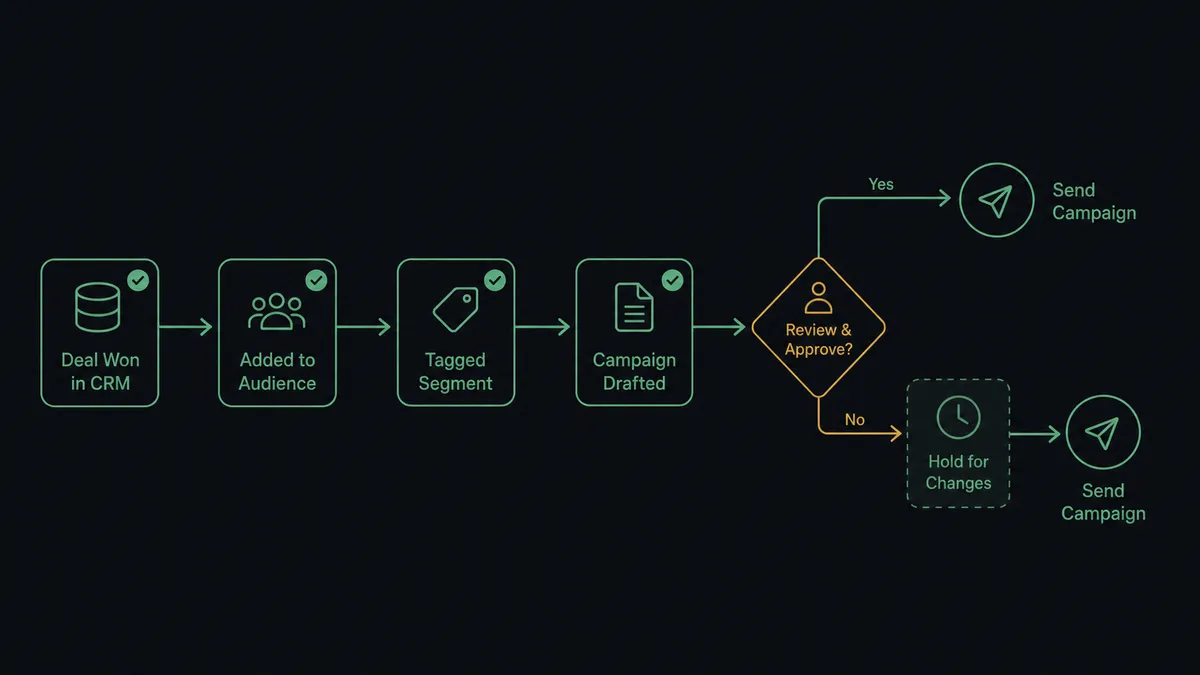
The flow starts when Insightly’s Update Opportunity call marks a deal Won. Before anything else runs, the flow resolves the correct pipeline and stage using List Pipelines and List Pipeline Stages, so the trigger only fires on a real, confirmed Won state rather than a partial update.
Once the deal is confirmed Won, FlowRunner reads the contact and organisation details off the opportunity record. It calls Add Or Update List Member against the Mailchimp audience, which checks for an existing subscriber by email and updates them if found, or creates them if not. That single call keeps the sync idempotent, so running it twice on the same contact never creates a duplicate. Next, Add Tag applies a segmentation tag, such as Customer, so the contact routes into the right nurture sequence instead of a generic welcome list.
From there, Add Campaign stages the onboarding campaign for the newly tagged segment. Before that campaign sends, Get Lists Info confirms the audience is the right one, and the flow checks the current subscriber count against a configurable threshold. If the audience is small, Send Campaign fires immediately. If it is not, the flow holds for approval, which is where the human step comes in. After the campaign sends, Get Campaign Report pulls performance data, and Create Note writes a summary back onto the original Insightly deal, so the sales rep who closed it can see how the customer is engaging with onboarding emails without opening Mailchimp at all.
Can an AI agent run it? (and why a human stays in the loop)
A Zapier-style rule can move a contact from Insightly to Mailchimp on a Won trigger. What it cannot do is decide whether a specific campaign send is safe to fire on its own. That is the difference between a sync tool and an orchestration layer: the agent reads the data, reasons about it, and calls Insightly and Mailchimp actions as tools it chooses to use, rather than following a fixed script.
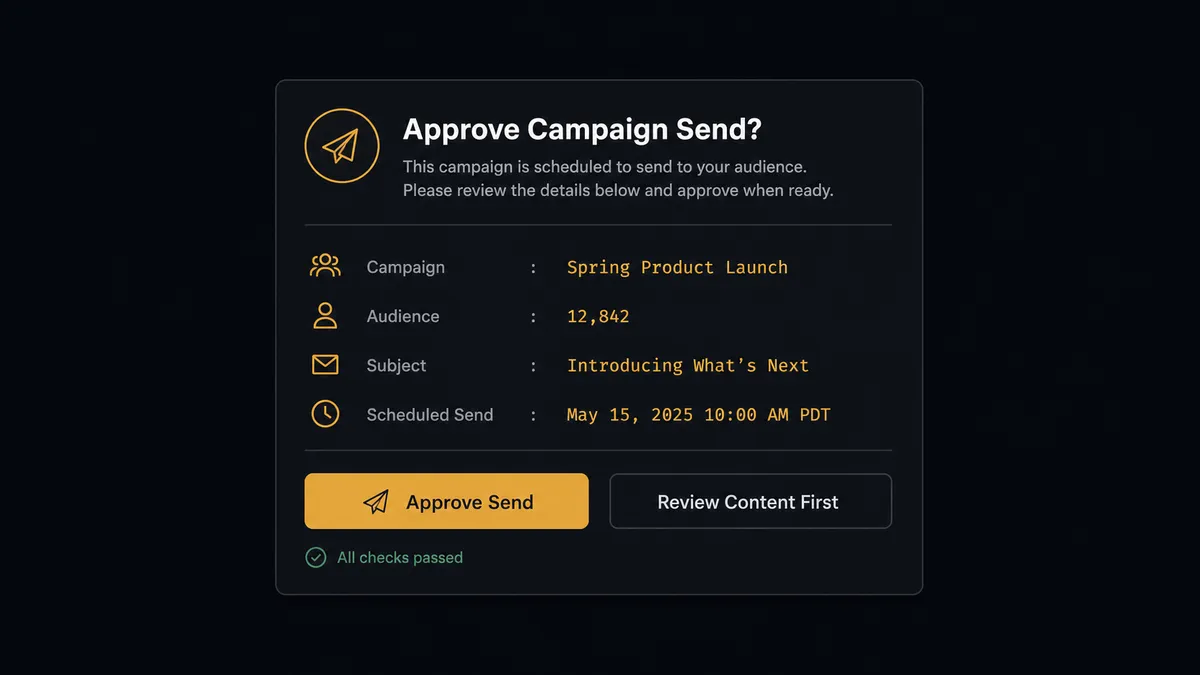
Here is the decision moment. The agent stages a campaign for a newly tagged segment and calls Get Lists Info to check the audience size. A campaign going to 200 people in a small regional segment sends immediately, because the downside of a mistake is small and reversible with a follow-up email. But when the same campaign is staged against an audience of 8,400 subscribers, the agent does not send it. It packages the context that matters: the campaign name, the exact subscriber count, the subject line, and the scheduled send time, and posts it to Slack: “Campaign Q3 Customer Onboarding is ready to send to 8,400 subscribers. Subject line: Welcome to [Product]. Scheduled send: 9:00 AM Tuesday. Approve send or review content first?” The marketing manager approves, rejects, or asks to review the content, and only then does Send Campaign run. This is not a hardcoded “always ask above 5,000” rule bolted onto the workflow; it is the agent evaluating the actual consequence of the send against the audience it is about to hit.
This is not a sync tool. The agent knows when to stop and ask, and it stops because the decision carries weight, not because a threshold was tripped. Prospects who have described this pattern to us call it a digital andon cord: the agent pulls the cord itself when it hits a decision that should not be made silently.
FlowRunner vs Zapier
Zapier is a legitimate choice for this exact pair. It has a mature Insightly integration and a mature Mailchimp integration, and for teams that only need “when a deal closes, add the contact to a list,” Zapier’s Zap editor is fast to set up and familiar to non-technical marketers. That is a real strength and worth naming plainly.
Where the two diverge is what happens at the campaign send decision. Zapier can trigger a send; it cannot reason about whether that specific send, to that specific audience, at that specific moment, should pause for a human first. That decision has to be hardcoded as a fixed rule, or it does not exist at all.
| Capability | Zapier | FlowRunner |
|---|---|---|
| Human-in-the-loop on the send decision | Not native; requires a manual approval step built outside the Zap | Native: the AI agent evaluates the send and invokes a Slack approval flow as a tool |
| Users included | Paid per-user on most plans | Unlimited users on every tier |
| AI provider | Zapier’s own AI credits, provider not user-controlled | BYOK: connect the AI provider you already have a contract with |
| Pricing model | Per-task pricing that scales with volume | Transparent workflow-based tiers with a fixed execution ceiling |
| Self-hosting | Not available | Self-hosted Community Edition (free) and Enterprise available |
Before and after
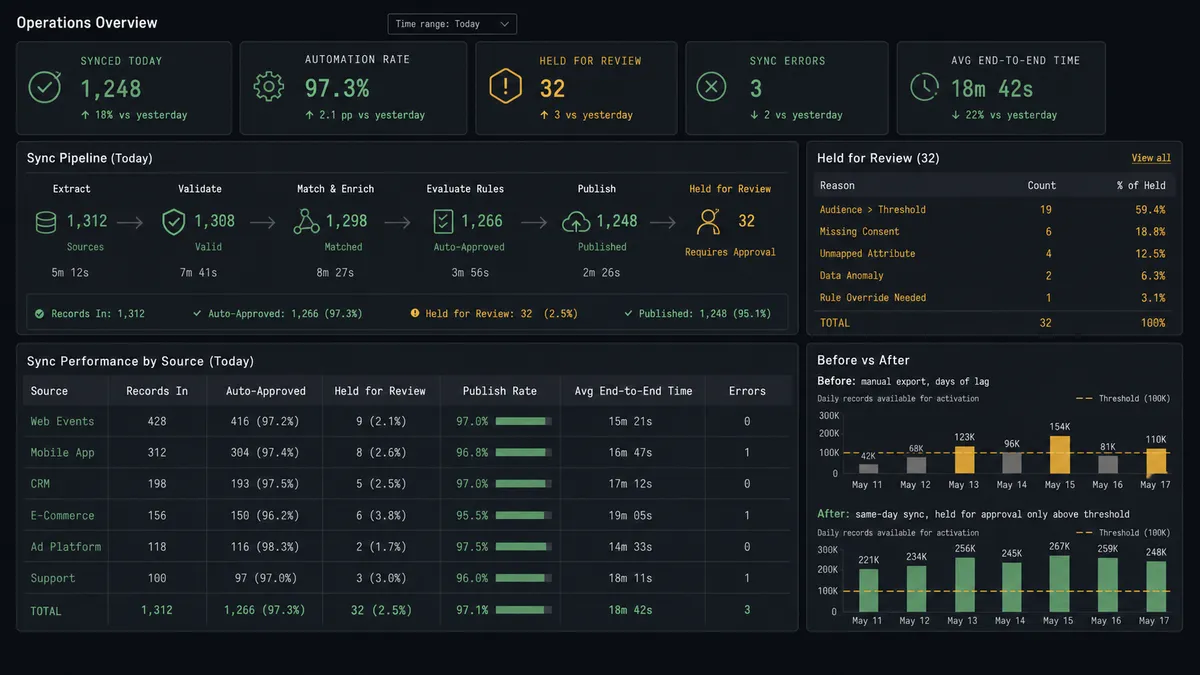
| Category | Before | After |
|---|---|---|
| List management | Marketing exports Insightly segments and imports them into Mailchimp by hand | CRM lifecycle changes sync to Mailchimp with no manual export or import |
| Audience accuracy | Mailchimp lists reflect whatever the last manual sync captured | The audience reflects the current pipeline state the moment a deal closes |
| Won-deal handoff | The rep announces a win in chat and marketing finds out days later | The contact is tagged and staged for onboarding the moment the deal is marked Won |
| Campaign send safety | Someone eyeballs the subscriber count before every large send | The agent checks the count automatically and only escalates sends above the threshold |
| Deal visibility | Campaign performance never makes it back to the Insightly record | Get Campaign Report results post back to the deal as a note automatically |
What you can build
Won-deal onboarding sync. Every Insightly opportunity marked Won syncs the buyer into the right Mailchimp audience, gets tagged Customer, and is staged into the onboarding campaign, with large sends held for Slack approval.
Behavioral signal back to the deal. Get Clicks Report pulls engagement data on the onboarding campaign, and Create Note logs which links a new customer clicked directly onto the Insightly opportunity, so account managers see engagement without leaving the CRM.
Lead-source segmentation. New leads created with Insightly’s Create Lead sync to a nurture-specific Mailchimp audience via Add Or Update List Member, tagged by lead source, so cold and warm leads never land in the same campaign.
Opt-out compliance sweep. When a contact is deleted or marked inactive in Insightly, the agent calls Unsubscribe Or Delete List Member in Mailchimp so the audience never keeps emailing someone who has left the CRM.
Monday pipeline and engagement digest. List Opportunities pulls the week’s open pipeline while Get Campaign Report pulls the prior week’s campaign performance, and the agent posts a combined summary to the sales and marketing Slack channels every Monday morning.
Common questions
Is it free to connect Insightly and Mailchimp Marketing on FlowRunner? Yes. FlowRunner has a free plan with 100 executions a month, every integration included, and no credit card required, and new accounts get 14 days of Professional on top.
Do I need to already use HubSpot to run this workflow? No. The Insightly-to-Mailchimp Marketing connection runs directly off Insightly’s own opportunity and contact records; HubSpot only enters the picture if you also route leads through it as a separate source.
Can I self-host this connection instead of using FlowRunner Cloud? Yes. FlowRunner offers a self-hosted Community Edition for single-instance deployments and a self-hosted Enterprise tier with multi-instance clustering and full compliance retention.
Does the agent need my own Mailchimp or OpenAI API key? The Mailchimp connection uses your own Mailchimp account credentials, and FlowRunner’s AI agents run on a bring-your-own-key model, so you connect the AI provider you already have a contract with.
What happens when the agent isn’t sure whether to send a campaign? The agent does not guess. When a campaign’s audience crosses the approval threshold, it posts the campaign name, subscriber count, subject line, and scheduled send time to Slack and waits for a marketing manager’s decision before Send Campaign runs.
Will this create duplicate contacts in Mailchimp Marketing? No. The agent calls Add Or Update List Member, which checks for an existing subscriber by email before writing, so repeated syncs update the same record instead of creating a duplicate.
Getting started
FlowRunner has a free plan with 100 executions a month, every integration included, and no credit card required, and new accounts get 14 days of Professional on top. Connect Insightly and Mailchimp Marketing, pick the Won-deal trigger, and let the agent handle the sync while a person handles the sends that matter. Start at flowrunner.ai or book a walkthrough at calendly.com/flowrunner/intro.
Frequently asked questions
Is it free to connect Insightly and Mailchimp Marketing on FlowRunner?
Yes. FlowRunner has a free plan with 100 executions a month, every integration included, and no credit card required, and new accounts get 14 days of Professional on top.
Do I need to already use HubSpot to run this workflow?
No. The Insightly-to-Mailchimp Marketing connection runs directly off Insightly's own opportunity and contact records; HubSpot only enters the picture if you also route leads through it as a separate source.
Can I self-host this connection instead of using FlowRunner Cloud?
Yes. FlowRunner offers a self-hosted Community Edition for single-instance deployments and a self-hosted Enterprise tier with multi-instance clustering and full compliance retention.
Does the agent need my own Mailchimp or OpenAI API key?
The Mailchimp connection uses your own Mailchimp account credentials, and FlowRunner's AI agents run on a bring-your-own-key model, so you connect the AI provider you already have a contract with.
What happens when the agent isn't sure whether to send a campaign?
The agent does not guess. When a campaign's audience crosses the approval threshold, it posts the campaign name, subscriber count, subject line, and scheduled send time to Slack and waits for a marketing manager's decision before Send Campaign runs.
Will this create duplicate contacts in Mailchimp Marketing?
No. The agent calls Add Or Update List Member, which checks for an existing subscriber by email before writing, so repeated syncs update the same record instead of creating a duplicate.